
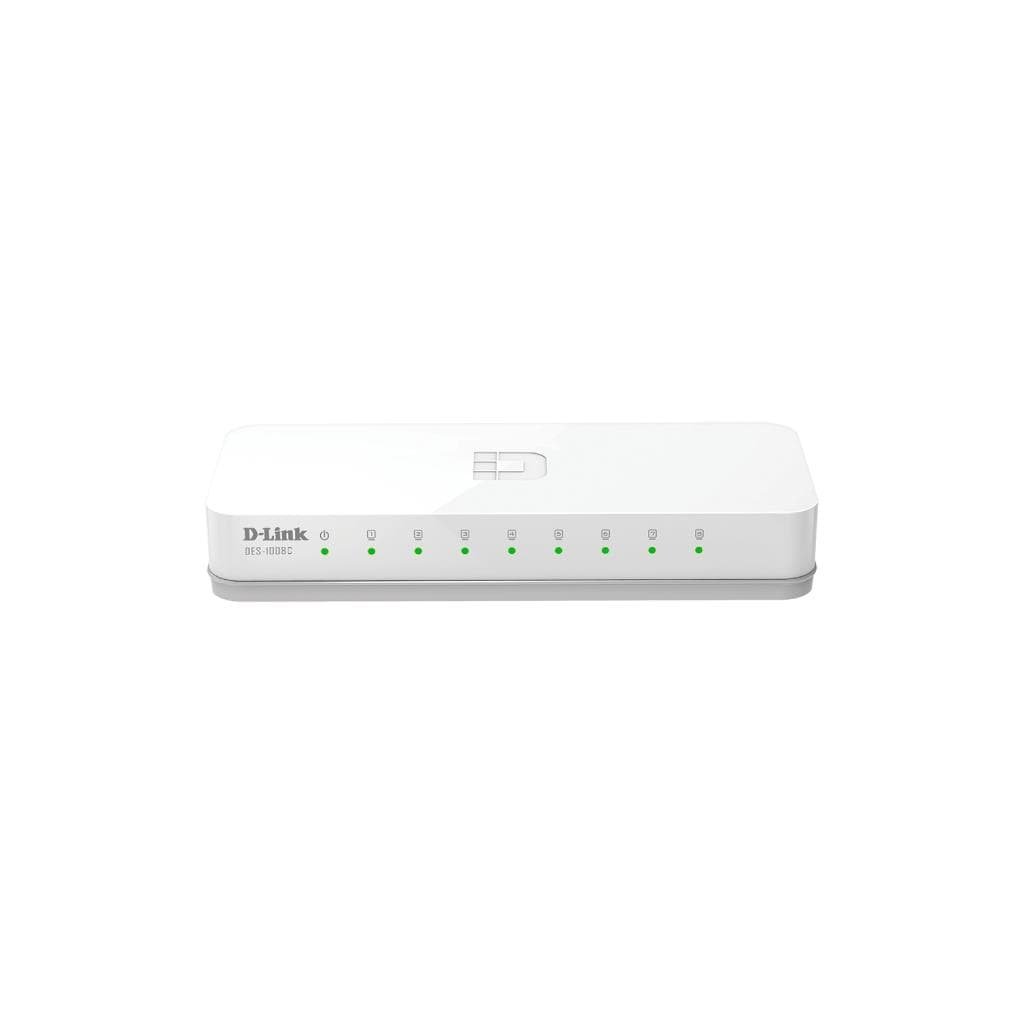

D-Link DES-1008C 8-Port Fast Ethernet Unmanaged Switch (10/100Mbps)
SKU: DES-1008CNetworking › Network Switches
฿210
Price includes 7% VATPrice updated November 1, 2026
In stock22 units1 year manufacturer's warranty
For orders placed before 12:00 on a business day; weekends excluded
GenuineFree delivery from ฿5,000Tax invoice
สวิตช์เครือข่าย 8 พอร์ต ความเร็ว 10/100 Mbps แบบไม่ต้องตั้งค่า ใช้งานง่ายสำหรับสำนักงานเล็ก บ้าน หรือ SOHO รองรับการประหยัดพลังงานอัจฉริยะ
Key features
- 8 พอร์ต Ethernet 10/100 Mbps รองรับการเชื่อมต่อพร้อมกันได้หลายเครื่อง
- รองรับ Auto MDI/MDIX ใช้สายตรงเชื่อมต่อได้ทันที
- ประหยัดพลังงานด้วยเทคโนโลยี Energy Efficient Ethernet (EEE)
- ไม่มีพัดลม ทำงานเงียบ ไม่ร้อน
- รองรับ Jumbo Frame สูงสุด 2,048 ไบต์ เพิ่มประสิทธิภาพเครือข่าย
Product description
D-Link DES-1008C เป็นสวิตช์เครือข่ายแบบไม่ต้องตั้งค่า (Unmanaged) ที่ออกแบบมาเพื่อขยายเครือข่ายในสำนักงานขนาดเล็ก บ้าน หรือ SOHO โดยมีพอร์ต Ethernet 8 พอร์ต รองรับความเร็วสูงสุด 100 Mbps พร้อมเทคโนโลยีประหยัดพลังงานอัจฉริยะ เช่น Energy Efficient Ethernet (EEE) และการลดพาวเวอร์เมื่อไม่มีการเชื่อมต่อ ทำให้ลดการใช้ไฟฟ้าและลดความร้อนได้อย่างมีประสิทธิภาพ โดยรองรับการเชื่อมต่อแบบ Auto MDI/MDIX ทุกพอร์ต จึงสามารถใช้สายตรง (straight-through) เชื่อมต่อกับเครื่องทุกชนิดได้ทันที ไม่ต้องใช้สายข้าม (crossover) สวิตช์รุ่นนี้มีความสามารถในการจัดการทราฟฟิกดีเยี่ยม โดยรองรับ Flow Control ตามมาตรฐาน 802.3x และป้องกันปัญหา Head-of-line (HOL) Blocking เพื่อให้การส่งข้อมูลราบรื่น ลดการสูญเสียแพ็กเก็ต โดยเฉพาะในช่วงที่มีการใช้งานหนัก เช่น การแชร์ไฟล์ หรือสตรีมมิ่งวิดีโอ นอกจากนี้ยังรองรับ Jumbo Frame สูงสุด 2,048 ไบต์ เพื่อเพิ่มประสิทธิภาพการส่งข้อมูลในเครือข่ายภายใน
More features
- จัดการทราฟฟิกดี ลดแพ็กเก็ตหลุดด้วย Flow Control
- ขนาดกะทัดรัด วางได้ทุกพื้นที่ พอร์ตซ่อนด้านหลัง
- ใช้งานง่าย ไม่ต้องตั้งค่า แค่เสียบปลั๊ก ก็ใช้งานได้ทันที
- รองรับการจัดเก็บข้อมูล MAC Address สูงสุด 2,000 รายการ
- อายุการใช้งานยาวนาน MTBF 1,579,582 ชั่วโมง
Pros and limitations
Pros
- รองรับการประหยัดพลังงานอัตโนมัติ ลดค่าไฟและความร้อน
- ไม่มีพัดลม ทำงานเงียบ ไม่รบกวนการทำงาน
- จัดการทราฟฟิกได้ดี ลดแพ็กเก็ตหลุดแม้ในโหมดใช้งานหนัก
- รองรับ Jumbo Frame เพิ่มประสิทธิภาพการส่งข้อมูล
- ขนาดเล็กกะทัดรัด วางได้ทุกพื้นที่ พอร์ตซ่อนด้านหลัง
Limitations
- ไม่รองรับ PoE จึงไม่สามารถจ่ายไฟให้อุปกรณ์ผ่านสาย Ethernet ได้
- ไม่มีการจัดการเครือข่าย (Unmanaged) จึงไม่เหมาะกับเครือข่ายใหญ่หรือต้องการควบคุมเฉพาะจุด
Who it is for
เหมาะสำหรับใช้ในสำนักงานเล็ก บ้าน หรือ SOHO เพื่อเพิ่มพอร์ต Ethernet สำหรับคอมพิวเตอร์ เครื่องพิมพ์ หรือกล้องวงจรปิด โดยไม่ต้องตั้งค่าใดๆ
Specifications (29)
- FAN
- Fanless
- MTBF
- 1,579,582 hours
- Layer
- L2
- น้ำหนัก
- 742 g
- Control
- 802.3x Flow
- Features
- Energy Efficient Ethernet, Auto MDI/MDIX, Flow Control, Jumbo Frame Support
- ขนาด
- 131x54x21mm
- การจัดการ
- Unmanaged
- Jumbo Frame
- 2048 Bytes
- ไฟขาเข้า
- DC: 5V, 0.55A
- Auto MDI/MDIX
- รองรับ
- ความชื้นในการจัดเก็บ
- 5% to 95% non-condensing
- ความชื้นขณะทำงาน
- 10% ~ 90% RH
- Packet Buffer Size
- 96KBytes
- Switching Capacity
- 1.6 Gbps
- อุณหภูมิในการจัดเก็บ
- -40 ~ 70 °C
- อุณหภูมิการทำงาน
- 0 ~ 40 °C
- MAC Address Table Size
- 2,000
- Maximum Heat Dissipation
- 0.691 BTU/h
- Maximum Power Consumption
- 1.55 W
- Standby Power Consumption
- 0.55 watts
- Store & Forward Forwading
- รองรับ
- Max. Packet Forwarding Rate
- 1.19 Mpps
- Power Saving By Link Status
- รองรับ
- จำนวนพอร์ต
- 8
- Energy Efficiency Ethernet (EEE)
- รองรับ
- Head-of-line (HOL) Blocking Prevention
- รองรับ
- ความเร็วพอร์ต
- 10/100 Mbps
- มาตรฐานเครือข่าย
- IEEE 802.3, IEEE 802.3u
Datasheets and manuals straight from the manufacturer — select a document to open or download it.
13 questions
Frequently asked questions about this product
Compiled from manufacturer information
DES-1008C รองรับการเชื่อมต่อพร้อมกันได้กี่เครื่อง?
รองรับการเชื่อมต่อพร้อมกันได้สูงสุด 8 เครื่องผ่านพอร์ต Ethernet 10/100 Mbps ทั้งหมด โดยแต่ละพอร์ตสามารถใช้งานได้พร้อมกัน ไม่มีข้อจำกัดด้านจำนวนอุปกรณ์
สวิตช์นี้ใช้ไฟเท่าไหร่เมื่อไม่ใช้งาน?
ในโหมดพัก (standby) ใช้ไฟเพียง 0.55 วัตต์ และเมื่อไม่มีการเชื่อมต่อที่พอร์ตใดพอร์ตนั้นจะลดพลังงานอัตโนมัติ ช่วยประหยัดไฟได้อย่างมีประสิทธิภาพ
ใช้กับกล้องวงจรปิดหรือ NAS ได้ไหม?
ได้แน่นอน รองรับการเชื่อมต่ออุปกรณ์เครือข่ายทั่วไป เช่น กล้อง IP, NAS, หรือเครื่องพิมพ์ โดยเฉพาะในสภาพแวดล้อม SOHO หรือสำนักงานเล็กที่ต้องการเพิ่มพอร์ต Ethernet
ต่อสายแลนกับสวิตช์นี้ได้ไกลสุดเท่าไหร่?
รองรับระยะทางสาย Ethernet ตามมาตรฐาน IEEE 802.3 คือไม่เกิน 100 เมตร ซึ่งเป็นระยะทางมาตรฐานของสาย LAN Cat5e/Cat6
ใช้กับเครื่องเล่นเกมได้ไหม?
ได้ดีมาก เนื่องจากรองรับการจัดการทราฟฟิกผ่าน Flow Control และลดแพ็กเก็ตหลุด ทำให้การเล่นเกมออนไลน์หรือสตรีมมิ่งวิดีโอราบรื่น ไม่มีกระตุก
ต้องใช้พาวเวอร์ซัพพลายเพิ่มไหม?
ไม่จำเป็น ใช้ไฟจากพอร์ต USB หรืออะแดปเตอร์ DC 5V 0.55A ได้ทันที โดยไม่ต้องใช้อุปกรณ์เสริมเพิ่ม
มีการจัดการเครือข่ายผ่านเว็บหรือแอปไหม?
ไม่มี เนื่องจากเป็นสวิตช์แบบ Unmanaged จึงไม่รองรับการตั้งค่าผ่านเว็บบราวเซอร์ หรือแอปพลิเคชัน ใช้งานได้ทันทีหลังเสียบปลั๊ก
ใช้กับสาย LAN ชนิดไหนดีที่สุด?
รองรับสาย LAN ทั่วไป เช่น Cat5e หรือ Cat6 ได้ดี โดยระยะทางสูงสุดไม่เกิน 100 เมตร แนะนำใช้สายคุณภาพดีเพื่อประสิทธิภาพสูงสุด
Is it in stock?
The D-Link DES-1008C 8-Port Fast Ethernet Unmanaged Switch (10/100Mbps) is in stock and ready to ship. Orders placed before 12:00 on a business day are delivered within 1–3 business days (Bangkok and vicinity) or 2–5 business days (other provinces). Order online at store.gist.co.th or contact our sales team at 092-251-4017.
How much does it cost?
The price is ฿210 (including 7% VAT). It is in stock and ready to ship. Business customers can request a quotation at sales@gist.co.th.
How long is the warranty?
Warranty period: 1 ปี รับประกันศูนย์ (manufacturer's terms). To make a warranty claim, call 092-251-4017 or 065-523-5262, or email sales@gist.co.th (Mon–Fri 9:00–18:00), then send the product with your order number to our head office, or bring it to the head office in person.
How long does delivery take?
Orders placed before 12:00 on a business day are delivered within 1–3 business days (Bangkok and vicinity) or 2–5 business days (other provinces). Free delivery on orders of ฿5,000 or more (a ฿150 delivery fee applies below this amount).
Is it genuine?
Genuine products sourced from distributors in Thailand, covered by the manufacturer's warranty. Full tax invoices are available.
Didn't find the answer you need?
Loading reviews…
Genuine products
Sourced from distributors in Thailand and covered by the manufacturer's warranty
Warranty period
1 ปี รับประกันศูนย์
Covered by the manufacturer's warranty; you can make claims through GIST
Claims through GIST
Ship the product to our head office or bring it in person
Warranty conditions
- A receipt or other proof of purchase is required
- The product must not have been modified or altered
- Damage caused by misuse is not covered by the warranty
- To make a warranty claim, call 092-251-4017 or 065-523-5262, or email sales@gist.co.th (Mon–Fri 9:00–18:00), then send the product with your order number to our head office, or bring it to the head office in person.Head office: 554 Sky Nine Center, Floor 12A, Room 554/62, Asok-Din Daeng Road, Din Daeng Subdistrict, Din Daeng District, Bangkok 10400
More in Network Switches
Price
฿210