


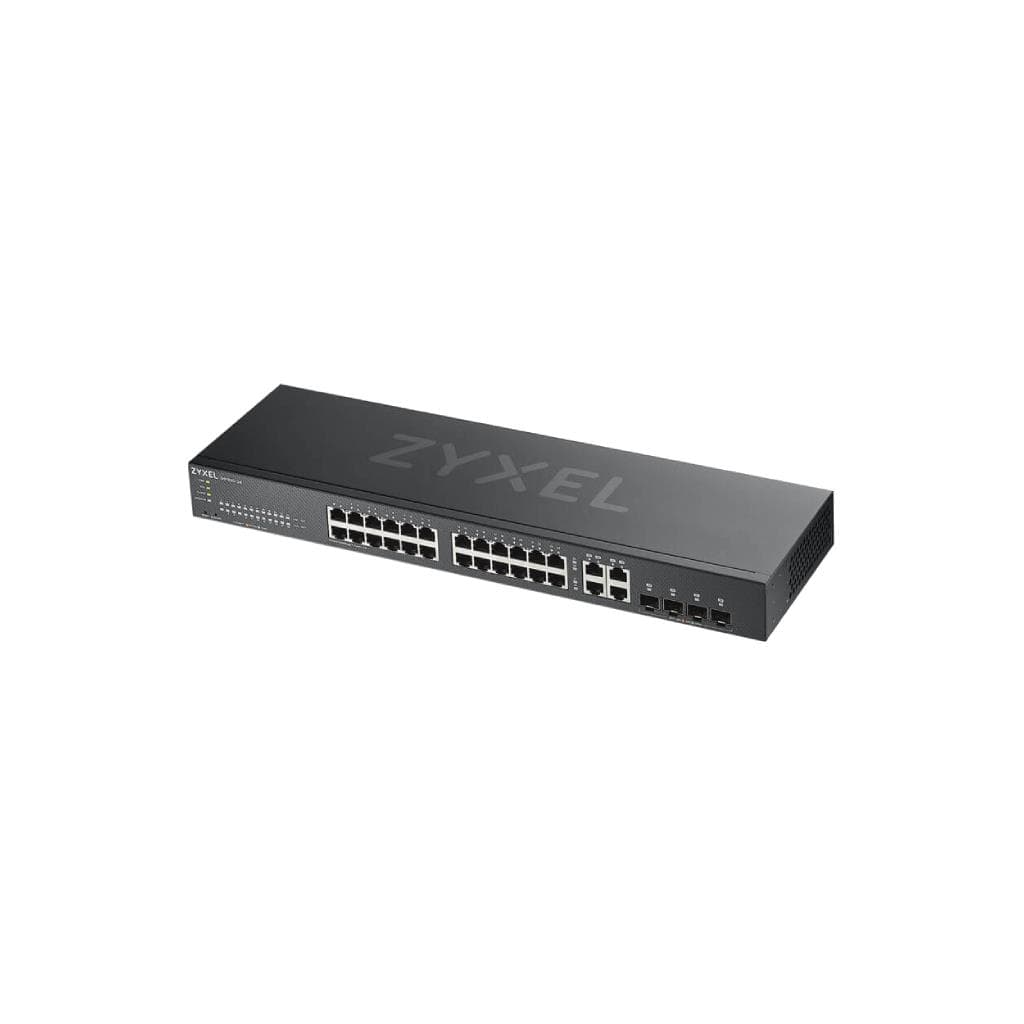
ZYXEL GS1900-24EP 24-Port Gigabit Smart Managed PoE+ Switch
SKU: GS1900-24EPNetworking › Network Switches
฿6,800
Price includes 7% VATPrice updated November 1, 2026
In stock10 unitsManufacturer's warranty
For orders placed before 12:00 on a business day; weekends excluded
GenuineFree delivery from ฿5,000Tax invoice
สวิตช์จัดการได้ 24 พอร์ต Gigabit รองรับ PoE+ สำหรับธุรกิจขนาดเล็กถึงกลาง ใช้งานร่วมกับ Access Point, IP Camera และ VoIP Phone ได้อย่างมีประสิทธิภาพ
Key features
- 24 พอร์ต Gigabit รองรับ PoE+ สูงสุด 30W ต่อพอร์ต
- จ่ายไฟรวมสูงสุด 170W รองรับอุปกรณ์จำนวนมากพร้อมกัน
- รองรับการจัดการผ่านเว็บเบราว์เซอร์ (Web Managed)
- มีฟีเจอร์ขั้นสูง เช่น VLAN, QoS, IGMP Snooping, LAG
- ออกแบบไร้พัดลมหรือมีพัดลมอัจฉริยะ ทำงานเงียบ
Product description
สวิตช์ ZYXEL GS1900-24EP เป็นอุปกรณ์เครือข่ายระดับ SMB ที่ออกแบบมาเพื่อรองรับการใช้งานจริงในสำนักงาน โดยมีพอร์ต Gigabit จำนวน 24 พอร์ต พร้อมความสามารถในการจ่ายไฟ PoE+ ผ่านสาย LAN ได้สูงสุด 30W ต่อพอร์ต รองรับมาตรฐาน IEEE 802.3at ทำให้สามารถเชื่อมต่ออุปกรณ์เครือข่ายหลายชนิด เช่น Access Point, กล้องวงจรปิด IP และโทรศัพท์ VoIP โดยไม่ต้องใช้ปลั๊กไฟเพิ่มเติม ช่วยลดค่าใช้จ่ายและเพิ่มความยืดหยุ่นในการวางระบบเครือข่าย พร้อมรองรับการจัดการผ่านเว็บเบราว์เซอร์ (Web Managed) และมีฟีเจอร์ขั้นสูง เช่น VLAN, QoS, IGMP Snooping, LAG และ IPv6 เพื่อควบคุมและแยกแบนด์วิธีได้อย่างมีประสิทธิภาพ ตัวสวิตช์ออกแบบไร้พัดลม (fan-less) หรือมีพัดลมอัจฉริยะที่ปรับความเร็วตามอุณหภูมิ เพื่อให้ทำงานอย่างเงียบและเหมาะสมกับสภาพแวดล้อมสำนักงาน
More features
- รองรับ IPv6 และ DoS Defense เพื่อความปลอดภัย
- ติดตั้งในแร็กได้ (Rack Mount)
- รองรับการตั้งค่าผ่าน Setup Assistant ง่ายๆ
- ใช้งานร่วมกับ Access Point, IP Camera และ VoIP Phone ได้ทันที
- รองรับการจัดการผ่าน ZON (Zyxel On Network)
Pros and limitations
Pros
- รองรับ PoE+ สูงสุด 30W ต่อพอร์ต ใช้งานกับอุปกรณ์หลากหลายได้ทันที
- มี PoE Budget รวม 170W รองรับการเชื่อมต่ออุปกรณ์จำนวนมากพร้อมกัน
- ออกแบบไร้พัดลมหรือมีพัดลมอัจฉริยะ ทำงานเงียบเหมาะกับสำนักงาน
- รองรับฟีเจอร์ขั้นสูง เช่น VLAN, QoS, IGMP Snooping และ LAG
- ติดตั้งในแร็กได้ ใช้งานได้จริงในศูนย์ข้อมูลหรือตู้เครือข่าย
Limitations
- ไม่รองรับการจัดการผ่าน Nebula Control Center (NCC)
Who it is for
เหมาะสำหรับธุรกิจขนาดเล็กถึงกลางที่ต้องการเครือข่ายเสถียร รองรับการเชื่อมต่ออุปกรณ์หลายชนิดพร้อมกัน เช่น Access Point, กล้องวงจรปิด และโทรศัพท์ VoIP โดยไม่ต้องใช้ปลั๊กไฟเพิ่มเติม
Weight
2.48 kg
Dimensions
330 x 230 x 44 mm
Connectivity
10/100/1000BASE-T, SFP
Specifications (37)
- Password (Default)
- 1234
- User Name (Default)
- admin
- พอร์ต SFP
- 2
- รวม PoE Budget
- 170 W
- น้ำหนัก
- 3.5 kg
- รองรับ PoE
- ใช่
- รองรับ QoS
- ใช่
- รองรับ IPv6
- ใช่
- รองรับ LLDP
- ใช่
- รองรับ VLAN
- ใช่
- มาตรฐาน PoE
- IEEE 802.3at (PoE+)
- การจัดการ
- Web Managed
- รองรับ PoE Input
- ใช่
- จำนวนพอร์ต
- 26
- รองรับ DoS Defense
- ใช่
- พอร์ต Gigabit Ethernet
- 24
- รองรับ IGMP Snooping
- ใช่
- ประเภทพัดลม
- Fan-less หรือ Smart Fan
- โหมดจ่ายไฟ PoE
- Default PoE consumption mode (ใช้เฉพาะพลังงานที่ต้องการจริง)
- รองรับ Web Configurator
- ใช่
- รองรับ Nebula Control Center
- ไม่รองรับ
- รองรับ PoE Budget Management
- ใช่
- รองรับ LAG (Link Aggregation)
- ใช่
- รองรับ ZON (Zyxel On Network)
- ใช่
- สูงสุดต่อพอร์ต
- 30 W
- ระดับเสียงทำงาน
- ใกล้เคียงกับเสียงเงียบ
- IP เริ่มต้นเริ่มต้น
- 192.168.1.1
- ขนาด (กว้าง x ลึก x สูง)
- 440 x 220 x 43.6 mm
- การใช้พลังงานสูงสุด
- 170 W
- ชุดอุปกรณ์ติดตั้งแร็ก
- มี
- รองรับการจัดการระยะไกล
- ใช่
- รองรับการติดตั้งในแร็ก
- ใช่
- รองรับการจัดการผ่าน HTTP/HTTPS
- ใช่
- รองรับการตั้งค่า IP ผ่าน DHCP
- ใช่
- รองรับการอัปเดตเฟิร์มแวร์
- ใช่
- รองรับการตั้งค่าผ่าน Setup Assistant
- ใช่
- รองรับการเชื่อมต่อผ่านสาย LAN
- ใช่
Datasheets and manuals straight from the manufacturer — select a document to open or download it.
13 questions
Frequently asked questions about this product
Compiled from manufacturer information
GS1900-24EP รองรับการจัดการผ่าน Nebula Control Center ได้ไหม?
ไม่รองรับ โดยเฉพาะรุ่น GS1900-24EP ไม่สามารถจัดการผ่าน Nebula Control Center (NCC) ได้ แม้จะเป็นสวิตช์ที่จัดการได้ แนะนำให้ใช้รุ่น GS1915-24EP ที่รองรับ NCC แทน
GS1900-24EP จ่ายไฟ PoE ได้สูงสุดเท่าไรต่อพอร์ต?
รองรับมาตรฐาน IEEE 802.3at (PoE+) สูงสุด 30W ต่อพอร์ต และมี PoE Budget รวมทั้งหมด 170W สำหรับ 24 พอร์ต
GS1900-24EP รองรับการจัดการผ่าน CLI หรือ SNMP ได้ไหม?
ไม่มีข้อมูลในแหล่งข้อมูลเกี่ยวกับการรองรับ CLI หรือ SNMP โดยเฉพาะ ดังนั้นจึงไม่สามารถยืนยันได้
GS1900-24EP ติดตั้งในแร็กได้ไหม?
ใช่ รองรับการติดตั้งในแร็ก (Rack Mount) และมีชุดอุปกรณ์ติดตั้งแร็กมาให้พร้อม
GS1900-24EP ใช้พลังงานไฟฟ้าสูงสุดเท่าไร?
การใช้พลังงานสูงสุดรวมอยู่ที่ 170W โดยเฉพาะเมื่อจ่ายไฟ PoE ให้อุปกรณ์ทั้งหมดพร้อมกัน
GS1900-24EP รองรับ IPv6 ได้ไหม?
ใช่ รองรับการใช้งาน IPv6 ได้ตามฟีเจอร์ที่ระบุในเอกสาร
GS1900-24EP ตั้งค่า IP ได้อย่างไรถ้าไม่รู้?
สามารถตั้งค่าผ่าน DHCP หรือใช้ IP เริ่มต้นที่ 192.168.1.1 โดยเข้าเว็บเบราว์เซอร์เพื่อจัดการได้ทันที
GS1900-24EP รองรับการจัดการผ่าน ZON ไหม?
ใช่ รองรับการจัดการผ่าน ZON (Zyxel On Network) ซึ่งเป็นเครื่องมือช่วยค้นหาและตั้งค่าสวิตช์ในเครือข่ายได้ง่าย
Is it in stock?
The ZYXEL GS1900-24EP 24-Port Gigabit Smart Managed PoE+ Switch is in stock and ready to ship. Orders placed before 12:00 on a business day are delivered within 1–3 business days (Bangkok and vicinity) or 2–5 business days (other provinces). Order online at store.gist.co.th or contact our sales team at 092-251-4017.
How much does it cost?
The price is ฿6,800 (including 7% VAT). It is in stock and ready to ship. Business customers can request a quotation at sales@gist.co.th.
How long is the warranty?
Warranty period: ข้อมูลรับประกันไม่มีในแหล่งข้อมูล (manufacturer's terms). To make a warranty claim, call 092-251-4017 or 065-523-5262, or email sales@gist.co.th (Mon–Fri 9:00–18:00), then send the product with your order number to our head office, or bring it to the head office in person.
How long does delivery take?
Orders placed before 12:00 on a business day are delivered within 1–3 business days (Bangkok and vicinity) or 2–5 business days (other provinces). Free delivery on orders of ฿5,000 or more (a ฿150 delivery fee applies below this amount).
Is it genuine?
Genuine products sourced from distributors in Thailand, covered by the manufacturer's warranty. Full tax invoices are available.
Didn't find the answer you need?
Loading reviews…
Genuine products
Sourced from distributors in Thailand and covered by the manufacturer's warranty
Warranty period
ข้อมูลรับประกันไม่มีในแหล่งข้อมูล
Covered by the manufacturer's warranty; you can make claims through GIST
Claims through GIST
Ship the product to our head office or bring it in person
Warranty conditions
- A receipt or other proof of purchase is required
- The product must not have been modified or altered
- Damage caused by misuse is not covered by the warranty
- To make a warranty claim, call 092-251-4017 or 065-523-5262, or email sales@gist.co.th (Mon–Fri 9:00–18:00), then send the product with your order number to our head office, or bring it to the head office in person.Head office: 554 Sky Nine Center, Floor 12A, Room 554/62, Asok-Din Daeng Road, Din Daeng Subdistrict, Din Daeng District, Bangkok 10400
More in Network Switches
Price
฿6,800