


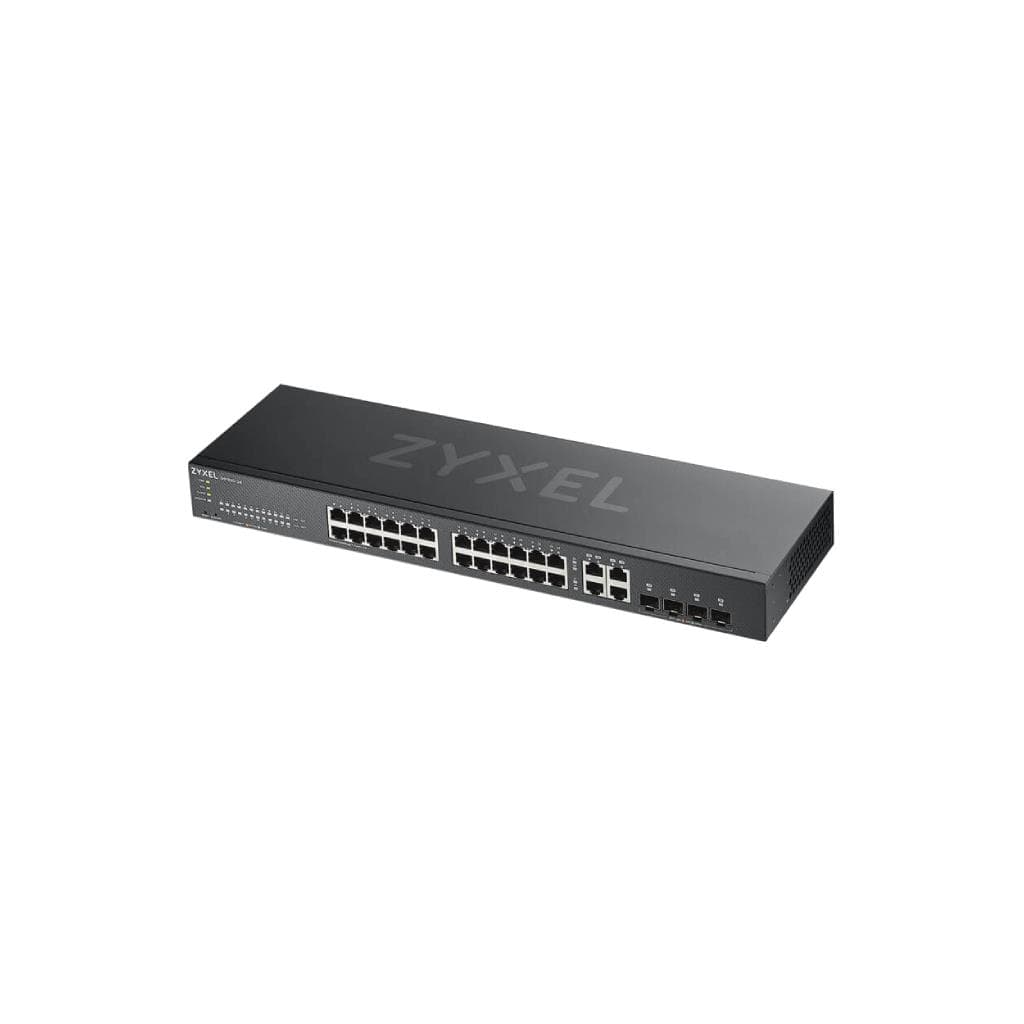
ZYXEL GS1920-48HPv2 48-Port Smart Managed PoE Switch 375W
SKU: GS1920-48HPV2Networking › Network Switches
฿22,146
Price includes 7% VATPrice updated November 1, 2026
In stock3 units3 years manufacturer's warranty
For orders placed before 12:00 on a business day; weekends excluded
GenuineFree delivery from ฿5,000Tax invoice
สวิตช์จัดการแบบสต๊าด 48 พอร์ต รองรับ PoE พร้อมอัปเกรด PoE 375 วัตต์ ใช้งานได้ทั้งในโหมดเดี่ยวและคลาวด์ผ่าน NebulaFlex
Key features
- รองรับ PoE 375 วัตต์ จ่ายไฟได้สูงสุด 30 วัตต์ต่อพอร์ต
- มีพอร์ต 1Gbps ทั้งหมด 48 พอร์ต พร้อม 4 พอร์ต Combo 1G + 2 SFP
- รองรับการจัดการแบบคลาวด์ NebulaFlex ได้ทันที
- ออกแบบมาเพื่อการทำงานเงียบ ไม่มีพัดลม (fanless)
- รองรับการตั้งค่าผ่าน Nebula Cloud หรือโหมดเดี่ยว (Standalone)
Product description
สวิตช์ ZYXEL GS1920-48HPv2 ออกแบบมาเพื่อรองรับเครือข่ายธุรกิจขนาดเล็กถึงกลางที่ต้องการความยืดหยุ่นในการขยายเครือข่ายและจ่ายไฟผ่านสายเคเบิล (PoE) ได้อย่างมีประสิทธิภาพ โดยมีทั้งหมด 48 พอร์ต 1Gbps พร้อมอัปเกรด PoE 375 วัตต์ รองรับการจ่ายไฟสูงสุด 30 วัตต์ต่อพอร์ต ทำให้สามารถเชื่อมต่ออุปกรณ์ PoE ได้หลากหลาย เช่น กล้องวงจรปิด โทรศัพท์ IP และ Access Point ได้อย่างมั่นคง พร้อมระบบจัดการแบบคลาวด์ NebulaFlex ที่สามารถสลับโหมดการจัดการได้ทันทีโดยไม่ต้องติดตั้งซอฟต์แวร์เพิ่มเติม ช่วยลดความซับซ้อนในการบริหารเครือข่ายในองค์กรที่มีหลายจุดเชื่อมต่อ
More features
- รองรับ LACP, VLAN, QoS, ACL และ IGMP Snooping
- รองรับการอัปเดตเฟิร์มแวร์ผ่าน Nebula หรือโหมดเดี่ยว
- รองรับการจัดการผ่าน ZON Utility สำหรับการค้นหาอุปกรณ์ในเครือข่าย
- รองรับการจัดการผ่าน Web GUI, CLI และ SNMP
- ออกแบบด้วยฮาร์ดแวร์ระดับองค์กร ทนทานต่อการใช้งานหนัก
Pros and limitations
Pros
- รองรับ PoE 375 วัตต์ จ่ายไฟได้สูงสุด 30 วัตต์ต่อพอร์ต ใช้งานได้หลากหลายอุปกรณ์
- ออกแบบไร้พัดลม (fanless) ทำงานเงียบ ไม่รบกวนการทำงานในออฟฟิศ
- รองรับการจัดการผ่านคลาวด์ NebulaFlex ได้ทันที ไม่ต้องติดตั้งซอฟต์แวร์เพิ่มเติม
- รองรับการอัปเดตเฟิร์มแวร์ผ่าน Nebula หรือโหมดเดี่ยว ช่วยลดเวลาในการดูแลระบบ
- มีพอร์ต SFP และ Combo รองรับการขยายเครือข่ายระยะไกลด้วยไฟเบอร์ออปติก
Limitations
- ไม่รองรับ PoE++ (802.3bt) จ่ายไฟได้สูงสุด 30 วัตต์ต่อพอร์ต
- ไม่มีพอร์ต 2.5G หรือ 10G สำหรับการเชื่อมต่อความเร็วสูง
- ไม่มีพอร์ต USB สำหรับการอัปเดตเฟิร์มแวร์หรือการจัดการเพิ่มเติม
Who it is for
เหมาะสำหรับธุรกิจขนาดเล็กถึงกลางที่ต้องการจัดการเครือข่ายแบบรวมศูนย์ผ่านคลาวด์ พร้อมจ่ายไฟ PoE ให้กล้องวงจรปิด โทรศัพท์ IP และ Access Point ได้อย่างมั่นคง
Connectivity
Ethernet, SFP
Specifications (111)
- Layer
- L2
- น้ำหนัก
- 4.5 kg
- ความชื้น
- 10% to 90% non-condensing
- การรับประกัน
- 3 years
- ประเภทพอร์ต
- 1Gbps Ethernet
- SFP Slots
- 2x SFP
- DHCP Relay
- รองรับ
- ขนาด
- 440 x 220 x 44 mm
- Fan Design
- Fanless
- HTTP/HTTPS
- รองรับ
- PoE Budget
- 375 W
- จำนวนพอร์ต
- >=48
- การติดตั้งในตู้ Rack
- รองรับ
- ACL Support
- รองรับ
- CLI Support
- รองรับ
- Combo Ports
- 4x 1G Combo (RJ45 + SFP)
- DHCP Server
- รองรับ
- รองรับ PoE
- รองรับ
- ไฟขาเข้า
- AC 100-240V, 50/60Hz
- QoS
- รองรับ
- SSH Support
- รองรับ
- SNMP Support
- รองรับ
- VLAN
- Up to 4094
- IGMP Snooping
- รองรับ
- การรับรอง
- CE, FCC, RoHS
- ไฟแสดงสถานะ
- Cloud, PoE Power Usage
- Port Mirroring
- รองรับ
- Telnet Support
- รองรับ
- Web Management
- รองรับ
- Management Mode
- Standalone, Nebula Cloud
- Default Password
- 1234
- Default Username
- admin
- เวอร์ชันเฟิร์มแวร์
- V5.00(ABMK.2)C0
- Link Aggregation
- LACP, Static
- การใช้พลังงาน
- 375 W
- Power Supply Type
- Internal AC-DC
- คุณสมบัติด้านความปลอดภัย
- 802.1X, MAC Authentication, Port Security
- Default IP Address
- 192.168.1.1
- Max Power Per Port
- 30 W
- NebulaFlex Support
- รองรับ
- Switching Capacity
- 96 Gbps
- Voice VLAN Support
- รองรับ (via LLDP MED)
- Date Format in Logs
- YYYY-MM-DD HH:MM:SS
- Management Protocol
- HTTP, HTTPS, SNMPv1/v2c/v3, Telnet, SSH
- อุณหภูมิในการจัดเก็บ
- -40°C to 70°C
- Date Format in Backup
- YYYY-MM-DD
- อุณหภูมิการทำงาน
- -10°C to 55°C
- Packet Forwarding Rate
- 71.4 Mpps
- Maximum Number of Users
- 16
- Maximum Number of VLANs
- 4094
- Maximum Number of ACL Rules
- 1024
- Maximum Number of Port LEDs
- 48
- Maximum Number of Port Names
- 48
- Maximum Number of SNMP Traps
- 16
- Maximum Number of Time Zones
- 256
- Maximum Number of User Roles
- 16
- Maximum Number of DNS Servers
- 4
- Maximum Number of IGMP Groups
- 1024
- Maximum Number of LACP Groups
- 16
- Maximum Number of NTP Servers
- 4
- Maximum Number of QoS Policies
- 8
- Maximum Number of Time Servers
- 4
- Maximum Number of Static Routes
- 16
- Maximum Number of User Accounts
- 16
- Maximum Number of User Sessions
- 16
- Maximum Number of Syslog Servers
- 4
- Maximum Number of Port Statistics
- 48
- Maximum Number of Firmware Updates
- 16
- Maximum Number of User Permissions
- 16
- Maximum Number of Port Descriptions
- 48
- Maximum Number of Configuration Files
- 16
- Maximum Number of Port Error Counters
- 48
- Maximum Number of Port Speed Settings
- 48
- Maximum Number of User Login Attempts
- 16
- Maximum Number of User Password Reset
- 16
- Maximum Number of Port Duplex Settings
- 48
- Maximum Number of User Lockout Periods
- 16
- Maximum Number of User Password Length
- 16
- Maximum Number of DHCP Snooping Entries
- 1024
- Maximum Number of Port Traffic Counters
- 48
- Maximum Number of User Password History
- 16
- Maximum Number of Port Status Indicators
- 48
- Maximum Number of User Password Policies
- 16
- Maximum Number of User Password Recovery
- 16
- Maximum Number of User Password Strength
- 16
- Maximum Number of Port Mirroring Sessions
- 4
- Maximum Number of User Password Complexity
- 16
- Maximum Number of User Password Expiration
- 16
- Maximum Number of Port Link Status Settings
- 48
- Maximum Number of Port Configuration Backups
- 16
- Maximum Number of Port Flow Control Settings
- 48
- Maximum Number of Port Auto-Negotiation Settings
- 48
- Maximum Number of User Password Change Frequency
- 16
- Maximum Number of User Password Complexity Rules
- 16
- Maximum Number of User Password History Retention
- 16
- Maximum Number of User Password Expiration Lockout
- 16
- Maximum Number of User Password Expiration Warning
- 16
- Maximum Number of User Password Expiration Grace Days
- 16
- Maximum Number of User Password Expiration Grace Hours
- 16
- Maximum Number of User Password Expiration Grace Period
- 16
- Maximum Number of User Password Expiration Lockout Days
- 16
- Maximum Number of User Password Expiration Notification
- 16
- Maximum Number of User Password Expiration Warning Days
- 16
- Maximum Number of User Password Expiration Grace Minutes
- 16
- Maximum Number of User Password Expiration Grace Seconds
- 16
- Maximum Number of User Password Expiration Lockout Hours
- 16
- Maximum Number of User Password Expiration Warning Hours
- 16
- Maximum Number of User Password Expiration Lockout Minutes
- 16
- Maximum Number of User Password Expiration Lockout Seconds
- 16
- Maximum Number of User Password Expiration Warning Minutes
- 16
- Maximum Number of User Password Expiration Warning Seconds
- 16
Datasheets and manuals straight from the manufacturer — select a document to open or download it.
13 questions
Frequently asked questions about this product
Compiled from manufacturer information
GS1920-48HPv2 รองรับการจัดการผ่านคลาวด์ Nebula ได้ไหม?
ใช่ รองรับการจัดการผ่าน NebulaFlex ได้ทันที โดยสามารถสลับโหมดระหว่าง Standalone และ Cloud Management ได้ด้วยการคลิกเพียงไม่กี่ครั้ง ไม่ต้องติดตั้งซอฟต์แวร์เพิ่มเติม ช่วยให้การบริหารเครือข่ายในหลายสาขาทำได้ง่ายขึ้น
สามารถจ่ายไฟ PoE ให้กล้องวงจรปิดได้กี่ตัวพร้อมกัน?
รองรับ PoE 375 วัตต์ จ่ายไฟได้สูงสุด 30 วัตต์ต่อพอร์ต ดังนั้นสามารถจ่ายไฟให้กล้องวงจรปิดได้สูงสุดประมาณ 12 ตัว (ถ้ากล้องใช้ไฟ 30W) หรือมากกว่านั้นหากใช้กล้องที่ใช้ไฟต่ำกว่า
ต้องใช้เฟิร์มแวร์เวอร์ชันไหนเพื่อใช้งาน NebulaFlex?
รองรับ NebulaFlex ตั้งแต่เวอร์ชัน V5.00(ABMK.2)C0 ขึ้นไป ซึ่งเป็นเวอร์ชันที่ระบุไว้ในเอกสารเฟิร์มแวร์อย่างเป็นทางการ สามารถอัปเดตผ่าน Nebula หรือโหมดเดี่ยวได้ทันที
สามารถเชื่อมต่อสองสวิตช์ GS1920-48HPv2 ผ่าน LACP ได้ไหม?
ได้ รองรับการตั้งค่า LACP ได้ทั้งแบบ Static และ Dynamic แต่ต้องไม่ตั้งค่า LACP Group ข้ามเซกเมนต์เครือข่าย (cross-segment) หากต้องการใช้งานควรตั้งค่าเป็น T1 และ T2 แยกกันเพื่อป้องกันปัญหาการสูญเสียการเชื่อมต่อ
สวิตช์นี้รองรับการจัดการผ่าน ZON Utility ได้ไหม?
ใช่ รองรับการค้นหาและตั้งค่าสวิตช์ผ่าน ZON Utility ได้ทันที ช่วยให้สามารถจัดการสวิตช์ รูเตอร์ และ Access Point ทั้งหมดในเครือข่ายเดียวกันได้ด้วยการคลิกเพียงครั้งเดียว
มีพอร์ต SFP กี่พอร์ต และใช้กับไฟเบอร์ออปติกได้ไหม?
มี 2 พอร์ต SFP รองรับการเชื่อมต่อผ่านไฟเบอร์ออปติกได้ทันที ใช้สำหรับการขยายเครือข่ายระยะไกลหรือเชื่อมต่อระหว่างอาคารได้อย่างมั่นคง
สามารถตั้งค่า VLAN ได้กี่กลุ่ม?
รองรับการตั้งค่า VLAN ได้สูงสุด 4,094 กลุ่ม พร้อมรองรับการจัดการ VLAN ผ่าน Web GUI, CLI หรือ Nebula Cloud ได้ทันที ช่วยให้แบ่งเครือข่ายได้อย่างยืดหยุ่น
รองรับการอัปเดตเฟิร์มแวร์ผ่าน Nebula ได้ไหม?
ใช่ รองรับการอัปเดตเฟิร์มแวร์ผ่าน Nebula Cloud ได้ทันที โดยไม่ต้องต่อสายหรือใช้เครื่องคอมพิวเตอร์ ช่วยลดเวลาในการดูแลระบบและเพิ่มความปลอดภัย
Is it in stock?
The ZYXEL GS1920-48HPv2 48-Port Smart Managed PoE Switch 375W is in stock and ready to ship. Orders placed before 12:00 on a business day are delivered within 1–3 business days (Bangkok and vicinity) or 2–5 business days (other provinces). Order online at store.gist.co.th or contact our sales team at 092-251-4017.
How much does it cost?
The price is ฿22,146 (including 7% VAT). It is in stock and ready to ship. Business customers can request a quotation at sales@gist.co.th.
How long is the warranty?
Warranty period: 3 ปี (manufacturer's terms). To make a warranty claim, call 092-251-4017 or 065-523-5262, or email sales@gist.co.th (Mon–Fri 9:00–18:00), then send the product with your order number to our head office, or bring it to the head office in person.
How long does delivery take?
Orders placed before 12:00 on a business day are delivered within 1–3 business days (Bangkok and vicinity) or 2–5 business days (other provinces). Free delivery on orders of ฿5,000 or more (a ฿150 delivery fee applies below this amount).
Is it genuine?
Genuine products sourced from distributors in Thailand, covered by the manufacturer's warranty. Full tax invoices are available.
Didn't find the answer you need?
Loading reviews…
Genuine products
Sourced from distributors in Thailand and covered by the manufacturer's warranty
Warranty period
3 ปี
Covered by the manufacturer's warranty; you can make claims through GIST
Claims through GIST
Ship the product to our head office or bring it in person
Warranty conditions
- A receipt or other proof of purchase is required
- The product must not have been modified or altered
- Damage caused by misuse is not covered by the warranty
- To make a warranty claim, call 092-251-4017 or 065-523-5262, or email sales@gist.co.th (Mon–Fri 9:00–18:00), then send the product with your order number to our head office, or bring it to the head office in person.Head office: 554 Sky Nine Center, Floor 12A, Room 554/62, Asok-Din Daeng Road, Din Daeng Subdistrict, Din Daeng District, Bangkok 10400
More in Network Switches
Price
฿22,146