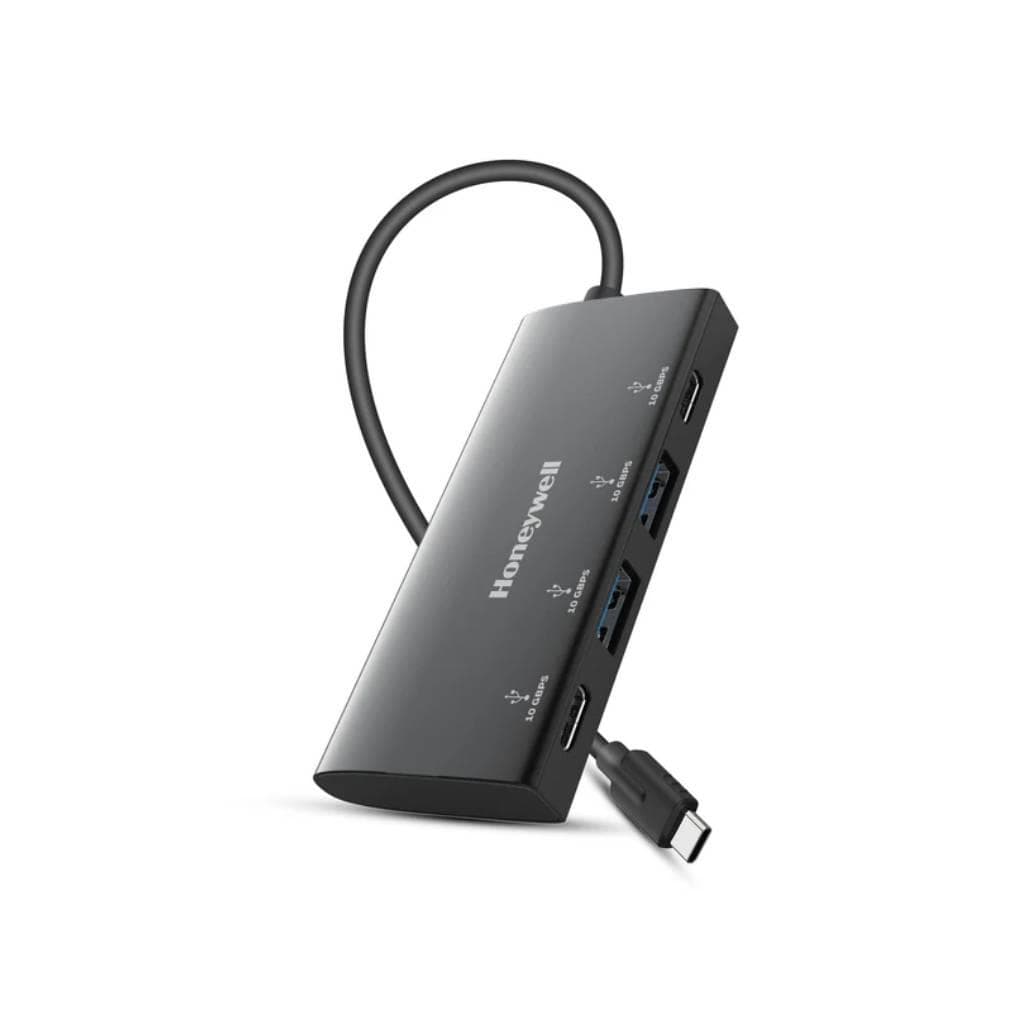
HONEYWELL Momentum Type-C to 4-in-1 Docking Station (2x USB-C, 2x USB-A)
SKU: HC-LAP-DOCKING-2C2USpecial Offers › สินค้าราคาพิเศษ
Please enquire before ordering
The distributor has not yet confirmed the latest price and availability (last checked Sep 14, 2026)
092-251-4017Awaiting stock confirmationManufacturer's warranty
GenuineFree delivery from ฿5,000Tax invoice
ฮันนีเวล Momentum ด็อกกิ้งสเตชัน แปลงพอร์ต Type-C เป็น 4 พอร์ตหลัก ใช้งานได้ทั้งแล็ปท็อปและเดสก์ท็อปอย่างมีประสิทธิภาพ
Key features
- รองรับการเชื่อมต่อพร้อมกัน 4 อุปกรณ์ผ่านพอร์ตเดียว
- เชื่อมต่อจอภาพความละเอียดสูงสุด 4K@60Hz
- ใช้งานได้กับแล็ปท็อปที่มีพอร์ต Type-C เท่านั้น
- ออกแบบมาเพื่อเพิ่มประสิทธิภาพการทำงานในออฟฟิศ
- รองรับการชาร์จไฟผ่านพอร์ต Type-C ได้สูงสุด 65W
Product description
ฮันนีเวล Momentum Type-C to 4-in-1 Docking Station ช่วยขยายพอร์ตการเชื่อมต่อให้กับแล็ปท็อปหรือโน้ตบุ๊กที่มีเพียงพอร์ต Type-C เพียงพอร์ตเดียว โดยรองรับการเชื่อมต่อพร้อมกันได้ถึง 4 อุปกรณ์ เช่น จอภาพ คีย์บอร์ด เม้าส์ และอุปกรณ์จัดเก็บข้อมูล ด้วยพอร์ต USB-C 2 พอร์ต และ USB-A 2 พอร์ต พร้อมรองรับการเชื่อมต่อจอภาพความละเอียดสูงสุด 4K@60Hz ผ่าน DisplayPort Alt Mode ทำให้เพิ่มประสิทธิภาพการทำงานในออฟฟิศหรือสถานีงานได้อย่างเต็มประสิทธิภาพ
Pros and limitations
Pros
- ขยายพอร์ตการเชื่อมต่อได้ทันทีจาก Type-C เพียงพอร์ตเดียว
- รองรับจอภาพความละเอียดสูงสุด 4K@60Hz ใช้งานได้จริง
- รองรับการชาร์จไฟผ่านพอร์ตเดียวกันได้สูงสุด 65W
- เชื่อมต่อเครือข่ายผ่าน Ethernet ความเร็ว 1 Gbps
- ใช้งานง่าย ไม่ต้องติดตั้งไดรเวอร์
Limitations
- ต้องใช้แล็ปท็อปที่รองรับ DisplayPort Alt Mode
- ไม่รองรับการเชื่อมต่อจอภาพสองจอพร้อมกัน
- ขนาดพอร์ต USB-C อาจไม่เหมาะกับแล็ปท็อปบางรุ่นที่มีพอร์ตแคบ
Who it is for
เหมาะสำหรับพนักงานออฟฟิศที่ใช้แล็ปท็อปตัวเบา และต้องการขยายพอร์ตเชื่อมต่อจอภาพ คีย์บอร์ด เม้าส์ และเครือข่ายในสถานีทำงาน
Specifications (22)
- HDMI
- รองรับ 4K@60Hz
- Ethernet
- 1 Gbps
- USB 3.2 Gen 1
- รองรับ
- พอร์ต
- USB-C x2, USB-A x2, HDMI x1, Ethernet (RJ45) x1
- DisplayPort Alt Mode
- รองรับ
- การใช้งาน
- สำหรับแล็ปท็อปและเดสก์ท็อป
- ขนาดพอร์ต
- USB-C, USB-A, HDMI, Ethernet (RJ45)
- การติดตั้ง
- Plug-and-Play ไม่ต้องติดตั้งไดรเวอร์
- การเชื่อมต่อ
- ผ่านพอร์ต Type-C บนแล็ปท็อป
- ความละเอียดจอ
- สูงสุด 4K@60Hz
- ความเข้ากันได้
- รองรับแล็ปท็อปที่มีพอร์ต Type-C พร้อมฟีเจอร์ DisplayPort Alt Mode
- การจัดวางตำแหน่ง
- ใช้งานบนโต๊ะหรือในสถานีงานได้ทันที
- การจัดเก็บข้อมูล
- รองรับการเชื่อมต่อ SSD, HDD, USB Flash Drive
- รองรับการชาร์จไฟ
- สูงสุด 65W
- การใช้งานในออฟฟิศ
- เหมาะสำหรับสถานีงานที่ต้องการความเร็วและประสิทธิภาพสูง
- การเชื่อมต่อเครือข่าย
- รองรับ Ethernet 1 Gbps ผ่านพอร์ต RJ45
- การใช้งานร่วมกับจอภาพ
- รองรับจอภาพภายนอกสูงสุด 1 จอ
- การจัดเก็บข้อมูลผ่านพอร์ต
- รองรับการเชื่อมต่ออุปกรณ์จัดเก็บข้อมูลผ่าน USB-A และ USB-C
- การใช้งานร่วมกับอุปกรณ์พิมพ์
- รองรับการเชื่อมต่อเครื่องพิมพ์ผ่าน USB-A หรือ Ethernet
- การใช้งานร่วมกับอุปกรณ์เสริม
- รองรับคีย์บอร์ด เม้าส์ จอภาพ และอุปกรณ์จัดเก็บข้อมูล
- การจัดเก็บข้อมูลผ่านเครือข่าย
- รองรับการเชื่อมต่อเครือข่ายผ่าน Ethernet
- การใช้งานร่วมกับระบบปฏิบัติการ
- รองรับ Windows, macOS, Chrome OS
Datasheets and manuals straight from the manufacturer — select a document to open or download it.
13 questions
Frequently asked questions about this product
Compiled from manufacturer information
ด็อกกิ้งสเตชันรุ่นนี้ใช้งานกับแล็ปท็อปที่มีพอร์ต Type-C ได้ทุกรุ่นไหม?
ไม่ใช่ทุกรุ่น ต้องเป็นแล็ปท็อปที่รองรับฟีเจอร์ DisplayPort Alt Mode เพื่อส่งสัญญาณวิดีโอผ่านพอร์ต Type-C ได้ หากไม่รองรับ จะไม่สามารถแสดงผลจอภาพได้
ใช้ด็อกกิ้งสเตชันนี้แล้วจอภาพจะแสดงผลได้สูงสุดเท่าไหร่?
รองรับการแสดงผลจอภาพความละเอียดสูงสุด 4K@60Hz ผ่านพอร์ต HDMI หากแล็ปท็อปและจอภาพรองรับมาตรฐานนี้
สามารถชาร์จแล็ปท็อปได้สูงสุดกี่วัตต์?
รองรับการชาร์จไฟผ่านพอร์ต Type-C ได้สูงสุด 65W ซึ่งเพียงพอสำหรับแล็ปท็อปส่วนใหญ่ในตลาดปัจจุบัน
พอร์ต Ethernet ใช้งานได้กี่เมกะบิต?
รองรับความเร็วเครือข่ายสูงสุด 1 Gbps ผ่านพอร์ต RJ45 ทำให้การเชื่อมต่ออินเทอร์เน็ตมีเสถียรภาพและเร็วขึ้น
ใช้งานกับแล็ปท็อป Mac ได้ไหม?
ได้ รองรับแล็ปท็อปที่ใช้ระบบปฏิบัติการ macOS และมีพอร์ต Type-C พร้อมรองรับ DisplayPort Alt Mode เช่น MacBook Pro หรือ MacBook Air รุ่นใหม่
สามารถเชื่อมต่อจอภาพสองจอพร้อมกันได้ไหม?
ไม่สามารถเชื่อมต่อจอภาพสองจอพร้อมกันได้ เนื่องจากรุ่นนี้รองรับการเชื่อมต่อจอภาพภายนอกเพียง 1 จอผ่านพอร์ต HDMI
ต้องติดตั้งไดรเวอร์ไหม?
ไม่จำเป็น ใช้งานแบบ Plug-and-Play โดยไม่ต้องติดตั้งไดรเวอร์เพิ่มเติม รองรับระบบปฏิบัติการ Windows, macOS และ Chrome OS ทันที
พอร์ต USB-C บนด็อกกิ้งสเตชันใช้สำหรับอะไร?
พอร์ต USB-C 2 พอร์ต ใช้สำหรับเชื่อมต่อแล็ปท็อปเพื่อส่งข้อมูลและชาร์จไฟ รวมถึงส่งสัญญาณวิดีโอไปยังจอภาพผ่าน DisplayPort Alt Mode
Is it in stock?
We are confirming the latest stock and price of the HONEYWELL Momentum Type-C to 4-in-1 Docking Station (2x USB-C, 2x USB-A) with the distributor. Please contact us before ordering at 092-251-4017 or sales@gist.co.th.
How much does it cost?
The distributor has not yet confirmed the latest price and availability. Please contact us before ordering at 092-251-4017 or sales@gist.co.th.
How long is the warranty?
The warranty follows the manufacturer's terms for each model; ask our sales team for the warranty period of this model. To make a warranty claim, call 092-251-4017 or 065-523-5262, or email sales@gist.co.th (Mon–Fri 9:00–18:00), then send the product with your order number to our head office, or bring it to the head office in person.
How long does delivery take?
Orders placed before 12:00 on a business day are delivered within 1–3 business days (Bangkok and vicinity) or 2–5 business days (other provinces). Free delivery on orders of ฿5,000 or more (a ฿150 delivery fee applies below this amount).
Is it genuine?
Genuine products sourced from distributors in Thailand, covered by the manufacturer's warranty. Full tax invoices are available.
Didn't find the answer you need?
Loading reviews…
Genuine products
Sourced from distributors in Thailand and covered by the manufacturer's warranty
Warranty period
According to the manufacturer's terms for each model
Covered by the manufacturer's warranty; you can make claims through GIST
Claims through GIST
Ship the product to our head office or bring it in person
Warranty conditions
- A receipt or other proof of purchase is required
- The product must not have been modified or altered
- Damage caused by misuse is not covered by the warranty
- To make a warranty claim, call 092-251-4017 or 065-523-5262, or email sales@gist.co.th (Mon–Fri 9:00–18:00), then send the product with your order number to our head office, or bring it to the head office in person.Head office: 554 Sky Nine Center, Floor 12A, Room 554/62, Asok-Din Daeng Road, Din Daeng Subdistrict, Din Daeng District, Bangkok 10400
More in สินค้าราคาพิเศษ