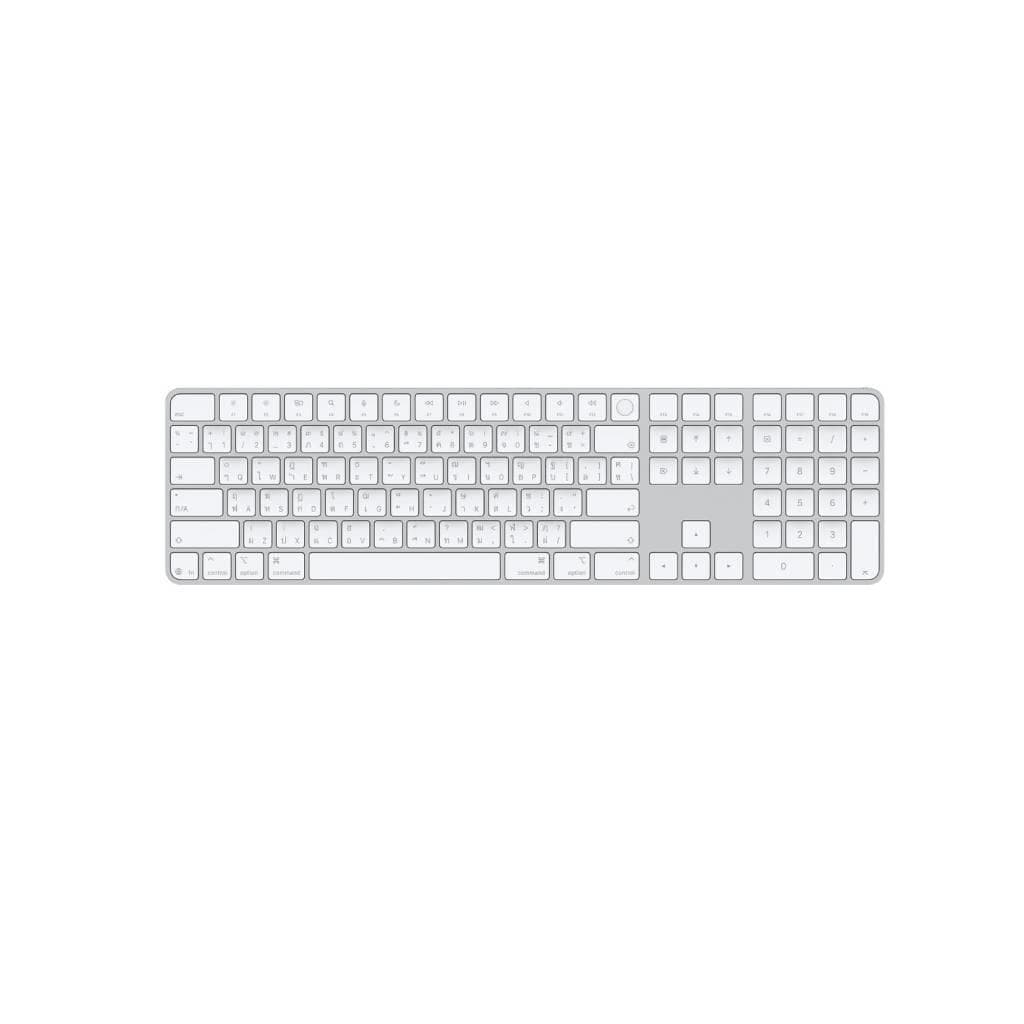
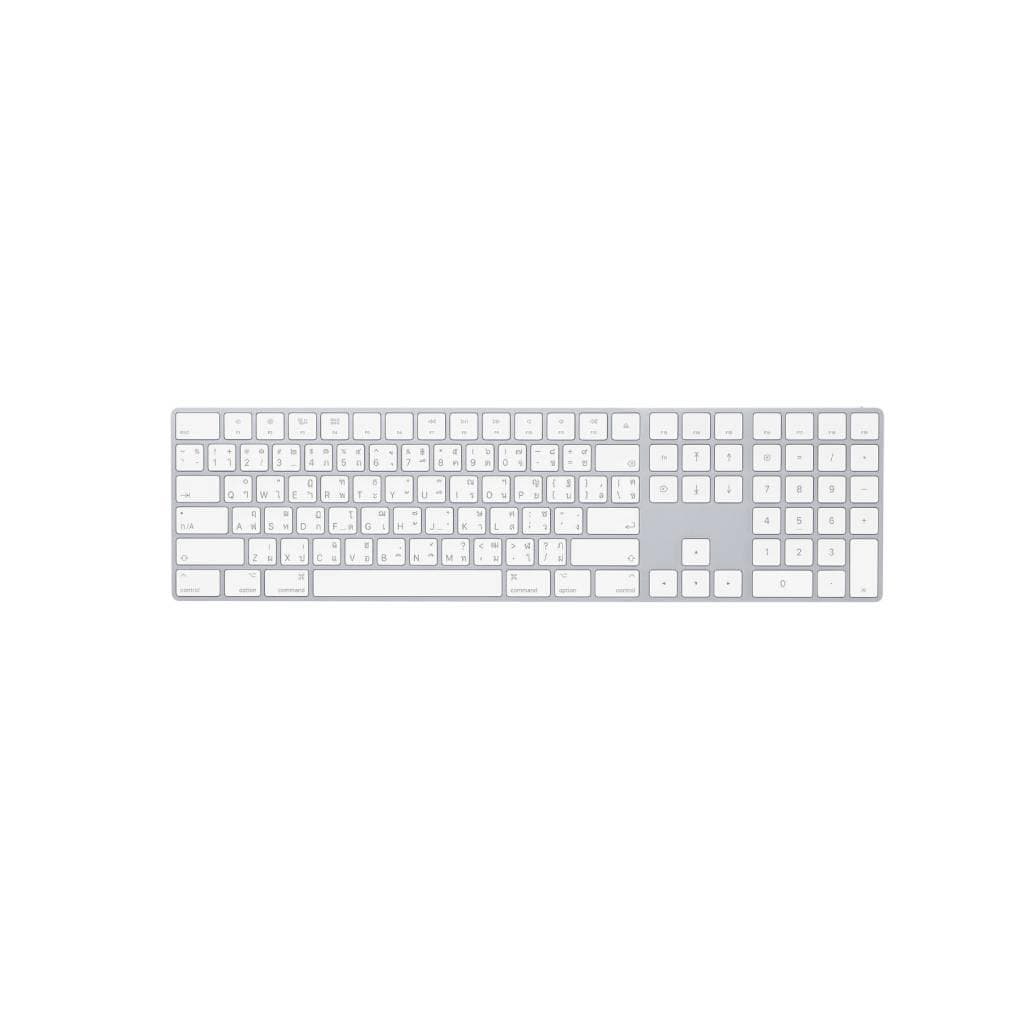

APPLE Magic Keyboard with Numeric Keypad Thai Silver
SKU: KEY-MXCJ3TH/AApple › Apple Accessories
Please enquire before ordering
The distributor has not yet confirmed the latest price and availability (last checked Aug 28, 2026)
092-251-4017Awaiting stock confirmation1 year manufacturer's warranty
GenuineFree delivery from ฿5,000Tax invoice
คีย์บอร์ดไร้สายรุ่นใหม่จาก Apple พร้อมคีย์พิมพ์ตัวเลข ออกแบบมาเพื่อใช้งานกับ Mac ทุกรุ่น รองรับ Bluetooth และมีแบตเตอรี่ชาร์จได้
Key features
- คีย์พิมพ์ตัวเลขแยกต่างหาก ใช้งานสะดวก
- รองรับ Bluetooth ไร้สาย ใช้งานได้กับ Mac ทุกรุ่น
- แบตเตอรี่ชาร์จได้ ใช้งานได้นานถึง 1 ปี
- ตั้งค่าได้ผ่าน System Preferences บน macOS
- ออกแบบมาเพื่อใช้งานกับ Mac โดยเฉพาะ
Product description
Magic Keyboard with Numeric Keypad คือคีย์บอร์ดไร้สายที่ออกแบบมาอย่างพิถีพิถันเพื่อให้ผู้ใช้ Mac ได้รับประสบการณ์การพิมพ์ที่ราบรื่นและมีประสิทธิภาพสูงสุด โดยมีคีย์พิมพ์ตัวเลขแยกต่างหาก ช่วยเพิ่มความเร็วในการทำงานทั้งในงานเอกสาร งานบัญชี และการวิเคราะห์ข้อมูล คีย์บอร์ดใช้เทคโนโลยี Bluetooth® ในการเชื่อมต่อไร้สาย และมีแบตเตอรี่ชาร์จไฟได้ภายในตัว ใช้งานได้นานถึง 1 ปีต่อการชาร์จ 1 ครั้ง รองรับการตั้งค่าผ่านระบบปฏิบัติการ macOS 10.12.4 หรือใหม่กว่า พร้อมใช้งานกับฟังก์ชันต่าง ๆ เช่น การปรับความสว่างหน้าจอ การเปิด Mission Control และการควบคุมเสียงได้ทันทีผ่านคีย์ฟังก์ชันด้านบน
More features
- มีสวิตช์เปิด-ปิด พร้อมไฟเขียวแสดงสถานะ
- ใช้ Lightning to USB cable สำหรับชาร์จและตั้งค่า
- รองรับการตั้งค่าคีย์ Modifier และ Shortcuts
- พิมพ์ได้เงียบ ไม่รบกวนผู้อื่น
- ดีไซน์เรียบหรู สีเงิน ใช้งานได้ทุกสภาพแวดล้อม
Pros and limitations
Pros
- มีคีย์พิมพ์ตัวเลขแยก ช่วยเพิ่มความเร็วในการทำงาน
- ใช้งานได้ยาวนานด้วยแบตเตอรี่ชาร์จได้
- เชื่อมต่อผ่าน Bluetooth ได้ทันที
- รองรับการตั้งค่าผ่าน macOS ได้อย่างละเอียด
- ดีไซน์เรียบหรู ทนทาน ใช้งานได้ทุกสภาพแวดล้อม
Limitations
- ไม่มีไฟพื้นหลัง (Backlight)
- ต้องใช้ Lightning cable สำหรับชาร์จ
Who it is for
เหมาะสำหรับผู้ใช้ Mac ที่ต้องการคีย์บอร์ดไร้สายที่มีคีย์พิมพ์ตัวเลข ใช้ทำงานเอกสาร บัญชี หรือวิเคราะห์ข้อมูลอย่างมีประสิทธิภาพ
Specifications (39)
- แบรนด์
- APPLE
- สี
- Silver
- ความลึก
- 445 mm
- รุ่น
- Magic Keyboard with Numeric Keypad
- พอร์ต
- Lightning port
- ความกว้าง
- 135 mm
- ความสูง
- 10 mm
- น้ำหนัก
- 610 g
- วัสดุ
- Aluminum
- การรับประกัน
- 1 year
- Backlight
- ไม่รองรับ
- การเชื่อมต่อ
- Bluetooth®
- ขนาด
- 445 x 135 x 10 mm
- หมายเลขชิ้นส่วน (P/N)
- KEY-MXCJ3TH/A
- อายุการใช้งานแบตเตอรี่
- Up to 1 year
- ประเภทแบตเตอรี่
- Rechargeable
- ประเภทสินค้า
- Wireless Keyboard
- Supported OS
- macOS
- ความเข้ากันได้
- macOS 10.12.4 or later
- Customization
- รองรับ (via System Preferences)
- Function Keys
- รองรับ
- Input Sources
- Customizable
- Language Code
- TH
- Modifier Keys
- Customizable
- On/Off Switch
- รองรับ
- Delete Pairing
- รองรับ (via Bluetooth preferences)
- Included Cable
- Lightning to USB cable
- Numeric Keypad
- รองรับ
- Pairing Method
- Automatic via Lightning cable
- Charging Method
- Lightning to USB cable
- Indicator Light
- Green when on
- Key Switch Type
- Scissor-switch
- Keyboard Layout
- Thai
- Language Layout
- Thai
- การใช้พลังงาน
- Low
- Wireless Standard
- Bluetooth®
- Keyboard Shortcuts
- Customizable
- Multi-Device Pairing
- รองรับ
- Operating System Requirement
- macOS 10.12.4 or later
Datasheets and manuals straight from the manufacturer — select a document to open or download it.
13 questions
Frequently asked questions about this product
Compiled from manufacturer information
Magic Keyboard รุ่นนี้ใช้กับ Mac ทุกรุ่นได้ไหม?
ใช้ได้กับ Mac ที่รองรับ macOS 10.12.4 หรือใหม่กว่า โดยเชื่อมต่อผ่าน Bluetooth ได้ทันที ไม่จำเป็นต้องติดตั้งไดรเวอร์เพิ่มเติม
คีย์บอร์ดรุ่นนี้ใช้แบตเตอรี่แบบไหน?
ใช้แบตเตอรี่ชาร์จไฟได้ภายในตัว ใช้งานได้นานถึง 1 ปีต่อการชาร์จ 1 ครั้ง ชาร์จผ่าน Lightning to USB cable ที่มากับตัวเครื่อง
ตั้งค่าคีย์ฟังก์ชันได้ไหม?
ได้ สามารถตั้งค่าคีย์ฟังก์ชัน เช่น ปรับความสว่างหน้าจอ หรือเปิด Mission Control ได้ผ่าน System Preferences บน macOS
รองรับการเชื่อมต่อกับอุปกรณ์หลายเครื่องไหม?
ได้ สามารถจับคู่กับ Mac อีกเครื่องได้โดยลบการจับคู่เดิมออกก่อน แล้วจับคู่ใหม่ผ่าน Bluetooth
ใช้กับ iPad ได้ไหม?
ไม่รองรับโดยตรง เนื่องจากต้องใช้ macOS 10.12.4 หรือใหม่กว่า ซึ่ง iPad ไม่รองรับระบบปฏิบัติการนี้
มีไฟพื้นหลังหรือไม่?
ไม่มีไฟพื้นหลัง (Backlight) คีย์บอร์ดใช้แสงธรรมชาติในการมองเห็น ไม่ต้องพึ่งไฟส่องพื้นหลัง
ต้องใช้ Lightning cable ตลอดไหม?
ไม่จำเป็น ใช้ Lightning cable เพียงครั้งแรกในการตั้งค่าหรือชาร์จเท่านั้น หลังจากนั้นสามารถใช้งานผ่าน Bluetooth ได้ทันที
ใช้กับ Mac ที่ไม่ใช่ภาษาไทยได้ไหม?
ได้ ใช้ได้กับ Mac ทุกภาษา แต่คีย์บอร์ดจะมี layout เป็นภาษาไทย ซึ่งเหมาะกับผู้ใช้ที่ต้องการพิมพ์ภาษาไทยโดยเฉพาะ
Is it in stock?
We are confirming the latest stock and price of the APPLE Magic Keyboard with Numeric Keypad Thai Silver with the distributor. Please contact us before ordering at 092-251-4017 or sales@gist.co.th.
How much does it cost?
The distributor has not yet confirmed the latest price and availability. Please contact us before ordering at 092-251-4017 or sales@gist.co.th.
How long is the warranty?
Warranty period: 1 ปี (manufacturer's terms). To make a warranty claim, call 092-251-4017 or 065-523-5262, or email sales@gist.co.th (Mon–Fri 9:00–18:00), then send the product with your order number to our head office, or bring it to the head office in person.
How long does delivery take?
Orders placed before 12:00 on a business day are delivered within 1–3 business days (Bangkok and vicinity) or 2–5 business days (other provinces). Free delivery on orders of ฿5,000 or more (a ฿150 delivery fee applies below this amount).
Is it genuine?
Genuine products sourced from distributors in Thailand, covered by the manufacturer's warranty. Full tax invoices are available.
Didn't find the answer you need?
Loading reviews…
Genuine products
Sourced from distributors in Thailand and covered by the manufacturer's warranty
Warranty period
1 ปี
Covered by the manufacturer's warranty; you can make claims through GIST
Claims through GIST
Ship the product to our head office or bring it in person
Warranty conditions
- A receipt or other proof of purchase is required
- The product must not have been modified or altered
- Damage caused by misuse is not covered by the warranty
- To make a warranty claim, call 092-251-4017 or 065-523-5262, or email sales@gist.co.th (Mon–Fri 9:00–18:00), then send the product with your order number to our head office, or bring it to the head office in person.Head office: 554 Sky Nine Center, Floor 12A, Room 554/62, Asok-Din Daeng Road, Din Daeng Subdistrict, Din Daeng District, Bangkok 10400
More in Apple Accessories