
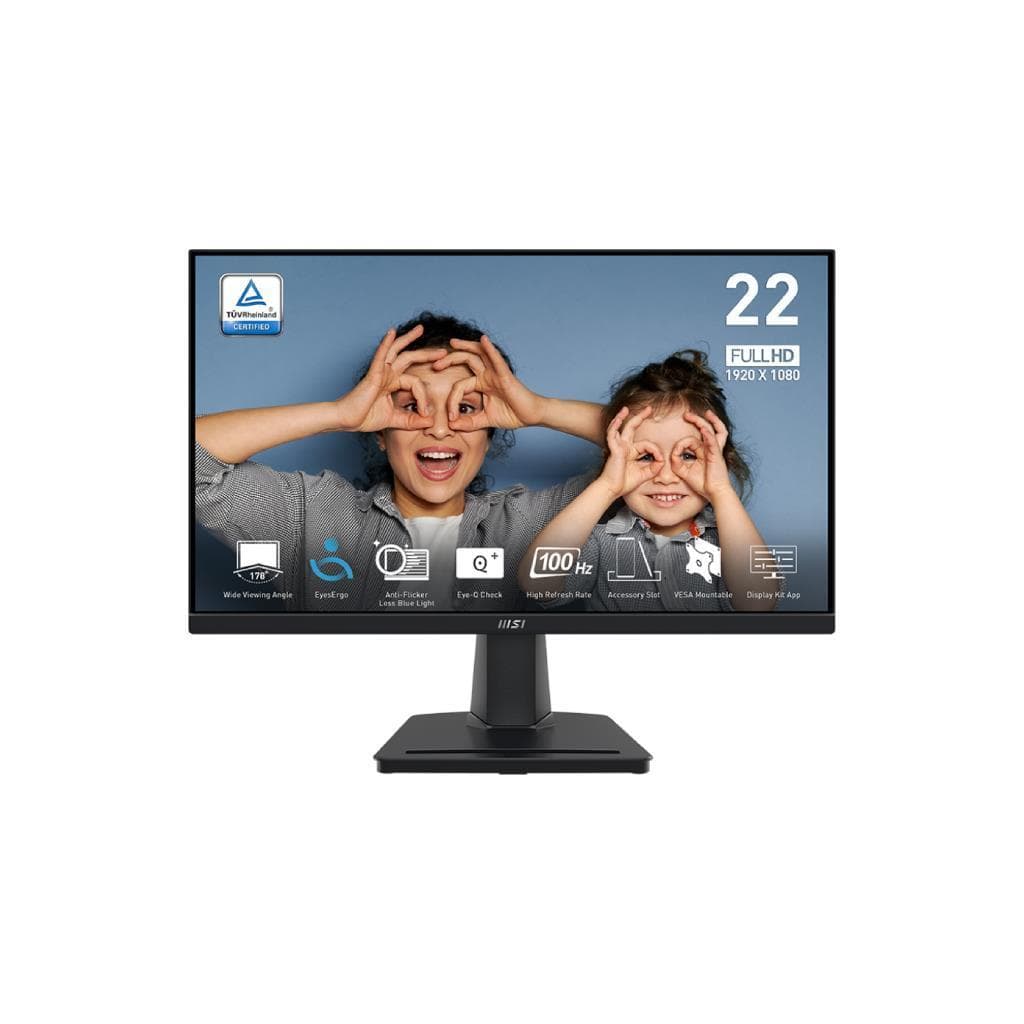

MSI PRO MAX 241PHW E14 23.8" IPS FHD 144Hz 1ms 65W USB-C DP-Alt
SKU: PRO-MAX-241PHW-E14Displays & Projectors › Monitors
฿5,074
Price includes 7% VATPrice updated November 1, 2026
In stock4 units3 years manufacturer's warranty
For orders placed before 12:00 on a business day; weekends excluded
GenuineFree delivery from ฿5,000Tax invoice
จอภาพขนาด 23.8 นิ้ว ความละเอียด FHD 1920x1080 รีเฟรชเรท 144Hz ตอบสนอง 1ms รองรับ USB-C DP-Alt และ Power Delivery สูงสุด 65W เหมาะสำหรับผู้ใช้งานทั่วไปและเกมเมอร์ระดับกลาง
Key features
- รีเฟรชเรท 144Hz สำหรับภาพลื่นไหล
- เวลาตอบสนอง 1ms (MPRT) ลดอาการเบลอ
- รองรับ USB-C DP-Alt และ PD สูงสุด 65W
- สีสันแม่นยำ sRGB 99% / DCI-P3 96%
- มุมมองกว้าง 178° ทั้งแนวนอนและแนวตั้ง
Product description
MSI PRO MAX 241PHW E14 เป็นจอภาพ IPS ขนาด 23.8 นิ้ว ความละเอียด FHD 1920x1080 รีเฟรชเรทสูงถึง 144Hz และเวลาตอบสนองเพียง 1ms (MPRT) ให้ภาพเคลื่อนไหวลื่นไหล ไม่กระตุก แม้ในเกมหรืองานกราฟิกหนัก รองรับ Adaptive-Sync เพื่อลด screen tearing โดยเฉพาะเมื่อใช้งานกับการ์ดจอ NVIDIA และ AMD พร้อมสีสันที่แม่นยำด้วยสเปกสี sRGB 99%, Adobe RGB 93%, DCI-P3 96% ให้ความสว่างสูงถึง 300 cd/m² และมุมมองกว้าง 178° ทั้งแนวนอนและแนวตั้ง ใช้งานได้ดีในหลายมุมมอง ไม่เบลอหรือเปลี่ยนสีเมื่อเอียงจอ
More features
- รองรับ Adaptive-Sync ลด screen tearing
- มี USB Hub พร้อมพอร์ต Type-A และ Type-B
- มีลำโพงในตัว 3W + 3W
- ปรับเอียง-เลื่อนสูงได้ 110 มม.
- รองรับ VESA Mount ขนาด 75mm
Pros and limitations
Pros
- รีเฟรชเรทสูง 144Hz ให้ภาพลื่นไหลแม้ในเกม
- รองรับ USB-C DP-Alt และ PD 65W ชาร์จแล็ปท็อปได้จากจอเดียว
- สีสันแม่นยำด้วย DCI-P3 96% และ sRGB 99%
- มุมมองกว้าง 178° ใช้งานร่วมกับผู้อื่นได้ดี
- มีฟีเจอร์เสริมครบ เช่น KVM Switch, USB Hub, Adaptive-Sync
Limitations
- ไม่มีพอร์ต DisplayPort หรือ HDMI แบบแยกเพิ่มเติม
- ไม่รองรับ HDR10 หรือ Dolby Vision (ข้อมูลจาก specs ไม่ระบุ)
Who it is for
เหมาะสำหรับผู้ใช้งานทั่วไป นักเรียน หรือเกมเมอร์ระดับกลางที่ต้องการจอภาพความละเอียด FHD รีเฟรชเรทสูง พร้อมพอร์ต USB-C สำหรับเชื่อมต่อแล็ปท็อปและชาร์จไฟได้ในตัว
Specifications (33)
- HDR
- รองรับ
- พอร์ต
- HDMI 2.0b x1, DisplayPort 1.2a x1, USB-C (DP Alt mode, USB PD) x1, USB 3.2 Gen 1 Type-A x2, USB 3.2 Gen 1 Type-B x1, Headphone Out x1
- น้ำหนัก
- 5.4 kg
- ลำโพง
- 3W + 3W
- การรับประกัน
- 3 years (domestic)
- ความสว่าง
- 300 cd/m²
- ขนาด
- 542 x 201 x 382 mm
- KVM Switch
- รองรับ
- MSI M-Mate
- รองรับ
- ขนาดหน้าจอ
- 23.8"
- ประเภทจอ
- IPS
- ความละเอียด
- 1920 x 1080
- การติดตั้ง VESA
- 75 mm (with spacer screws)
- ความลึกสี
- Approx. 16.7 million colors
- ขอบเขตสี
- sRGB 99%, Adobe RGB 93%, DCI-P3 96%
- Eye-Q Check
- รองรับ
- ระยะห่างพิกเซล
- 0.2745 x 0.2745 mm
- Anti-Flicker
- รองรับ
- อัตราส่วนภาพ
- 16:9
- แหล่งจ่ายไฟ
- Built-in power supply
- อัตราการรีเฟรช
- 144 Hz
- Surface Type
- Anti-glare (Circular Polarization)
- Adaptive-Sync
- รองรับ
- การปรับตั้ง
- Tilt: -5° to 20°, Height: 0 to 110 mm, Swivel: -30° to 30°
- แรงดันไฟฟ้าขาเข้า
- AC 100-240 V, 50/60 Hz
- เวลาตอบสนอง
- 1 ms (MPRT)
- มุมมองภาพ
- 178° (H) / 178° (V)
- อัตราส่วนคอนทราสต์
- 1500:1
- USB Hub Function
- รองรับ
- การใช้พลังงาน
- 14 W (operating), 0.5 W (standby)
- USB Power Delivery
- 65 W
- Productivity Intelligence
- รองรับ
- Hardware Blue Light Filter
- รองรับ
Datasheets and manuals straight from the manufacturer — select a document to open or download it.
12 questions
Frequently asked questions about this product
Compiled from manufacturer information
จอรุ่นนี้ใช้กับแล็ปท็อป Mac ได้ไหม?
ได้ครับ รองรับ USB-C DP-Alt Mode และ Power Delivery สูงสุด 65W จึงสามารถเชื่อมต่อแล็ปท็อป Mac ได้ทั้งภาพและเสียง พร้อมชาร์จไฟในตัว โดยเฉพาะรุ่น MacBook Pro หรือ MacBook Air ที่ใช้พอร์ต USB-C
ใช้จอต่อเกมคอนโซลได้ไหม?
ได้ครับ รองรับ HDMI 2.0b และ DisplayPort 1.2a จึงสามารถเชื่อมต่อกับ PlayStation 5 หรือ Xbox Series X ได้ที่ความละเอียด FHD 1920x1080 รีเฟรชเรทสูงสุด 144Hz โดยเฉพาะในโหมดเกม
จอรุ่นนี้ติดตั้งบนขาตั้งหรือผนังได้ไหม?
ได้ครับ มีช่อง VESA Mount ขนาด 75mm และมาพร้อมสเปรเซอร์น็อตสำหรับติดตั้ง จึงสามารถติดตั้งบนขาตั้งหรือผนังได้ รองรับการปรับเอียงและเลื่อนสูงได้สูงสุด 110 มม.
จอรุ่นนี้ใช้ไฟฟ้ากี่วัตต์?
ใช้งานจริงประมาณ 14 วัตต์ ส่วนโหมดสแตนบายอยู่ที่ 0.5 วัตต์ ประหยัดไฟมาก เหมาะสำหรับใช้งานทั้งวันโดยไม่กินไฟมาก
จอรุ่นนี้มีลำโพงในตัวไหม?
มีครับ มีลำโพงในตัวขนาด 3W + 3W รองรับเสียงพื้นฐานได้ดีสำหรับการฟังเพลงหรือดูวิดีโอ โดยไม่จำเป็นต้องใช้ลำโพงภายนอก
จอรุ่นนี้รองรับ Adaptive-Sync ไหม?
มีครับ รองรับ Adaptive-Sync เพื่อลด screen tearing โดยเฉพาะเมื่อใช้งานกับการ์ดจอ NVIDIA และ AMD ทำให้ภาพเกมหรือวิดีโอไม่กระตุก
จอรุ่นนี้มีฟีเจอร์ช่วยถนอมสายตาไหม?
มีครับ มีฟีเจอร์ Anti-Flicker และ Hardware Blue Light Filter ช่วยลดแสงสีฟ้าและไฟกระพริบ ทำให้ใช้งานได้นานโดยไม่เมื่อยตา
Is it in stock?
The MSI PRO MAX 241PHW E14 23.8" IPS FHD 144Hz 1ms 65W USB-C DP-Alt is in stock and ready to ship. Orders placed before 12:00 on a business day are delivered within 1–3 business days (Bangkok and vicinity) or 2–5 business days (other provinces). Order online at store.gist.co.th or contact our sales team at 092-251-4017.
How much does it cost?
The price is ฿5,074 (including 7% VAT). It is in stock and ready to ship. Business customers can request a quotation at sales@gist.co.th.
How long is the warranty?
Warranty period: รับประกัน 3 ปี ตามเงื่อนไขผู้ผลิต (manufacturer's terms). To make a warranty claim, call 092-251-4017 or 065-523-5262, or email sales@gist.co.th (Mon–Fri 9:00–18:00), then send the product with your order number to our head office, or bring it to the head office in person.
How long does delivery take?
Orders placed before 12:00 on a business day are delivered within 1–3 business days (Bangkok and vicinity) or 2–5 business days (other provinces). Free delivery on orders of ฿5,000 or more (a ฿150 delivery fee applies below this amount).
Is it genuine?
Genuine products sourced from distributors in Thailand, covered by the manufacturer's warranty. Full tax invoices are available.
Didn't find the answer you need?
Loading reviews…
Genuine products
Sourced from distributors in Thailand and covered by the manufacturer's warranty
Warranty period
รับประกัน 3 ปี ตามเงื่อนไขผู้ผลิต
Covered by the manufacturer's warranty; you can make claims through GIST
Claims through GIST
Ship the product to our head office or bring it in person
Warranty conditions
- A receipt or other proof of purchase is required
- The product must not have been modified or altered
- Damage caused by misuse is not covered by the warranty
- To make a warranty claim, call 092-251-4017 or 065-523-5262, or email sales@gist.co.th (Mon–Fri 9:00–18:00), then send the product with your order number to our head office, or bring it to the head office in person.Head office: 554 Sky Nine Center, Floor 12A, Room 554/62, Asok-Din Daeng Road, Din Daeng Subdistrict, Din Daeng District, Bangkok 10400
More in Monitors
Price
฿5,074