
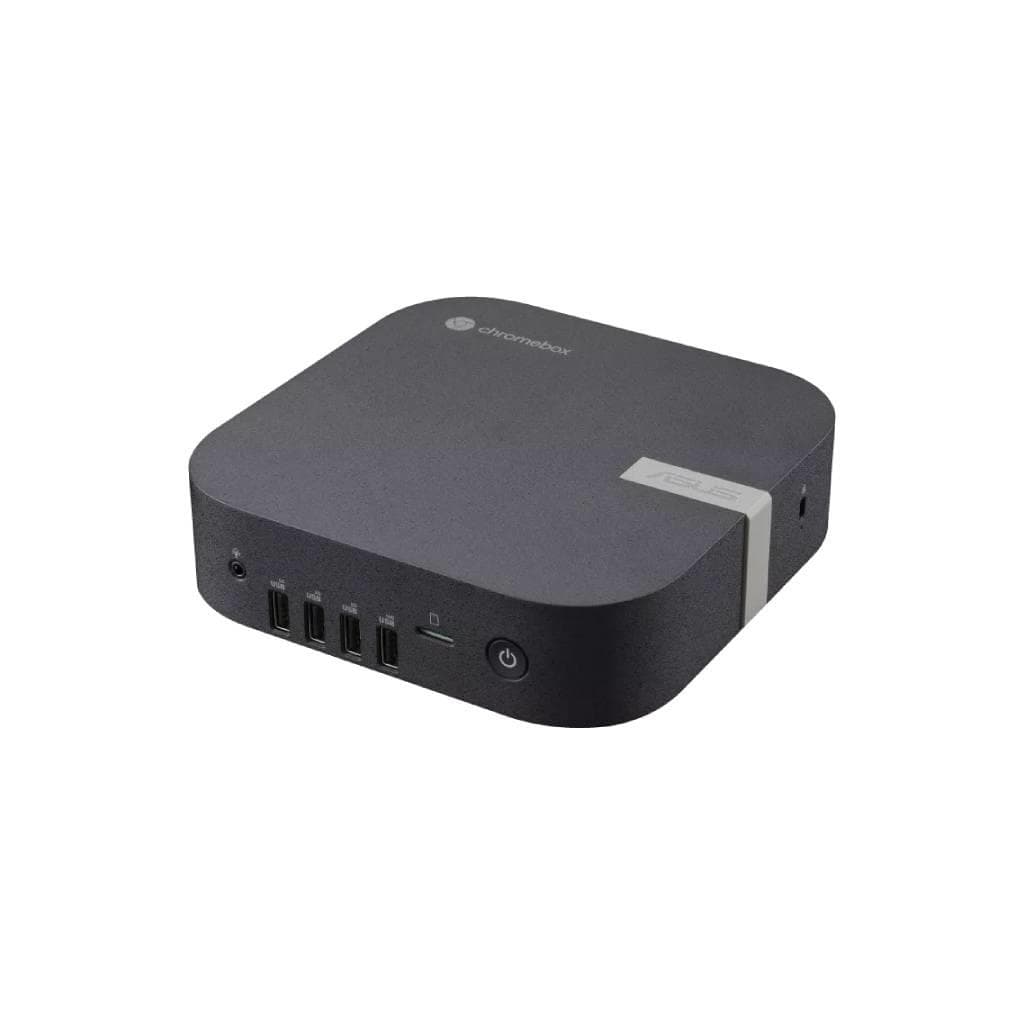


ASUS NUC 14 Essential Mini PC Core i3 N355 8GB DDR5 5600MHz 512GB NVMe SSD
SKU: RNUC14MNK3500000Computers › Mini PCs· P/N: 90AR00M2-M00010
Please enquire before ordering
The distributor has not yet confirmed the latest price and availability (last checked Jun 15, 2026)
092-251-4017Awaiting stock confirmation3 years manufacturer's warranty
GenuineFree delivery from ฿5,000Tax invoice
คอมพิวเตอร์ตัวเล็กขนาด 0.56L ใช้ซีพียู Intel Core i3 N355 รองรับการเชื่อมต่อหน้าจอ 3 จอ 4K พร้อม Wi-Fi 6E และ 2.5G LAN สำหรับการทำงานที่รวดเร็วและเสถียร
Key features
- ซีพียู Intel Core i3 N355 8 คอร์ 8 เธรด ความเร็วสูงสุด 3.90GHz
- รองรับแรม DDR5-5600 สูงสุด 16GB
- SSD NVMe PCIe 4.0 512GB ความเร็วสูง
- เชื่อมต่อหน้าจอ 3 จอ 4K พร้อม HDMI 2.1
- Wi-Fi 6E และ 2.5G LAN สำหรับความเร็วอินเทอร์เน็ตสูง
Product description
ASUS NUC 14 Essential คือคอมพิวเตอร์ตัวเล็กที่ออกแบบมาเพื่อประสิทธิภาพสูงในพื้นที่จำกัด โดยใช้ซีพียู Intel Core i3 N355 ที่มี 8 คอร์ 8 เธรด ความเร็วสูงสุด 3.90GHz พร้อม TDP 15W รองรับแรม DDR5-5600 ความจุสูงสุด 16GB พร้อม SSD NVMe PCIe 4.0 ขนาด 512GB ที่ให้ความเร็วในการอ่าน/เขียนสูง รองรับการเชื่อมต่อหน้าจอ 3 จอ 4K พร้อม HDMI 2.1 และ DisplayPort ผ่าน Thunderbolt 4 ทำให้เหมาะสำหรับงานด้านกราฟิก หรือใช้เป็นเครื่องเซิร์ฟเวอร์เล็กในออฟฟิศ ติดตั้งง่ายด้วยดีไซน์แบบไม่ต้องใช้เครื่องมือ และมีพอร์ต 2.5G LAN สำหรับการเชื่อมต่ออินเทอร์เน็ตความเร็วสูง
More features
- ขนาดเล็กเพียง 0.56L ติดตั้งง่ายด้วยดีไซน์ไม่ต้องใช้เครื่องมือ
- รองรับระบบปฏิบัติการ Windows 11 Pro, Ubuntu 24.04 LTS, RedHat Enterprise Linux
- พอร์ตครบครัน รวมถึง Thunderbolt 4 และ USB 3.2 Gen 2x2
- รองรับการติดตั้ง HDD 2.5 นิ้ว (ตัวเลือก)
- ออกแบบมาเพื่อใช้งานในออฟฟิศ หรือเป็นเครื่องเซิร์ฟเวอร์เล็ก
Pros and limitations
Pros
- ซีพียู 8 คอร์ 8 เธรด ประสิทธิภาพสูงในขนาดเล็ก
- รองรับการเชื่อมต่อหน้าจอ 3 จอ 4K พร้อม HDMI 2.1
- มีพอร์ต Thunderbolt 4 และ USB 3.2 Gen 2x2 สำหรับความเร็วสูง
- รองรับ SSD NVMe PCIe 4.0 ความเร็วสูง 512GB
- ออกแบบมาเพื่อการติดตั้งง่าย ไม่ต้องใช้เครื่องมือ
Limitations
- ไม่มีการ์ดจอแยก สำหรับงานกราฟิกหนักอาจจำกัด
- ไม่รองรับการอัปเกรด SSD แบบ M.2 2242 ขนาดใหญ่กว่า 2TB
- ไม่มีพอร์ต LAN 1G สำรอง ต้องพึ่ง 2.5G LAN เท่านั้น
Who it is for
เหมาะสำหรับใช้งานในออฟฟิศ หรือเป็นเครื่องเซิร์ฟเวอร์เล็ก สำหรับงานเอกสาร ดูหนัง หรือใช้ร่วมกับหน้าจอหลายจอในระบบงานกราฟิก
Connectivity
HDMI, USB 3.2, Wi-Fi 6, Bluetooth 5.3
Specifications (28)
- ซีพียู (CPU)
- Intel® Core™ i3 N355, 8 Cores / 8 Threads, Base Clock 1.80 GHz, Max Turbo Clock 3.90 GHz, TDP 15W
- LAN
- 1 x Realtek Ethernet Controller RTL8125BG-CG, 2.5G
- หน่วยความจำ (RAM)
- 8GB DDR5-5600 SO-DIMM (Included)
- เสียง
- Built-in speaker, 3.5mm audio jack
- พอร์ต
- 1 x HDMI 2.1, 1 x Thunderbolt 4 (USB4), 2 x USB 3.2 Gen 2 Type A, 1 x USB 3.2 Gen 2x2 Type C, 1 x DC-in, 1 x Audio Jack, 1 x 2.5" SATA (for HDD/SSD)
- น้ำหนัก
- 0.8 kg
- ชิปเซ็ต
- Integrated
- Cooling
- Passive cooling
- การ์ดจอ (GPU)
- Intel® UHD Graphics (N97)
- ความปลอดภัย
- TPM 2.0
- การรับประกัน
- 3 years
- ขนาด
- 140 x 140 x 56 mm
- การติดตั้ง VESA
- Included
- รูปทรง
- Mini PC
- Chassis Size
- 0.56L
- ประเภทหน่วยเก็บข้อมูล
- M.2 2280 NVMe™ PCIe® 4.0 SSD
- Supported OS
- Windows 11, RedHat Enterprise Linux, Ubuntu 24.04 LTS
- การปรับตั้ง
- Toolless chassis for easy access and upgrades
- แรงดันไฟฟ้าขาเข้า
- DC-in
- การรับรอง
- Wi-Fi 6E, Bluetooth 5.3, 2.5G LAN
- Storage Slot 1
- 128GB~2TB M.2 2280 NVMe™ PCIe® 4.0 SSD
- Storage Slot 2
- 128GB~2TB M.2 2242 SATA SSD
- Display Support
- Support for three 4K displays
- Max RAM Capacity
- 16GB DDR5-4800 SO-DIMM
- ระบบปฏิบัติการ
- Windows 11 Home, Windows 11 Pro, No preinstalled OS
- ความจุ
- 512GB
- การใช้พลังงาน
- 15W (TDP)
- Wireless Data Network
- Intel® Wi-Fi 6E AX211 (Gig+), Bluetooth 5.3
Datasheets and manuals straight from the manufacturer — select a document to open or download it.
13 questions
Frequently asked questions about this product
Compiled from manufacturer information
ASUS NUC 14 Essential รองรับการเชื่อมต่อหน้าจอ 4K ได้กี่จอ?
รองรับการเชื่อมต่อหน้าจอ 4K ได้สูงสุด 3 จอ พร้อมพอร์ต HDMI 2.1 และ Thunderbolt 4 สำหรับขยายการแสดงผล
สามารถอัปเกรดแรมได้ไหม? สูงสุดเท่าไหร่?
สามารถอัปเกรดแรมได้ สูงสุด 16GB DDR5-4800 SO-DIMM โดยใช้พอร์ตเดิมที่มีอยู่
รองรับการติดตั้ง HDD 2.5 นิ้วได้ไหม?
รองรับการติดตั้ง HDD 2.5 นิ้วผ่านพอร์ต SATA ภายใน พร้อมกับมีแผ่นยึด VESA ให้มาด้วย
ใช้ Wi-Fi 6E ได้ไหม? ความเร็วสูงสุดเท่าไหร่?
ใช้ได้ รองรับ Wi-Fi 6E AX211 ที่ให้ความเร็วสูงสุดถึง 2.4 Gbps พร้อม Bluetooth 5.3
ต้องใช้พาวเวอร์ซัพพลายแบบไหน?
ใช้พาวเวอร์ซัพพลายแบบ DC-in ขนาด 19V ที่รองรับการจ่ายไฟผ่านพอร์ต DC-in โดยไม่ต้องใช้ปลั๊กอื่น
สามารถใช้ร่วมกับระบบ Linux ได้ไหม?
ใช้ได้ รองรับระบบปฏิบัติการ Ubuntu 24.04 LTS และ RedHat Enterprise Linux ได้โดยตรง
มีพอร์ต Thunderbolt 4 หรือไม่? ใช้ทำอะไรได้บ้าง?
มี 1 พอร์ต Thunderbolt 4 รองรับการเชื่อมต่อหน้าจอ 4K, การชาร์จเร็ว, และการเชื่อมต่ออุปกรณ์ภายนอกความเร็วสูง
ใช้พลังงานเท่าไหร่? ประหยัดไฟไหม?
ใช้พลังงานสูงสุด 15W (TDP) ถือว่าประหยัดไฟมาก เหมาะสำหรับใช้งานทั่วไปในออฟฟิศหรือบ้าน
Is it in stock?
We are confirming the latest stock and price of the ASUS NUC 14 Essential Mini PC Core i3 N355 8GB DDR5 5600MHz 512GB NVMe SSD with the distributor. Please contact us before ordering at 092-251-4017 or sales@gist.co.th.
How much does it cost?
The distributor has not yet confirmed the latest price and availability. Please contact us before ordering at 092-251-4017 or sales@gist.co.th.
How long is the warranty?
Warranty period: รับประกัน 3 ปี ตามเงื่อนไขผู้ผลิต (manufacturer's terms). To make a warranty claim, call 092-251-4017 or 065-523-5262, or email sales@gist.co.th (Mon–Fri 9:00–18:00), then send the product with your order number to our head office, or bring it to the head office in person.
How long does delivery take?
Orders placed before 12:00 on a business day are delivered within 1–3 business days (Bangkok and vicinity) or 2–5 business days (other provinces). Free delivery on orders of ฿5,000 or more (a ฿150 delivery fee applies below this amount).
Is it genuine?
Genuine products sourced from distributors in Thailand, covered by the manufacturer's warranty. Full tax invoices are available.
Didn't find the answer you need?
Loading reviews…
Genuine products
Sourced from distributors in Thailand and covered by the manufacturer's warranty
Warranty period
รับประกัน 3 ปี ตามเงื่อนไขผู้ผลิต
Covered by the manufacturer's warranty; you can make claims through GIST
Claims through GIST
Ship the product to our head office or bring it in person
Warranty conditions
- A receipt or other proof of purchase is required
- The product must not have been modified or altered
- Damage caused by misuse is not covered by the warranty
- To make a warranty claim, call 092-251-4017 or 065-523-5262, or email sales@gist.co.th (Mon–Fri 9:00–18:00), then send the product with your order number to our head office, or bring it to the head office in person.Head office: 554 Sky Nine Center, Floor 12A, Room 554/62, Asok-Din Daeng Road, Din Daeng Subdistrict, Din Daeng District, Bangkok 10400
More in Mini PCs

ASUS
ASUS NUC 15 Pro มินิพีซี Intel Core 3 100U 8GB DDR5 SSD 512GB (RNUC15CRHI3053C1)
Price on request