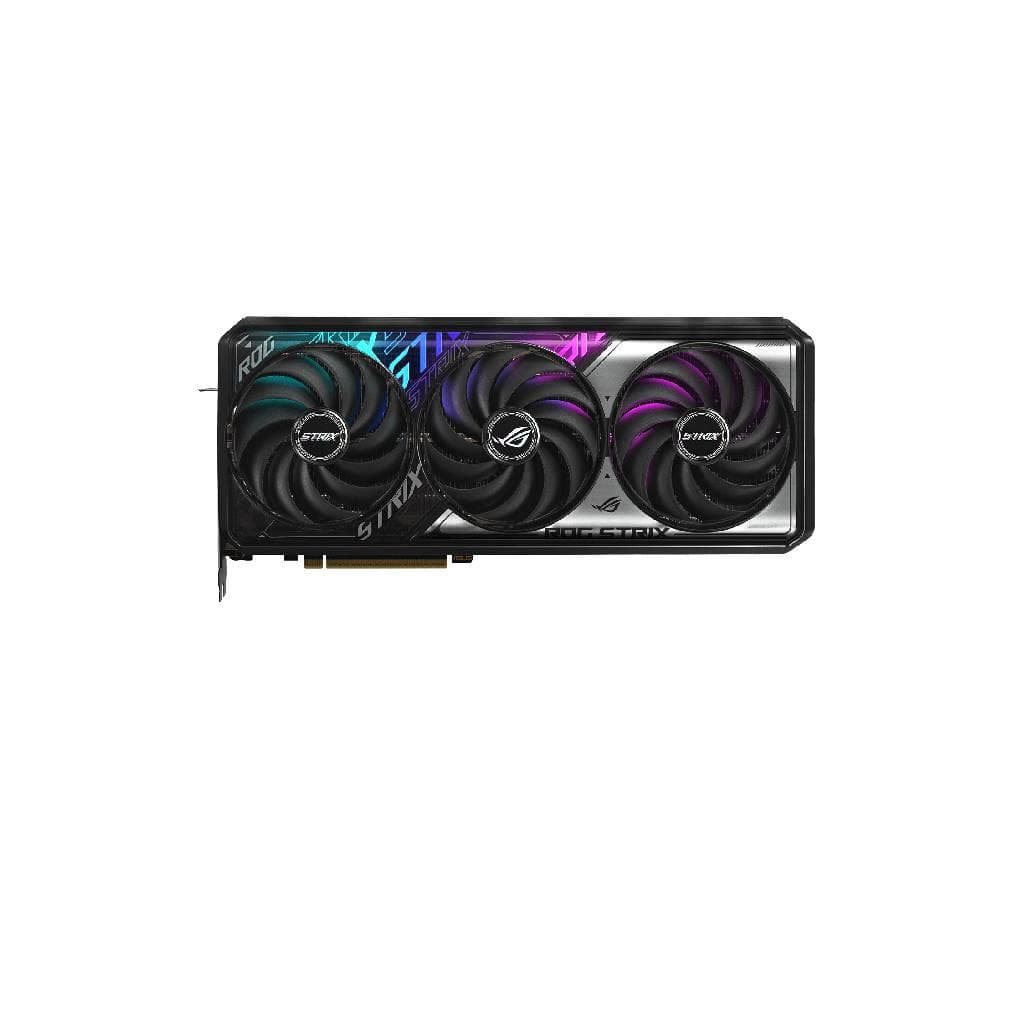

ASUS ROG Strix GeForce RTX™ 5070 Ti 16GB GDDR7 OC Edition
SKU: ROG-STRIX-RTX5070TI-O16G-GMPC Components › Graphics Cards
฿54,796
Price includes 7% VATPrice updated October 15, 2026
Out of stockManufacturer's warranty
Temporarily out of stock — ask us about the restock date or an alternative model
Call us 092-251-4017Send a question to salesGenuineFree delivery from ฿5,000Tax invoice
การ์ดจอระดับพรีเมียมจาก ASUS สำหรับเกมเมอร์และผู้สร้างเนื้อหา รองรับ DLSS 4 และ Ray Tracing แบบเต็มรูปแบบ ด้วยหน่วยความจำ GDDR7 16GB ความเร็ว 28 Gbps
Key features
- รองรับ DLSS 4 ด้วย AI 5th-gen Tensor Cores
- หน่วยความจำ GDDR7 16GB ความเร็ว 28 Gbps
- รองรับ Ray Tracing แบบเต็มรูปแบบ
- ระบบระบายความร้อน Axial-tech พร้อมพัดลม 3 ตัว
- รองรับ DisplayPort 2.1b และ HDMI 2.1b สำหรับการแสดงผลสูงสุด 4 จอ
Product description
ASUS ROG Strix GeForce RTX™ 5070 Ti 16GB GDDR7 OC Edition เป็นการ์ดจอระดับ flagship ที่ออกแบบมาเพื่อประสิทธิภาพสูงสุดในเกมและงานสร้างสรรค์ โดยใช้สถาปัตยกรรม NVIDIA Blackwell พร้อม CUDA Core 8,960 ตัว และเครื่องประมวลผล AI 1,406 TOPs เพื่อเร่งการเล่นเกมด้วย DLSS 4 ที่มี Multi Frame Generation และ Ray Reconstruction ที่เหนือชั้น ความเร็วของหน่วยความจำ GDDR7 สูงถึง 28 Gbps พร้อม interface 256-bit ทำให้สามารถจัดการข้อมูลได้อย่างรวดเร็ว รองรับการแสดงผลสูงสุด 4 จอพร้อมกันผ่าน HDMI 2.1b และ DisplayPort 2.1b ที่รองรับความละเอียดสูงสุด 7680 x 4320 พิกเซล พร้อมระบบระบายความร้อนแบบ ROG Axial-tech ที่ช่วยลดเสียงและเพิ่มประสิทธิภาพการระบายความร้อน
More features
- ใช้ PCIe 5.0 เพื่อแบนด์วิธีที่สูงขึ้น
- รองรับ NVIDIA Reflex 2 ลด latency ได้มากถึง 30%
- มี AURA SYNC RGB ควบคุมผ่านซอฟต์แวร์
- ออกแบบมาเพื่อใช้งานกับ PSU 850W ขึ้นไป
Pros and limitations
Pros
- รองรับเทคโนโลยี DLSS 4 ที่ใช้ AI เพื่อเพิ่ม FPS และลด latency
- หน่วยความจำ GDDR7 16GB ความเร็ว 28 Gbps จัดการข้อมูลได้รวดเร็ว
- ออกแบบมาเพื่อประสิทธิภาพสูงสุดด้วยระบบระบายความร้อน Axial-tech
- รองรับการแสดงผลสูงสุด 4 จอพร้อม DisplayPort 2.1b และ HDMI 2.1b
- ใช้ PCIe 5.0 สำหรับแบนด์วิธีที่สูงขึ้น
Limitations
- ไม่รองรับ NVLink หรือ Crossfire
- ต้องใช้ PSU 850W ขึ้นไป อาจต้องอัปเกรดแหล่งจ่ายไฟเดิม
- ขนาดใหญ่ 332 x 147.3 x 64 mm อาจไม่เหมาะกับเคสเล็ก
Who it is for
เหมาะสำหรับเกมเมอร์ระดับสูงและผู้ใช้งานงานกราฟิก เช่น ออกแบบ 3D, ตัดต่อวิดีโอ และทำงาน AI ที่ต้องการประสิทธิภาพสูงสุด
Specifications (26)
- ซอฟต์แวร์
- ASUS GPU Tweak III & MuseTree & GeForce Game Ready Driver & Studio Driver
- AURA SYNC
- ARGB
- Fan Count
- 3
- GPU Model
- NVIDIA GeForce RTX™ 5070 Ti
- อินเทอร์เฟซ
- Yes x 2 (Native HDMI 2.1b), Yes x 3 (Native DisplayPort 2.1b)
- CUDA Cores
- 8960
- ขนาด
- 332 x 147.3 x 64 mm
- ความละเอียด
- Digital Max Resolution 7680 x 4320
- Slot Width
- 3.2 Slot
- Accessories
- 1 x Speedsetup Manual, 1 x ROG Graphics Card Holder, 1 x ROG Velcro Hook & Loop, 1 x ROG Magnet, 1 x ROG PCB Ruler, 1 x Thank You Card, 1 x Power Cable (1 to 3)
- Architecture
- NVIDIA Blackwell
- Bus Standard
- PCI Express 5.0
- Engine Clock
- OC mode: 2625MHz, Default mode: 2602MHz (Boost Clock)
- HDCP Support
- รองรับ (2.3)
- ความเร็วหน่วยความจำ
- 28 Gbps
- Video Memory
- 16GB GDDR7
- AI Performance
- 1406 TOPs
- ระบบระบายความร้อน
- ROG Axial-tech Fans
- Max Resolution
- 7680 x 4320
- OpenGL Support
- OpenGL® 4.6
- Recommended PSU
- 850W
- Memory Interface
- 256-bit
- ขั้วต่อไฟ
- 1 x 16-pin
- Dimensions (inches)
- 13.07 x 5.79 x 2.519 inch
- Maximum Display Support
- 4
- NVLink / Crossfire Support
- ไม่รองรับ
Datasheets and manuals straight from the manufacturer — select a document to open or download it.
13 questions
Frequently asked questions about this product
Compiled from manufacturer information
การ์ดจอรุ่นนี้ใช้ PSU เท่าไหร่ได้บ้าง?
แนะนำให้ใช้ PSU 850W ขึ้นไป โดยเฉพาะในโหมด OC หรือระบบ CPU + GPU โอเวอร์คล็อกเต็มรูปแบบ แม้จะระบุว่า 850W เป็นค่าแนะนำ แต่ควรตรวจสอบความจุของ PSU จริงในเคส
รองรับการเชื่อมจอ 4 จอพร้อมกันได้ไหม?
ใช่ รองรับการแสดงผลสูงสุด 4 จอพร้อมกันผ่านพอร์ต HDMI 2.1b และ DisplayPort 2.1b ที่มีอยู่ 2 และ 3 พอร์ตตามลำดับ
ใช้ PCIe 5.0 ได้ไหม?
ใช่ รองรับ Bus Standard PCI Express 5.0 ทำให้สามารถส่งข้อมูลได้เร็วขึ้นอย่างมากเมื่อใช้งานกับเมนบอร์ดที่รองรับ PCIe 5.0
มีระบบระบายความร้อนแบบไหน?
ใช้ระบบระบายความร้อน Axial-tech พร้อมพัดลม 3 ตัว ออกแบบมาเพื่อเพิ่มประสิทธิภาพการระบายความร้อนและลดเสียงรบกวน
รองรับ DLSS 4 ได้หรือไม่?
ใช่ รองรับ DLSS 4 ที่ใช้ AI เพื่อเพิ่ม FPS และปรับปรุงคุณภาพภาพ โดยเฉพาะในเกมที่ใช้ Ray Tracing สูง
ต้องใช้ซอฟต์แวร์อะไรบ้าง?
ต้องดาวน์โหลดและติดตั้ง ASUS GPU Tweak III, MuseTree, GeForce Game Ready Driver และ Studio Driver จากเว็บไซต์สนับสนุนของ ASUS เพื่อควบคุมประสิทธิภาพและโหมดการใช้งาน
มีช่องเสียบสายไฟกี่ช่อง?
มีเพียง 1 ช่องเสียบสายไฟ 16-pin สำหรับจ่ายไฟจาก PSU โดยต้องใช้สายที่รองรับ 16-pin หรือแปลงจากสองสาย 8-pin
ขนาดของการ์ดจอใหญ่แค่ไหน?
มีขนาด 332 มม. กว้าง x 147.3 มม. สูง x 64 มม. ความหนา 64 มม. จึงเหมาะกับเคสขนาดใหญ่หรือเคสแบบ Full Tower
Is it in stock?
The ASUS ROG Strix GeForce RTX™ 5070 Ti 16GB GDDR7 OC Edition is temporarily out of stock. Ask us about the restock date or an alternative model at sales@gist.co.th or 092-251-4017.
How much does it cost?
The price is ฿54,796 (including 7% VAT). It is currently out of stock; ask us about the restock date at sales@gist.co.th. Business customers can request a quotation at sales@gist.co.th.
How long is the warranty?
The warranty follows the manufacturer's terms for each model; ask our sales team for the warranty period of this model. To make a warranty claim, call 092-251-4017 or 065-523-5262, or email sales@gist.co.th (Mon–Fri 9:00–18:00), then send the product with your order number to our head office, or bring it to the head office in person.
How long does delivery take?
Orders placed before 12:00 on a business day are delivered within 1–3 business days (Bangkok and vicinity) or 2–5 business days (other provinces). Free delivery on orders of ฿5,000 or more (a ฿150 delivery fee applies below this amount).
Is it genuine?
Genuine products sourced from distributors in Thailand, covered by the manufacturer's warranty. Full tax invoices are available.
Didn't find the answer you need?
Loading reviews…
Genuine products
Sourced from distributors in Thailand and covered by the manufacturer's warranty
Warranty period
According to the manufacturer's terms for each model
Covered by the manufacturer's warranty; you can make claims through GIST
Claims through GIST
Ship the product to our head office or bring it in person
Warranty conditions
- A receipt or other proof of purchase is required
- The product must not have been modified or altered
- Damage caused by misuse is not covered by the warranty
- To make a warranty claim, call 092-251-4017 or 065-523-5262, or email sales@gist.co.th (Mon–Fri 9:00–18:00), then send the product with your order number to our head office, or bring it to the head office in person.Head office: 554 Sky Nine Center, Floor 12A, Room 554/62, Asok-Din Daeng Road, Din Daeng Subdistrict, Din Daeng District, Bangkok 10400
More in Graphics Cards