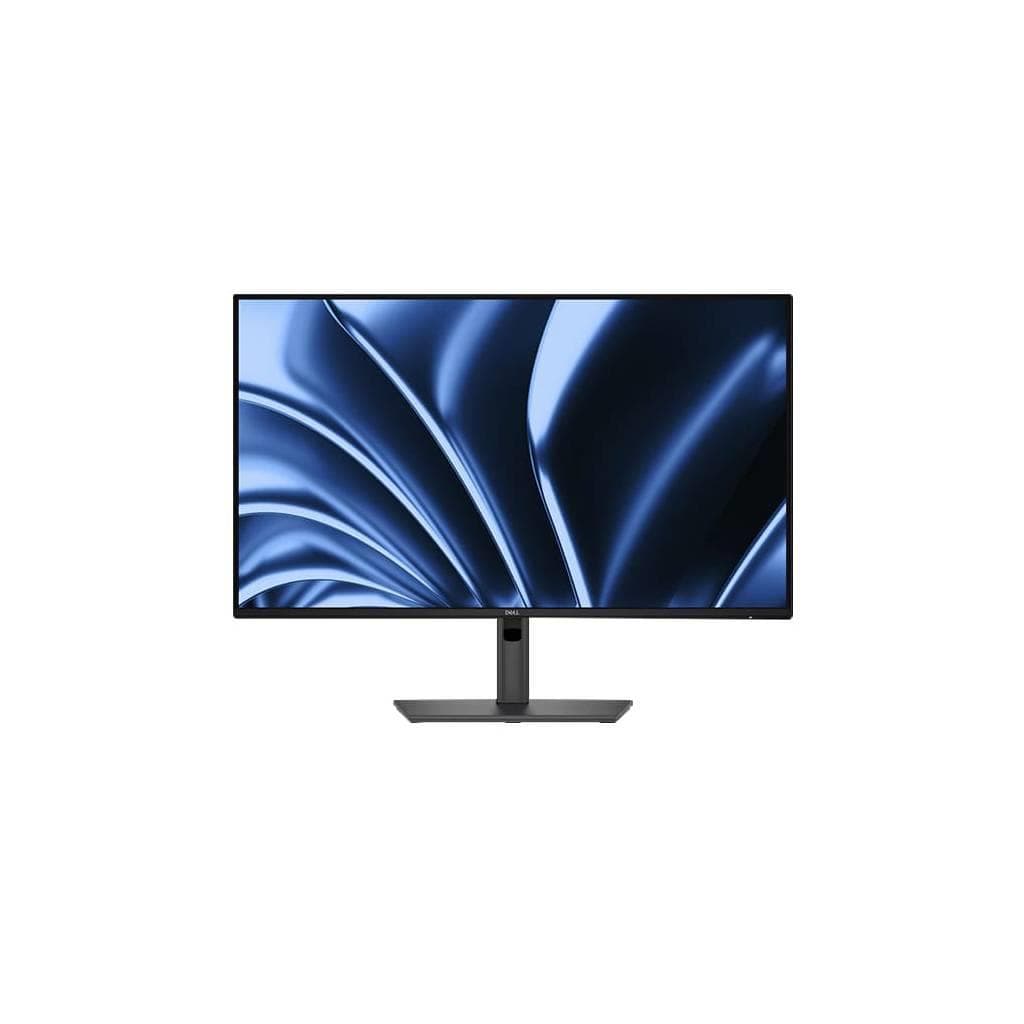


DELL P2425E 24" USB-C Hub Monitor - 1920 x 1200 WUXGA IPS 16:10
SKU: SNSP2425EDisplays & Projectors › Business Monitors· Model: P2425E
Please enquire before ordering
The distributor has not yet confirmed the latest price and availability (last checked Jul 2, 2026)
092-251-4017Awaiting stock confirmation3 years manufacturer's warranty
GenuineFree delivery from ฿5,000Tax invoice
จอภาพ Dell P2425E ขนาด 24 นิ้ว พร้อมพอร์ต USB-C Hub รองรับการชาร์จไฟสูงสุด 90W และเชื่อมต่อได้หลากหลาย ใช้งานสำนักงานหรือทำงานจากที่บ้านได้อย่างมีประสิทธิภาพ
Key features
- รองรับการชาร์จไฟผ่าน USB-C สูงสุด 90W
- เชื่อมต่อ HDMI, DP และ Ethernet ในตัวจอ
- ความละเอียด WUXGA (1920 x 1200) อัตราส่วน 16:10
- เทคโนโลยี IPS ให้มุมมองกว้างและสีสันแม่นยำ
- รองรับการปรับระดับจอได้ทั้งความสูง โน้ม หมุน และหมุนแนวตั้ง
Product description
จอภาพ Dell P2425E ขนาด 24.07 นิ้ว ใช้เทคโนโลยี IPS ให้สีสันสดใสและมุมมองกว้าง เหมาะสำหรับการทำงานที่ต้องการความแม่นยำของสีและการมองเห็นระยะไกล โดยมีความละเอียด WUXGA (1920 x 1200) ในอัตราส่วน 16:10 ช่วยเพิ่มพื้นที่แสดงผลมากกว่าจอ Full HD ทั่วไปถึง 12% ทำให้เห็นข้อมูลได้ครบในหน้าเดียว พร้อมรองรับการเชื่อมต่อ HDMI, DisplayPort และ USB-C แบบรวมศูนย์ในตัวจอ โดยเฉพาะพอร์ต USB-C ที่สามารถส่งสัญญาณวิดีโอและชาร์จไฟได้สูงสุด 90W ช่วยลดจำนวนสายไฟและเพิ่มความเรียบร้อยบนโต๊ะทำงาน
More features
- ได้รับการรับรอง TÜV สำหรับ Eye Comfort 4 ดาว
- มีพอร์ต USB 3.2 Gen1 ทั้งหมด 4 ช่อง
- รองรับ Ethernet 1GbE ในตัวจอ
- ใช้งานได้กับโน้ตบุ๊กที่มี USB-C เช่น MacBook, Dell XPS, และ Windows 10/11
- ออกแบบมาเพื่อเพิ่มประสิทธิภาพการทำงานในสำนักงาน
Pros and limitations
Pros
- ชาร์จไฟได้สูงสุด 90W ผ่าน USB-C ลดความยุ่งเหยิงของสายไฟ
- มีพอร์ต Ethernet ในตัวจอ ใช้งานได้ทันทีโดยไม่ต้องเสียบสาย LAN แยก
- รองรับการปรับจอได้ทั้งความสูง โน้ม หมุน และหมุนแนวตั้ง ใช้งานได้หลากหลายมุมมอง
- ความละเอียด WUXGA (1920 x 1200) อัตราส่วน 16:10 เพิ่มพื้นที่แสดงผลมากกว่าจอ Full HD
- เทคโนโลยี IPS ให้มุมมองกว้างและสีสันแม่นยำ ใช้งานได้ยาวนานโดยไม่เมื่อยตา
Limitations
- ไม่มีลำโพงในตัวจอ
- ไม่รองรับ HDR
- ต้องใช้สาย DP หรือ HDMI เพื่อเชื่อมต่อจอหลัก (ไม่มีพอร์ต DisplayPort แบบแยก)
Who it is for
เหมาะสำหรับพนักงานออฟฟิศ นักออกแบบ หรือผู้ใช้งานที่ต้องการจอภาพพร้อมพอร์ตเชื่อมต่อครบครัน ใช้กับโน้ตบุ๊กที่มี USB-C เพื่อชาร์จไฟและส่งสัญญาณวิดีโอผ่านสายเดียว
Connectivity
HDMI, DisplayPort, RJ45, USB-C
Specifications (21)
- HDR
- ไม่รองรับ
- ลำโพง
- ไม่มี
- การติดตั้ง VESA
- 100 x 100 mm
- ขอบเขตสี
- sRGB 99%
- ระยะห่างพิกเซล
- 0.276 mm
- อัตราส่วนภาพ
- 16:10
- ขนาด
- 578.9 x 438.5 x 195.5 mm
- การปรับตั้ง
- Height, Tilt, Swivel, Pivot
- แรงดันไฟฟ้าขาเข้า
- 100-240 V AC, 50/60 Hz
- มุมมองภาพ
- 178° (H) / 178° (V)
- อัตราส่วนคอนทราสต์
- 1000:1
- พอร์ต
- 1x HDMI 1.4 (HDCP 1.4), 1x DP 1.4 (HDCP 1.4), 1x DP-out (1.4) with MST(HDCP 1.4), 1x RJ45 Ethernet port, 1x USB 3.2 Gen1 Type-C upstream (Alt. mode with DP1.4) with up to 90W PD, 3x USB 3.2 Gen1 Type-A downstream, 1x USB 3.2 Gen1 Type-C downstream with up to 15W PD
- ประเภทจอ
- In-Plane Switching (IPS) technology
- การใช้พลังงาน
- 35 W (typical)
- ขนาดหน้าจอ
- 24.07"
- น้ำหนัก
- 6.2 kg
- ความสว่าง
- 300 cd/m²
- อัตราการรีเฟรช
- 60 Hz
- ความละเอียด
- 1920 x 1200
- เวลาตอบสนอง
- 5 ms
- การรับประกัน
- 3 ปี
Datasheets and manuals straight from the manufacturer — select a document to open or download it.
13 questions
Frequently asked questions about this product
Compiled from manufacturer information
จอ P2425E ชาร์จไฟให้โน้ตบุ๊กได้สูงสุดกี่วัตต์?
จอ Dell P2425E รองรับการชาร์จไฟผ่านพอร์ต USB-C ได้สูงสุด 90W ซึ่งเพียงพอสำหรับโน้ตบุ๊กหลายรุ่น เช่น MacBook Pro, Dell XPS และ Windows 10/11 ที่ใช้พอร์ต USB-C ชาร์จไฟ
จอ P2425E รองรับการเชื่อมต่อ Ethernet ได้ไหม?
ใช่ จอ P2425E มีพอร์ต RJ45 Ethernet port ความเร็ว 1GbE ในตัว ช่วยให้คุณเชื่อมต่ออินเทอร์เน็ตผ่านสาย LAN โดยไม่ต้องเสียบสายแยกจากโน้ตบุ๊ก
จอ P2425E ใช้กับ MacBook ได้ไหม?
ได้แน่นอน จอ P2425E รองรับการเชื่อมต่อผ่าน USB-C และสามารถชาร์จไฟให้ MacBook ได้สูงสุด 90W ทำให้ใช้งานได้ทันทีโดยไม่ต้องพกอะแดปเตอร์เพิ่ม
จอ P2425E มีลำโพงไหม?
ไม่มีลำโพงในตัวจอ แต่คุณสามารถเชื่อมต่อลำโพงหรือหูฟังผ่านพอร์ต Audio Line-out (mini-jack) ที่มีอยู่
จอ P2425E รองรับการหมุนแนวตั้งได้ไหม?
ใช่ จอ P2425E รองรับการปรับจอได้ทั้งความสูง โน้ม หมุน และหมุนแนวตั้ง (Pivot) ทำให้เหมาะกับการใช้งานในหลายมุมมอง เช่น อ่านเอกสารแนวนอนหรือแนวตั้ง
จอ P2425E ใช้พลังงานเท่าไร?
จอ P2425E มีการใช้พลังงานเฉลี่ยประมาณ 35W และรองรับไฟฟ้า 100-240 V AC ทำให้ใช้งานได้ทั่วโลกโดยไม่ต้องเปลี่ยนอะแดปเตอร์
จอ P2425E ใช้กับโน้ตบุ๊กที่ไม่มี USB-C ได้ไหม?
ไม่สามารถใช้งานได้โดยตรง เนื่องจากพอร์ตหลักคือ USB-C หากโน้ตบุ๊กของคุณไม่มีพอร์ตนี้ จำเป็นต้องใช้อแดปเตอร์แปลง เช่น USB-C to HDMI/DP
จอ P2425E รองรับการเชื่อมต่อหลายหน้าจอได้ไหม?
ใช่ โดยสามารถเชื่อมต่อผ่านพอร์ต DP-out (1.4) ที่รองรับ MST (Multi-Stream Transport) เพื่อขยายหน้าจอไปยังจออีกเครื่องได้
Is it in stock?
We are confirming the latest stock and price of the DELL P2425E 24" USB-C Hub Monitor - 1920 x 1200 WUXGA IPS 16:10 with the distributor. Please contact us before ordering at 092-251-4017 or sales@gist.co.th.
How much does it cost?
The distributor has not yet confirmed the latest price and availability. Please contact us before ordering at 092-251-4017 or sales@gist.co.th.
How long is the warranty?
Warranty period: 3 ปี (manufacturer's terms). To make a warranty claim, call 092-251-4017 or 065-523-5262, or email sales@gist.co.th (Mon–Fri 9:00–18:00), then send the product with your order number to our head office, or bring it to the head office in person.
How long does delivery take?
Orders placed before 12:00 on a business day are delivered within 1–3 business days (Bangkok and vicinity) or 2–5 business days (other provinces). Free delivery on orders of ฿5,000 or more (a ฿150 delivery fee applies below this amount).
Is it genuine?
Genuine products sourced from distributors in Thailand, covered by the manufacturer's warranty. Full tax invoices are available.
Didn't find the answer you need?
Loading reviews…
Genuine products
Sourced from distributors in Thailand and covered by the manufacturer's warranty
Warranty period
3 ปี
Covered by the manufacturer's warranty; you can make claims through GIST
Claims through GIST
Ship the product to our head office or bring it in person
Warranty conditions
- A receipt or other proof of purchase is required
- The product must not have been modified or altered
- Damage caused by misuse is not covered by the warranty
- To make a warranty claim, call 092-251-4017 or 065-523-5262, or email sales@gist.co.th (Mon–Fri 9:00–18:00), then send the product with your order number to our head office, or bring it to the head office in person.Head office: 554 Sky Nine Center, Floor 12A, Room 554/62, Asok-Din Daeng Road, Din Daeng Subdistrict, Din Daeng District, Bangkok 10400
More in Business Monitors