


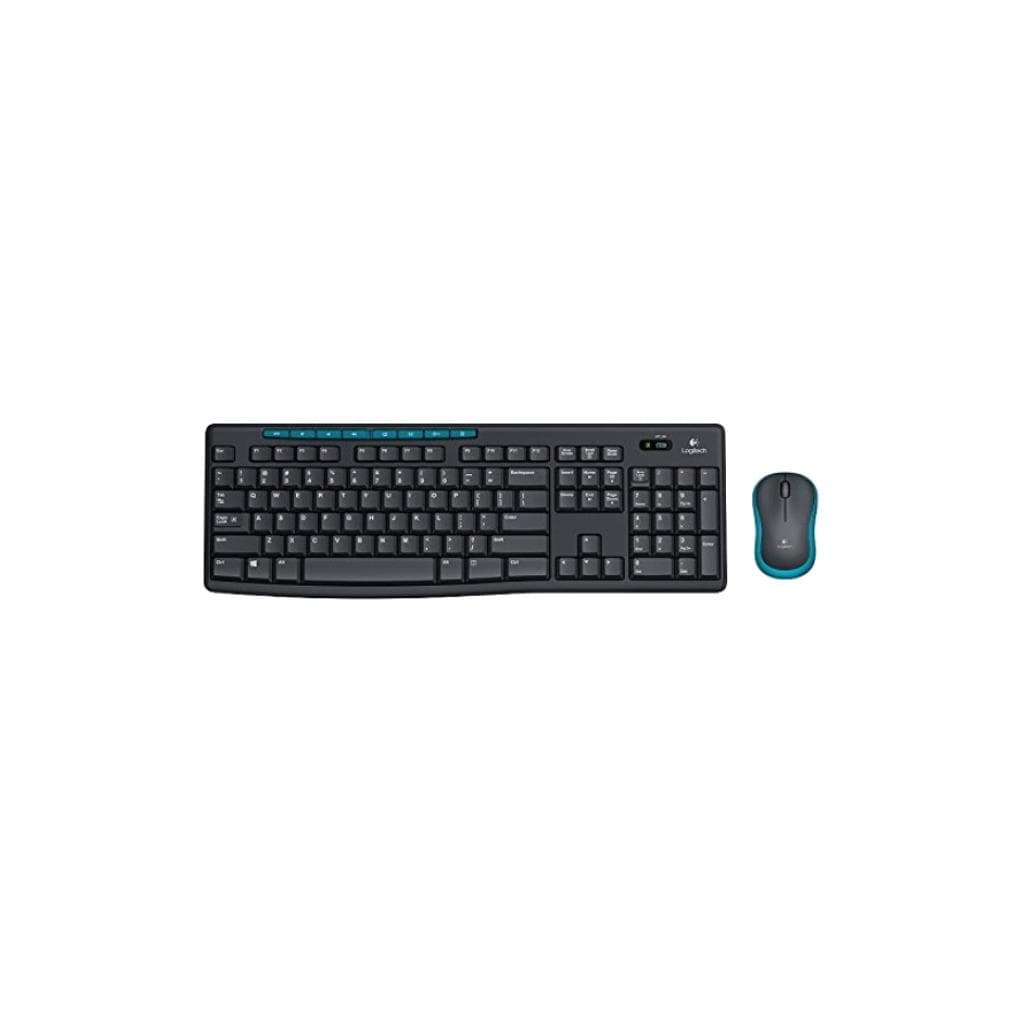
Logitech MK200 Media Keyboard & Mouse Combo (Black) - Full-Sized with 8 Media Keys
SKU: MEDIA_DESKTOP_MK200Gadgets & Accessories › Keyboards· Model: MK200
฿455
Price includes 7% VATPrice updated November 1, 2026
In stockManufacturer's warranty
For orders placed before 12:00 on a business day; weekends excluded
GenuineFree delivery from ฿5,000Tax invoice
ชุดคีย์บอร์ดและเมาส์ไร้สาย Logitech MK200 รุ่นดำ พร้อมปุ่มลัด 8 ปุ่มสำหรับควบคุมมัลติมีเดีย ใช้งานง่ายด้วยการเสียบ USB เพียงครั้งเดียว เหมาะสำหรับพนักงานออฟฟิศและผู้ใช้งานทั่วไป
Key features
- คีย์บอร์ดเต็มรูปแบบพร้อมพิมพ์ตัวเลข
- ปุ่มลัด 8 ปุ่มควบคุมมัลติมีเดีย
- เมาส์ ambidextrous ใช้ได้ทั้งมือซ้าย-ขวา
- รองรับการใช้งานแบบ Plug & Play ไม่ต้องติดตั้งไดรเวอร์
- คีย์บอร์ดกันน้ำหยด (spill-resistant)
Product description
ชุดคีย์บอร์ดและเมาส์ Logitech MK200 มาพร้อมการออกแบบที่เน้นความสะดวกสบายในการใช้งานทุกวัน โดยคีย์บอร์ดแบบเต็มรูปแบบ (full-sized) พร้อมพื้นที่พิมพ์ตัวเลข (number pad) ช่วยให้การป้อนข้อมูลรวดเร็วและแม่นยำ พร้อมปุ่มลัด 8 ปุ่มสำหรับควบคุมเสียง หน้าเว็บเบราว์เซอร์ และแอปพลิเคชันต่างๆ เพียงกดปุ่มเดียว ไม่ต้องสลับหน้าจอหรือใช้เมาส์บ่อยครั้ง เมาส์แบบ ambidextrous ออกแบบให้เหมาะกับทั้งมือซ้ายและมือขวา มีรูปร่างโค้งมนรองรับฝ่ามืออย่างสบาย พร้อมการควบคุมที่แม่นยำและลื่นไหล ทั้งสองอุปกรณ์ใช้งานได้ทันทีหลังเสียบเข้ากับพอร์ต USB โดยไม่ต้องติดตั้งไดรเวอร์หรือซอฟต์แวร์เพิ่มเติม คีย์บอร์ดยังมาพร้อมระบบกันน้ำหยด (spill-resistant) และขาตั้งปรับระดับได้ เพื่อความทนทานและใช้งานได้นาน
More features
- ขาตั้งปรับระดับได้ ช่วยลดอาการเมื่อยล้า
- รูปลักษณ์เรียบหรู สีดำคลาสสิก
- ใช้งานได้ทันทีหลังเสียบ USB
- เหมาะสำหรับออฟฟิศและงานประจำวัน
- ออกแบบเพื่อความทนทานและใช้งานยาวนาน
Pros and limitations
Pros
- คีย์บอร์ดเต็มรูปแบบพร้อมพิมพ์ตัวเลข ใช้งานสะดวกสำหรับงานเขียนและบันทึกข้อมูล
- ปุ่มลัด 8 ปุ่มควบคุมมัลติมีเดียได้ทันที ช่วยเพิ่มประสิทธิภาพการทำงาน
- เมาส์ ambidextrous ใช้งานได้ทั้งมือซ้ายและมือขวา รองรับผู้ใช้ทุกคน
- ออกแบบกันน้ำหยด ทนทานต่อการหกของเหลว
- ขาตั้งปรับระดับได้ ช่วยลดอาการเมื่อยล้าขณะพิมพ์งานเป็นเวลานาน
Limitations
- ไม่รองรับการเชื่อมต่อไร้สาย (USB wired เท่านั้น)
- ไม่มีไฟ LED หรือฟังก์ชันแสงส่องสว่าง
- ไม่รองรับซอฟต์แวร์ Logitech Options ปัจจุบัน (ต้องใช้ Logi Options+)
Who it is for
เหมาะสำหรับพนักงานออฟฟิศ นักเรียน หรือผู้ใช้งานทั่วไปที่ต้องการชุดคีย์บอร์ดและเมาส์ที่ใช้งานง่าย รองรับการป้อนข้อมูลเร็ว และควบคุมมัลติมีเดียได้สะดวก
Color
Black
Connectivity
USB
Specifications (25)
- สี
- Black
- การรับประกัน
- Limited warranty available
- การเชื่อมต่อ
- USB Wired
- Media Keys
- 8 keys (Volume, Play/Pause, Next/Previous Track, Browser, Mute)
- Mouse Type
- Ambidextrous
- ความยาวสาย
- 1.5 m (keyboard and mouse)
- Palm Support
- Curved palm support design
- Polling Rate
- 1,000 Hz (keyboard and mouse)
- แหล่งพลังงาน
- USB-powered
- ความเข้ากันได้
- Windows, macOS
- Keyboard Type
- Full-Sized with Number Pad
- เวลาตอบสนอง
- Typical response time under 1 ms
- การรับรอง
- CE, FCC, RoHS
- Key Durability
- Durable keys
- Mouse Tracking
- Smooth tracking
- Weight (Mouse)
- 95 g
- Carbon Footprint
- 6.36 kg CO2e
- Software Support
- Logi Options+ recommended for customization
- Spill Resistance
- รองรับ
- Weight (Keyboard)
- 670 g
- Dimensions (Mouse)
- 109 x 67 x 37 mm
- อุปกรณ์ในกล่อง
- Keyboard, Mouse, USB cable
- Dimensions (Keyboard)
- 480 x 135 x 25 mm
- Keyboard Height Adjustment
- Adjustable tilt legs
- ระบบปฏิบัติการที่รองรับ
- Windows 7 or later, macOS 10.10 or later
Datasheets and manuals straight from the manufacturer — select a document to open or download it.
13 questions
Frequently asked questions about this product
Compiled from manufacturer information
MK200 รองรับ macOS ได้ไหม?
ใช่ ชุดคีย์บอร์ดและเมาส์ Logitech MK200 รองรับระบบปฏิบัติการ macOS 10.10 ขึ้นไป โดยสามารถใช้งานได้ทันทีหลังเสียบ USB โดยไม่ต้องติดตั้งไดรเวอร์เพิ่มเติม
ปุ่มลัด 8 ปุ่มบน MK200 ทำอะไรได้บ้าง?
ปุ่มลัด 8 ปุ่ม ได้แก่ ควบคุมเสียง (Volume Up/Down/Mute), เล่น/หยุดเพลง (Play/Pause), เลื่อนไปหน้าถัดไป/ย้อนกลับ (Next/Previous Track), เปิดเบราว์เซอร์ และเข้าสู่แอปพลิเคชันโปรด ใช้งานได้ทันทีโดยไม่ต้องตั้งค่าเพิ่ม
เมาส์ MK200 ใช้ได้กับมือซ้ายไหม?
ใช่ เมาส์ Logitech MK200 เป็นแบบ ambidextrous ออกแบบให้ใช้งานได้ทั้งมือซ้ายและมือขวา โดยมีรูปร่างโค้งมนรองรับฝ่ามืออย่างสบาย ไม่ต้องกังวลเรื่องการจับถนัดมือ
คีย์บอร์ด MK200 กันน้ำได้ไหม?
ใช่ คีย์บอร์ด Logitech MK200 มาพร้อมระบบกันน้ำหยด (spill-resistant) ช่วยป้องกันความเสียหายจากน้ำหรือของเหลวหกเลอะ โดยเฉพาะในสภาพแวดล้อมออฟฟิศที่มีการดื่มเครื่องดื่มใกล้เครื่องคอมพิวเตอร์
MK200 ต้องใช้ซอฟต์แวร์เพิ่มไหม?
ไม่จำเป็น ชุดนี้ใช้งานได้ทันทีหลังเสียบ USB โดยไม่ต้องติดตั้งไดรเวอร์หรือซอฟต์แวร์ใดๆ อย่างไรก็ตาม หากต้องการปรับแต่งปุ่มลัดเพิ่มเติม แนะนำให้ใช้ Logi Options+
ระยะสาย USB ของ MK200 กี่เมตร?
สาย USB ยาว 1.5 เมตร สำหรับทั้งคีย์บอร์ดและเมาส์ ช่วยให้สามารถวางอุปกรณ์ได้อย่างยืดหยุ่นในโต๊ะทำงาน
MK200 ใช้พลังงานจากไหน?
อุปกรณ์ทั้งหมดใช้พลังงานจากพอร์ต USB โดยตรง ไม่ต้องใช้แบตเตอรี่หรือสายชาร์จเพิ่มเติม ประหยัดและสะดวกในการใช้งาน
สามารถปรับระดับความสูงของคีย์บอร์ดได้ไหม?
ใช่ คีย์บอร์ด Logitech MK200 มาพร้อมขาตั้งปรับระดับได้ 2 ระดับ เพื่อให้พิมพ์งานได้อย่างสบาย ลดอาการเมื่อยล้าของข้อมือและข้อศอก
Is it in stock?
The Logitech MK200 Media Keyboard & Mouse Combo (Black) - Full-Sized with 8 Media Keys is in stock and ready to ship. Orders placed before 12:00 on a business day are delivered within 1–3 business days (Bangkok and vicinity) or 2–5 business days (other provinces). Order online at store.gist.co.th or contact our sales team at 092-251-4017.
How much does it cost?
The price is ฿455 (including 7% VAT). It is in stock and ready to ship. Business customers can request a quotation at sales@gist.co.th.
How long is the warranty?
Warranty period: รับประกันตามเงื่อนไขผู้ผลิต (manufacturer's terms). To make a warranty claim, call 092-251-4017 or 065-523-5262, or email sales@gist.co.th (Mon–Fri 9:00–18:00), then send the product with your order number to our head office, or bring it to the head office in person.
How long does delivery take?
Orders placed before 12:00 on a business day are delivered within 1–3 business days (Bangkok and vicinity) or 2–5 business days (other provinces). Free delivery on orders of ฿5,000 or more (a ฿150 delivery fee applies below this amount).
Is it genuine?
Genuine products sourced from distributors in Thailand, covered by the manufacturer's warranty. Full tax invoices are available.
Didn't find the answer you need?
Loading reviews…
Genuine products
Sourced from distributors in Thailand and covered by the manufacturer's warranty
Warranty period
รับประกันตามเงื่อนไขผู้ผลิต
Covered by the manufacturer's warranty; you can make claims through GIST
Claims through GIST
Ship the product to our head office or bring it in person
Warranty conditions
- A receipt or other proof of purchase is required
- The product must not have been modified or altered
- Damage caused by misuse is not covered by the warranty
- To make a warranty claim, call 092-251-4017 or 065-523-5262, or email sales@gist.co.th (Mon–Fri 9:00–18:00), then send the product with your order number to our head office, or bring it to the head office in person.Head office: 554 Sky Nine Center, Floor 12A, Room 554/62, Asok-Din Daeng Road, Din Daeng Subdistrict, Din Daeng District, Bangkok 10400
More in Keyboards
Price
฿455