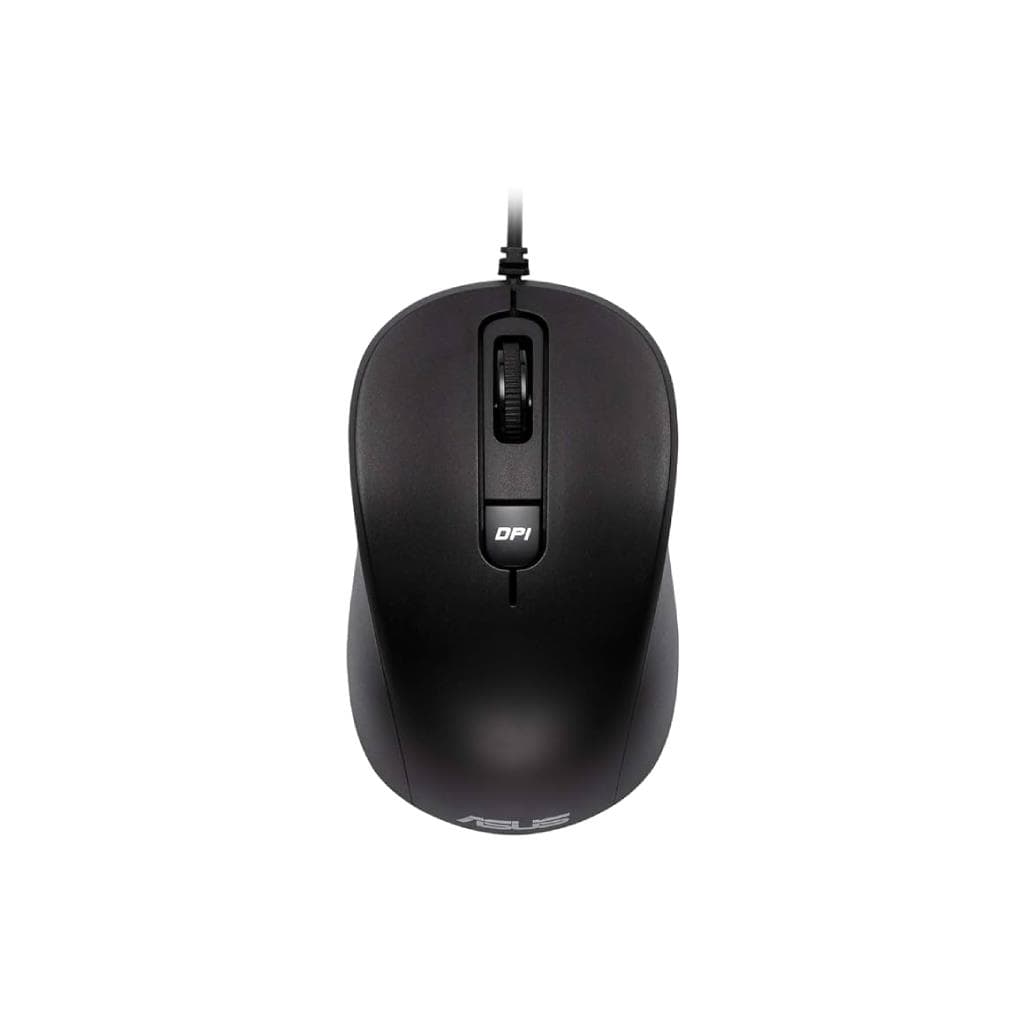

ASUS MU101C Wired Blue Ray Mouse Black (3200dpi) - Silent Click
SKU: MU101CComputers › Computer Parts & Options
Please enquire before ordering
The distributor has not yet confirmed the latest price and availability (last checked Jun 15, 2026)
092-251-4017Awaiting stock confirmationManufacturer's warranty
GenuineFree delivery from ฿5,000Tax invoice
เมาส์ไร้สาย ASUS MU101C สีดำ ใช้งานได้ทั้งมือซ้ายและมือขวา พร้อมเซ็นเซอร์ Blue Ray ตรวจจับการเคลื่อนไหวแม้บนพื้นผิวหลากหลาย เช่น ไม้ พลาสติก และผ้า
Key features
- สวิตช์คลิกไร้เสียง ลดเสียงเหลือเพียง 20dB
- เซ็นเซอร์ Blue Ray ตรวจจับการเคลื่อนไหวแม้บนพื้นผิวหลากหลาย
- รองรับ DPI 4 ระดับ: 1000 / 1600 / 2400 / 3200 dpi
- ออกแบบมาให้ใช้งานได้ทั้งมือซ้ายและมือขวา
- สายยาว 1.5 เมตร ใช้งานได้หลากหลายสถานการณ์
Product description
เมาส์ ASUS MU101C สีดำ ออกแบบมาเพื่อใช้งานในสภาพแวดล้อมที่ต้องการความเงียบ เช่น ห้องสมุด ห้องประชุม หรือออฟฟิศ โดยมีสวิตช์คลิกไร้เสียงที่ลดระดับเสียงลงเหลือเพียง 20dB เท่านั้น ทำให้ไม่รบกวนผู้อื่น พร้อมอายุการใช้งานสวิตช์ถึง 10,000K ครั้ง และเซ็นเซอร์ Blue Ray ที่สามารถติดตามการเคลื่อนไหวได้แม่นยำบนพื้นผิวหลายประเภท ไม่ว่าจะเป็นไม้ พลาสติก หรือแม้แต่ขาเสื้อผ้า โดยไม่จำเป็นต้องใช้แผ่นรองเมาส์
Pros and limitations
Pros
- สวิตช์คลิกเงียบ 20dB เหมาะกับพื้นที่ต้องการความเงียบ
- เซ็นเซอร์ Blue Ray ติดตามการเคลื่อนไหวแม่นยำบนพื้นผิวหลากหลาย
- รองรับ DPI สูงสุด 3200 ใช้งานได้ทั้งงานและเล่นเกม
- ออกแบบมาให้ใช้งานได้ทั้งมือซ้ายและมือขวา
- สายยาว 1.5 เมตร ใช้งานได้หลากหลายสถานการณ์
Limitations
- ไม่รองรับการชาร์จหรือไร้สาย
- น้ำหนัก 85 กรัม อาจรู้สึกหนักสำหรับบางคน
Who it is for
เหมาะสำหรับผู้ใช้งานที่ต้องการเมาส์เงียบในสภาพแวดล้อมทำงานร่วมกัน เช่น ห้องประชุม ห้องสมุด หรือออฟฟิศ พร้อมความแม่นยำสูงบนพื้นผิวหลากหลาย
Specifications (18)
- สี
- Black
- Shape
- Ambidextrous
- น้ำหนัก
- 85 g
- Tracking
- Optical
- DPI Switch
- 1000/1600/2400/3200
- ขนาด
- 96.6(L) x 57.7(W) x 38.0(H) mm
- ความละเอียด
- 3200dpi
- Default DPI
- 1600
- Sensor Type
- Blue Ray
- ความยาวสาย
- 150 cm
- การเชื่อมต่อ
- Wired
- Cable Durability
- Up to 1,000 times cord bending test
- Click Noise Level
- 20dB
- Operating Systems
- Windows® 11, Windows® 10, Chrome OS
- Switch Life Cycle
- Up to 10,000K clicks
- Symmetrical Design
- รองรับ
- อุปกรณ์ในกล่อง
- Warranty Booklet, Quick Start Guide, Mouse
- Surface Compatibility
- Wood, plastic, fabric, and other surfaces
Datasheets and manuals straight from the manufacturer — select a document to open or download it.
13 questions
Frequently asked questions about this product
Compiled from manufacturer information
เมาส์รุ่น MU101C รองรับพื้นผิวอะไรได้บ้าง?
เมาส์ ASUS MU101C รองรับการใช้งานบนพื้นผิวหลากหลาย เช่น ไม้ พลาสติก ผ้า และแม้แต่ขาเสื้อผ้า โดยใช้เซ็นเซอร์ Blue Ray ที่ตรวจจับการเคลื่อนไหวได้อย่างแม่นยำโดยไม่จำเป็นต้องใช้แผ่นรองเมาส์
สามารถเปลี่ยน DPI ได้กี่ระดับ?
สามารถเปลี่ยน DPI ได้ 4 ระดับ คือ 1000, 1600, 2400 และ 3200 dpi โดยเริ่มต้นที่ 1600 dpi พร้อมปุ่มสลับ DPI บนตัวเมาส์
เมาส์รุ่นนี้เหมาะกับการใช้งานในห้องสมุดหรือห้องประชุมไหม?
ใช่ เมาส์รุ่นนี้มีสวิตช์คลิกไร้เสียงที่ลดระดับเสียงเหลือเพียง 20dB ทำให้ไม่รบกวนผู้อื่น จึงเหมาะอย่างยิ่งสำหรับใช้งานในห้องสมุด ห้องประชุม หรือพื้นที่ต้องการความเงียบ
สายยาวเท่าไร และทนทานแค่ไหน?
สายยาว 150 ซม. รองรับการพับซ้ำได้ถึง 1,000 ครั้งโดยไม่เสียหาย จึงเหมาะกับการใช้งานในทุกสภาพแวดล้อม
รองรับระบบปฏิบัติการอะไรบ้าง?
รองรับ Windows® 10, Windows® 11 และ Chrome OS โดยสามารถใช้งานได้ทันทีโดยไม่ต้องติดตั้งไดรเวอร์เพิ่มเติม
เมาส์รุ่นนี้เหมาะกับผู้ใช้มือซ้ายไหม?
ใช่ เมาส์รุ่นนี้มีการออกแบบแบบ symmetrical และ ambidextrous จึงใช้งานได้สบายทั้งมือซ้ายและมือขวา
อายุการใช้งานสวิตช์เมาส์นานแค่ไหน?
สวิตช์เมาส์ทนทานถึง 10,000K ครั้ง หรือประมาณ 10 ล้านครั้ง ทำให้มั่นใจได้ว่าใช้งานได้นานหลายปีโดยไม่ต้องกังวลเรื่องความเสียหาย
มีอะไรในกล่องบ้าง?
ภายในกล่องประกอบด้วย เมาส์ ASUS MU101C, คู่มือการใช้งาน, และหนังสือรับประกัน ไม่มีอะไหล่เพิ่มเติม
Is it in stock?
We are confirming the latest stock and price of the ASUS MU101C Wired Blue Ray Mouse Black (3200dpi) - Silent Click with the distributor. Please contact us before ordering at 092-251-4017 or sales@gist.co.th.
How much does it cost?
The distributor has not yet confirmed the latest price and availability. Please contact us before ordering at 092-251-4017 or sales@gist.co.th.
How long is the warranty?
The warranty follows the manufacturer's terms for each model; ask our sales team for the warranty period of this model. To make a warranty claim, call 092-251-4017 or 065-523-5262, or email sales@gist.co.th (Mon–Fri 9:00–18:00), then send the product with your order number to our head office, or bring it to the head office in person.
How long does delivery take?
Orders placed before 12:00 on a business day are delivered within 1–3 business days (Bangkok and vicinity) or 2–5 business days (other provinces). Free delivery on orders of ฿5,000 or more (a ฿150 delivery fee applies below this amount).
Is it genuine?
Genuine products sourced from distributors in Thailand, covered by the manufacturer's warranty. Full tax invoices are available.
Didn't find the answer you need?
Loading reviews…
Genuine products
Sourced from distributors in Thailand and covered by the manufacturer's warranty
Warranty period
According to the manufacturer's terms for each model
Covered by the manufacturer's warranty; you can make claims through GIST
Claims through GIST
Ship the product to our head office or bring it in person
Warranty conditions
- A receipt or other proof of purchase is required
- The product must not have been modified or altered
- Damage caused by misuse is not covered by the warranty
- To make a warranty claim, call 092-251-4017 or 065-523-5262, or email sales@gist.co.th (Mon–Fri 9:00–18:00), then send the product with your order number to our head office, or bring it to the head office in person.Head office: 554 Sky Nine Center, Floor 12A, Room 554/62, Asok-Din Daeng Road, Din Daeng Subdistrict, Din Daeng District, Bangkok 10400
More in Computer Parts & Options