

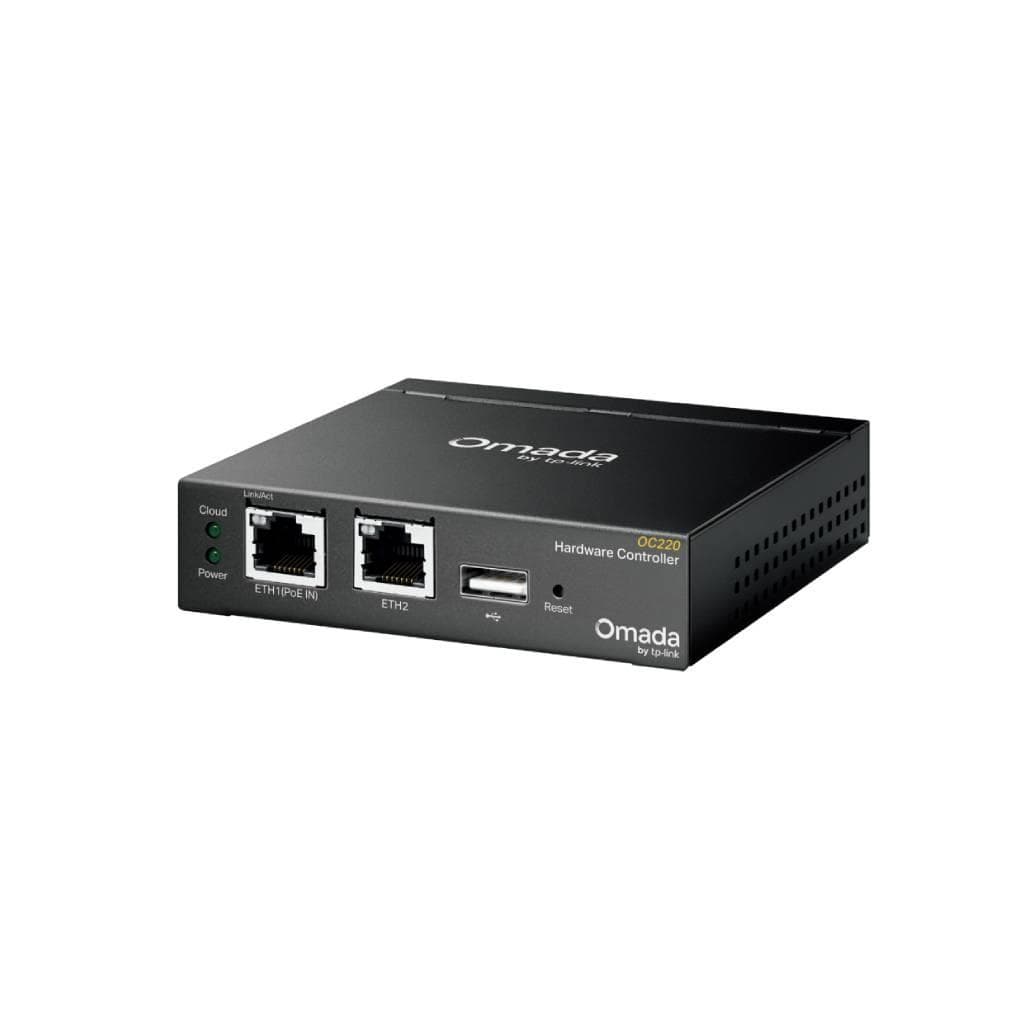

TP-Link Omada OC220 V1 Hardware Controller (2GB RAM, 8GB eMMC) - 2x Gigabit Ethernet, PoE & USB 2.0
SKU: OC220-VER1Networking › Routers & Access Points
Please enquire before ordering
The distributor has not yet confirmed the latest price and availability (last checked Aug 21, 2026)
092-251-4017Awaiting stock confirmationManufacturer's warranty
GenuineFree delivery from ฿5,000Tax invoice
TP-Link Omada OC220 V1 is a hardware controller for centralized Omada network management, supporting up to 100 Access Points, Switches, Gateways, and OLTs. It operates in both cloud and on-premises modes, with a USB port for data backup.
Key features
- Manage up to 100 APs, 10 Gateways, and 20 Switches
- Boots up 2.6 times faster than OC200
- Supports cloud and on-premises management with no licensing fees
- 2x Gigabit Ethernet ports with USB 2.0 for data backup
- Power over PoE or Micro USB 5V/1A for easy deployment
Product description
TP-Link Omada OC220 V1 is a professional hardware controller designed for centralized Omada network management, supporting up to 100 Access Points, 10 Gateways, 20 Switches, and 2 DeltaStream GPON OLTs. It operates without requiring a PC or server. Equipped with a Quad-Core CA53 processor running at 2.0 GHz and 2 GB DDR4 memory with 8 GB eMMC storage, it boots up 2.6 times faster than the previous model. It features 2 Gigabit Ethernet ports for primary network connectivity and a USB 2.0 port for data backup or connecting peripherals. It supports PoE 802.3af/at or Micro USB 5V/1A power input, enabling flexible desktop or wall mounting.
More features
- Metal chassis, fanless design for quiet operation
- Supports OpenAPI and Cluster Mode for network expansion
- Firmware updates via Omada App or Web UI
- Supports multi-site and multi-user management (Role/Site/Device Privileges)
- MTBF up to 1,475,648 hours at 25°C
Specifications (29)
- MTBF
- 1475648H @25℃; 733104H @40℃
- Memory
- 2 GB DDR4
- Storage
- 4MB Nor Flash; 8 GB eMMC
- USB Port
- 1 USB 2.0 Port; 1 Micro-USB Port
- Processor
- Quad-Core CA53 @ 2.0 GHz/Core
- RJ45 Port
- 2 10/100/1000 Mbps Ethernet Ports
- Dimensions
- 3.9 × 3.9 × 1.0 in (100 × 98 × 25 mm)
- ACL Support
- Up to 32 (actual number depends on configuration)
- API Support
- OpenAPI
- Form Factor
- Compact desktop or wall mount
- Noise Level
- Fanless (silent operation)
- PoE Support
- 802.3af/at
- Cloud Access
- Yes
- Cluster Mode
- Yes
- Power Supply
- 802.3af/at PoE; Micro-USB (DC 5 V/ Minimum 1 A)
- Reset Button
- 1
- VLAN Support
- Up to 4090 (actual number depends on switch capacity)
- Startup Speed
- 2.6× faster than previous generation
- Backup Support
- USB 2.0 port for data backup
- Kensington Lock
- 1
- Operating System
- Omada Software Controller
- Migration Support
- Yes (Site Migration)
- Supported Devices
- Up to 100 Omada Access Points, 10 Omada Gateways, 20 Omada Switches, 2 DeltaStream GPON OLTs
- Management Interface
- Web UI, Omada App
- Max Power Consumption
- 9.5 W (powered by a PoE device, with USB 2.0 connected); 3.3 W (powered via Micro-USB port, no USB 2.0 connected)
- Multi-Site Management
- Yes
- On-Premises Management
- Yes
- Multi-tenant Management
- Yes (Role/Site/Device Privileges)
- Firmware Upgrade Support
- Yes (via Omada App or Web UI)
Datasheets and manuals straight from the manufacturer — select a document to open or download it.
10 questions
Frequently asked questions about this product
Compiled from manufacturer information
How does OC220 V1 differ from OC200?
OC220 V1 features a Quad-Core 2.0 GHz CPU, 2 GB DDR4 memory, 8 GB eMMC storage, 2x Gigabit Ethernet ports, boots up 2.6 times faster than OC200, and supports OpenAPI and Cluster Mode.
Yes, it supports cloud-based management with no licensing fees, along with on-premises management for enhanced security and stability.
Yes, it supports cloud-based management with no licensing fees, along with on-premises management for enhanced security and stability.
Does it support PoE power delivery?
Yes, it supports PoE 802.3af/at power input, as well as Micro USB 5V/1A power input.
Does it have a backup port?
Yes, it has a USB 2.0 port for data backup.
Yes, it supports desktop or wall mounting with Kensington Lock.
Yes, it supports desktop or wall mounting with Kensington Lock.
Is it in stock?
We are confirming the latest stock and price of the TP-Link Omada OC220 V1 Hardware Controller (2GB RAM, 8GB eMMC) - 2x Gigabit Ethernet, PoE & USB 2.0 with the distributor. Please contact us before ordering at 092-251-4017 or sales@gist.co.th.
How much does it cost?
The distributor has not yet confirmed the latest price and availability. Please contact us before ordering at 092-251-4017 or sales@gist.co.th.
How long is the warranty?
The warranty follows the manufacturer's terms for each model; ask our sales team for the warranty period of this model. To make a warranty claim, call 092-251-4017 or 065-523-5262, or email sales@gist.co.th (Mon–Fri 9:00–18:00), then send the product with your order number to our head office, or bring it to the head office in person.
How long does delivery take?
Orders placed before 12:00 on a business day are delivered within 1–3 business days (Bangkok and vicinity) or 2–5 business days (other provinces). Free delivery on orders of ฿5,000 or more (a ฿150 delivery fee applies below this amount).
Is it genuine?
Genuine products sourced from distributors in Thailand, covered by the manufacturer's warranty. Full tax invoices are available.
Didn't find the answer you need?
Loading reviews…
Genuine products
Sourced from distributors in Thailand and covered by the manufacturer's warranty
Warranty period
According to the manufacturer's terms for each model
Covered by the manufacturer's warranty; you can make claims through GIST
Claims through GIST
Ship the product to our head office or bring it in person
Warranty conditions
- A receipt or other proof of purchase is required
- The product must not have been modified or altered
- Damage caused by misuse is not covered by the warranty
- To make a warranty claim, call 092-251-4017 or 065-523-5262, or email sales@gist.co.th (Mon–Fri 9:00–18:00), then send the product with your order number to our head office, or bring it to the head office in person.Head office: 554 Sky Nine Center, Floor 12A, Room 554/62, Asok-Din Daeng Road, Din Daeng Subdistrict, Din Daeng District, Bangkok 10400
More in Routers & Access Points






