

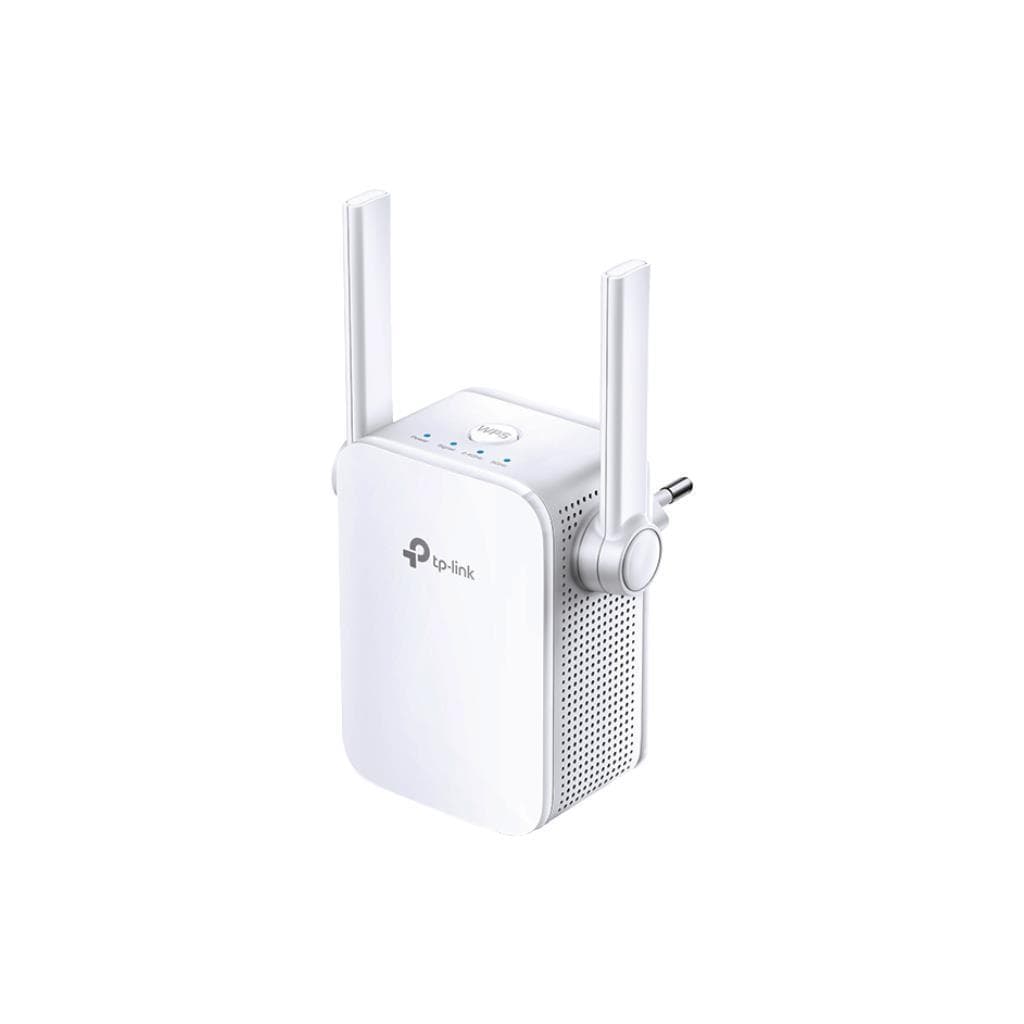

TP-Link RE305 AC1200 Wi-Fi Range Extender (867Mbps 5GHz + 300Mbps 2.4GHz)
SKU: RE305-VER4.4Networking › Routers & Access Points
฿1,191
Price includes 7% VATPrice updated October 30, 2026
Out of stockManufacturer's warranty
Temporarily out of stock — ask us about the restock date or an alternative model
Call us 092-251-4017Send a question to salesGenuineFree delivery from ฿5,000Tax invoice
ตัวขยายสัญญาณ Wi-Fi แบบ Dual-Band รองรับความเร็วรวมสูงสุด 1.2Gbps ใช้ต่อจากเราเตอร์เดิมเพื่อคลุมสัญญาณในพื้นที่ที่มีสัญญาณอ่อน พร้อมไฟแสดงสัญญาณอัจฉริยะช่วยหาตำแหน่งตั้งที่ดีที่สุด
Key features
- ความเร็วรวมสูงสุด 1.2Gbps (867Mbps 5GHz + 300Mbps 2.4GHz)
- ไฟแสดงสัญญาณอัจฉริยะ ช่วยหาตำแหน่งตั้งที่ดีที่สุด
- รองรับทั้ง 2.4GHz และ 5GHz พร้อมกัน
- ต่อสาย LAN ได้ผ่านพอร์ต RJ45
- ตั้งค่าผ่านแอป Tether หรือเบราว์เซอร์ได้ทันที
Product description
TP-Link RE305 ตัวขยายสัญญาณ Wi-Fi รุ่น AC1200 ออกแบบมาเพื่อแก้ปัญหาจุดตายของสัญญาณในบ้านหรือออฟฟิศ โดยรองรับทั้งแบนด์ 2.4GHz และ 5GHz พร้อมความเร็วสูงสุด 867Mbps ที่ 5GHz และ 300Mbps ที่ 2.4GHz รวมกันได้สูงสุด 1.2Gbps ทำให้การสตรีมวิดีโอ 4K หรือเล่นเกมออนไลน์มีความลื่นไหล ไม่สะดุด ไฟแสดงสถานะสัญญาณแบบอัจฉริยะช่วยให้คุณหาตำแหน่งตั้งที่เหมาะสมที่สุดได้อย่างง่ายดาย เพียงสังเกตสีของไฟ — ฟ้าแสดงสัญญาณดี แดงแสดงว่าอยู่ไกลเกินไป ตัวเครื่องมีเสาอากาศภายนอก 2 ตัว พร้อมพอร์ต Ethernet 1 ช่อง สำหรับเชื่อมต่ออุปกรณ์ที่ต้องการความเสถียรสูง เช่น กล้องวงจรปิดหรือเครื่องเล่นเกม รองรับการตั้งค่าผ่านแอป Tether หรือเบราว์เซอร์ได้ทันที
More features
- รองรับ WPA3 (ในเฟิร์มแวร์ใหม่)
- ใช้งานได้กับเราเตอร์ทุกรุ่น
- มีโหมด Access Point สำหรับใช้ขยายเครือข่ายแบบมีสาย
- รองรับการควบคุมผ่าน TP-Link Cloud
- ใช้ไฟฟ้า 100-240V~50/60Hz
Who it is for
เหมาะสำหรับผู้ใช้งานที่มีจุดตายของสัญญาณ Wi-Fi เช่น ห้องนอนชั้นบน หรือห้องทำงานที่อยู่ไกลจากเราเตอร์ ต้องการขยายสัญญาณให้ครอบคลุมทั้งบ้านหรือออฟฟิศ พร้อมใช้งานกับเราเตอร์ทุกรุ่น
Specifications (30)
- Button
- WPS Button, Reset Button
- เสาอากาศ
- 2 External Antennas
- Frequency
- 2.4GHz and 5GHz
- อินเทอร์เฟซ
- 1 x 10/100Mbps Ethernet Port (RJ45)
- Plug Type
- EU, UK, US
- Signal Rate
- 300Mbps at 2.4GHz, 867Mbps at 5GHz
- WPS Support
- รองรับ
- WPA3 Support
- รองรับ (in latest firmware and hardware version)
- การรับรอง
- CE, FCC, RoHS
- แรงดันไฟฟ้าขาเข้า
- 100-240V~50/60Hz
- ไฟแสดงสถานะ
- Signal strength indicator (Blue: Good, Red: Too far)
- Working Modes
- Range Extender / Access Point
- อุปกรณ์ในกล่อง
- AC1200 Wi-Fi Range Extender RE305, Quick Installation Guide
- การอัปเดตเฟิร์มแวร์
- Supports upgrade via TP-Link official website
- ความชื้นในการจัดเก็บ
- 5%~90% non-condensing
- Access Point Mode
- รองรับ
- ความปลอดภัยไร้สาย
- 64/128-bit WEP, WPA-PSK / WPA2-PSK
- ความชื้นขณะทำงาน
- 10%~90% non-condensing
- Transmission Power
- 2.4G<17dBm, 5G<17dBm
- Wireless Functions
- Enable/Disable Wireless Radio DFS, Access Control, LED Control, Power Schedule, Wi-Fi Coverage
- มาตรฐาน Wi-Fi
- IEEE 802.11a/n/ac 5GHz, IEEE 802.11b/g/n 2.4GHz
- อุณหภูมิในการจัดเก็บ
- -40°C~70°C (-40°F~158°F)
- ความต้องการของระบบ
- Microsoft® Windows® 98SE, NT, 2000, XP, Vista or Windows 7, 8, 10, Mac® OS, NetWare®, UNIX® or Linux.
- OneMesh Compatibility
- รองรับ
- อุณหภูมิการทำงาน
- 0°C~40°C (32°F~104°F)
- Reception Sensitivity
- 5GHz: 11a 6Mbps:-91dBm 11a 54Mbps: -74dBm 11ac HT20 mcs8: -68dBm 11ac HT40 mcs9: -63dBm 11ac HT80 mcs9: -59dBm 2.4GHz 11g 54Mbps: -79dBm 11n HT20 mcs7: -77dBm 11n HT40 mcs7: -74dBm
- TP-Link Cloud Service
- รองรับ
- ขนาด (กว้าง x ลึก x สูง)
- 3.1 x 3.0 x 3.0 in. (80 x 78 x 77mm)
- Max. Power Consumption
- 7.3W
- Box Dimensions (W X D X H)
- 6.15 x 4 x 3.7 in. (156.5 x 101.5 x 95mm)
Datasheets and manuals straight from the manufacturer — select a document to open or download it.
8 questions
Frequently asked questions about this product
Compiled from manufacturer information
สามารถตั้งค่า RE305 ผ่านแอป Tether ได้หรือไม่?
ได้ สามารถตั้งค่าผ่านแอป TP-Link Tether บนอุปกรณ์ iOS หรือ Android ได้ทันที
ไฟสีแดงหมายถึงอะไร?
หมายถึงอุปกรณ์อยู่ไกลเกินไปจากเราเตอร์ ควรย้ายตำแหน่งให้ใกล้ขึ้น
รองรับ WPA3 หรือไม่?
รองรับในเฟิร์มแวร์เวอร์ชันใหม่และฮาร์ดแวร์เวอร์ชัน V4.80
Is it in stock?
The TP-Link RE305 AC1200 Wi-Fi Range Extender (867Mbps 5GHz + 300Mbps 2.4GHz) is temporarily out of stock. Ask us about the restock date or an alternative model at sales@gist.co.th or 092-251-4017.
How much does it cost?
The price is ฿1,191 (including 7% VAT). It is currently out of stock; ask us about the restock date at sales@gist.co.th. Business customers can request a quotation at sales@gist.co.th.
How long is the warranty?
Warranty period: การอัปเดตเฟิร์มแวร์จากเว็บไซต์ TP-Link ท้องถิ่นเท่านั้น เพื่อป้องกันการละเมิดสิทธิ์รับประกัน (manufacturer's terms). To make a warranty claim, call 092-251-4017 or 065-523-5262, or email sales@gist.co.th (Mon–Fri 9:00–18:00), then send the product with your order number to our head office, or bring it to the head office in person.
How long does delivery take?
Orders placed before 12:00 on a business day are delivered within 1–3 business days (Bangkok and vicinity) or 2–5 business days (other provinces). Free delivery on orders of ฿5,000 or more (a ฿150 delivery fee applies below this amount).
Is it genuine?
Genuine products sourced from distributors in Thailand, covered by the manufacturer's warranty. Full tax invoices are available.
Didn't find the answer you need?
Loading reviews…
Genuine products
Sourced from distributors in Thailand and covered by the manufacturer's warranty
Warranty period
การอัปเดตเฟิร์มแวร์จากเว็บไซต์ TP-Link ท้องถิ่นเท่านั้น เพื่อป้องกันการละเมิดสิทธิ์รับประกัน
Covered by the manufacturer's warranty; you can make claims through GIST
Claims through GIST
Ship the product to our head office or bring it in person
Warranty conditions
- A receipt or other proof of purchase is required
- The product must not have been modified or altered
- Damage caused by misuse is not covered by the warranty
- To make a warranty claim, call 092-251-4017 or 065-523-5262, or email sales@gist.co.th (Mon–Fri 9:00–18:00), then send the product with your order number to our head office, or bring it to the head office in person.Head office: 554 Sky Nine Center, Floor 12A, Room 554/62, Asok-Din Daeng Road, Din Daeng Subdistrict, Din Daeng District, Bangkok 10400
More in Routers & Access Points






