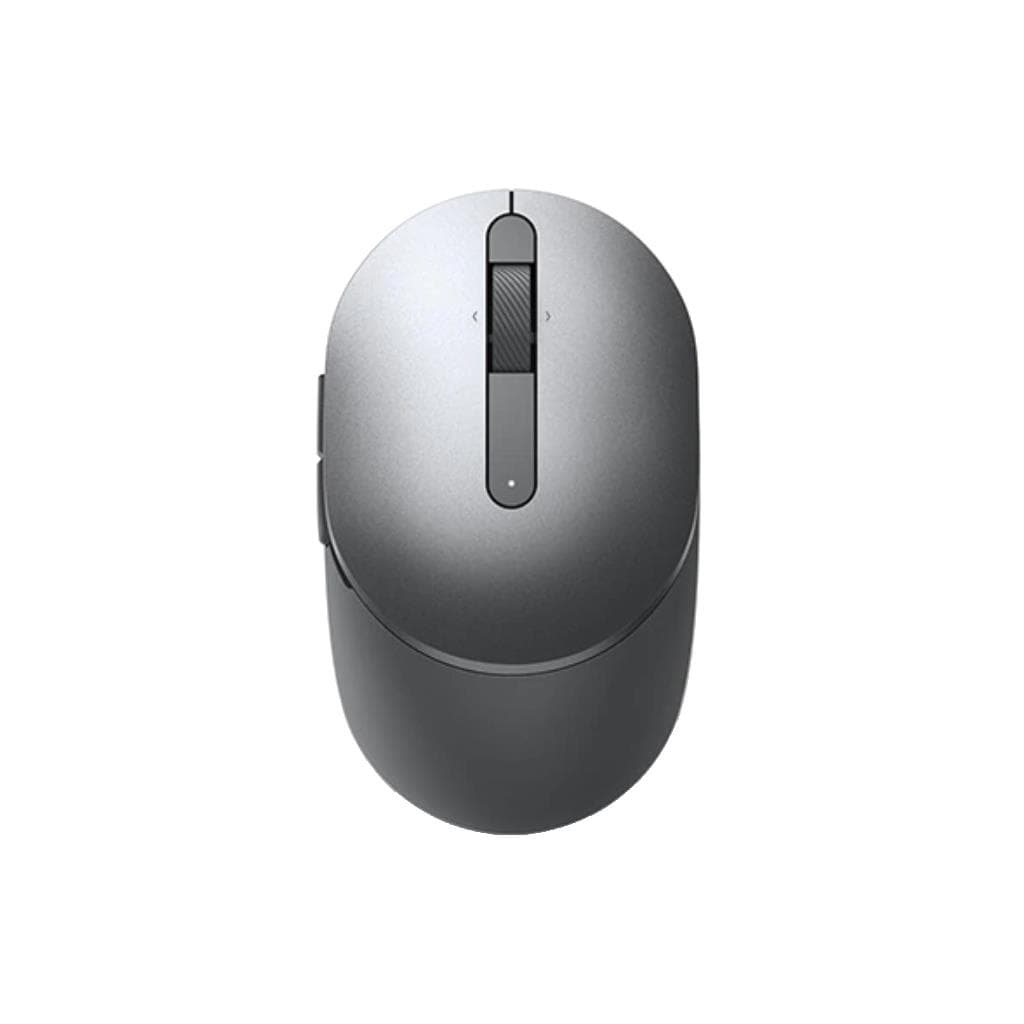
DELL MS116 Optical Mouse - Black (Retail Box)
SKU: SNS570-AAJKGadgets & Accessories › Keyboards· Model: MS116
Please enquire before ordering
The distributor has not yet confirmed the latest price and availability (last checked Sep 23, 2026)
092-251-4017Awaiting stock confirmation1 year manufacturer's warranty
GenuineFree delivery from ฿5,000Tax invoice
เมาส์ออปติคอลสีดำจาก Dell รุ่น MS116 ออกแบบมาเพื่อการใช้งานทั่วไป ให้ความแม่นยำในการควบคุมเคอร์เซอร์ ใช้งานง่ายกับทุกพื้นผิว
Key features
- เซ็นเซอร์ออปติคอลแม่นยำ ใช้งานได้ทุกพื้นผิว
- รูปทรงโค้งมน จับถนัดมือ ลดความเมื่อยล้า
- เชื่อมต่อผ่านพอร์ต USB ใช้งานได้ทันที
- สีดำเรียบหรู เหมาะกับทุกสภาพแวดล้อม
- บรรจุในกล่องขายปลีกพร้อมใช้งาน
Product description
เมาส์ Dell MS116 เป็นอุปกรณ์เสริมที่ออกแบบมาอย่างเรียบง่ายแต่ทรงประสิทธิภาพ ใช้เซ็นเซอร์ออปติคอลที่ให้ความแม่นยำในการควบคุมเคอร์เซอร์บนพื้นผิวทุกชนิด ไม่ว่าจะเป็นโต๊ะไม้ ผ้า หรือแม้แต่แผ่นวางเมาส์ทั่วไป รูปทรงโค้งมนเหมาะกับมือทุกขนาด ช่วยลดความเมื่อยล้าในระยะยาว การเชื่อมต่อผ่านพอร์ต USB ทำให้ติดตั้งใช้งานได้ทันทีโดยไม่ต้องติดตั้งไดรเวอร์เพิ่มเติม จึงเหมาะสำหรับผู้ใช้งานทั่วไป นักเรียน หรือพนักงานออฟฟิศที่ต้องการอุปกรณ์ที่เชื่อถือได้และใช้งานง่าย
Pros and limitations
Pros
- เซ็นเซอร์ออปติคอลแม่นยำ ใช้งานได้ทุกพื้นผิว
- รูปทรงโค้งมน จับถนัดมือ ใช้งานได้นานโดยไม่เมื่อย
- เชื่อมต่อผ่าน USB ใช้งานได้ทันที ไม่ต้องติดตั้งไดรเวอร์
- น้ำหนักเบาเพียง 85 กรัม ใช้งานสะดวก
- ราคาประหยัด คุ้มค่ากับการใช้งานทั่วไป
Limitations
- ไม่มีปุ่มปรับ DPI หรือฟังก์ชันเสริม
- สายยาว 1.5 เมตร อาจไม่เหมาะกับพื้นที่แคบ
- ไม่มีไฟ LED หรือฟีเจอร์ตกแต่ง
Who it is for
เหมาะสำหรับนักเรียน นักศึกษา และพนักงานออฟฟิศที่ต้องการเมาส์ใช้งานทั่วไป รองรับระบบปฏิบัติการหลากหลาย ใช้งานได้ทันทีหลังเสียบ USB
Color
ดำ
Connectivity
USB
Specifications (65)
- ความละเอียด DPI
- 1000
- SKU
- SNS570-AAJK
- แบรนด์
- DELL
- สี
- Black
- รุ่น
- MS116
- เซ็นเซอร์
- Optical
- น้ำหนัก
- 85 g
- จำนวนปุ่ม
- profile
- วัสดุ
- Plastic
- การรับประกัน
- 1 year
- อินเทอร์เฟซ
- USB
- Plug Type
- USB Type-A
- ประเภทพอร์ต
- USB 2.0
- ประเภทสาย
- USB Type-A
- การเชื่อมต่อ
- USB
- ขนาด
- 115 x 65 x 35 mm
- Sensor Type
- Optical
- Acceleration
- 1000 dpi
- ความยาวสาย
- 1.5 m
- Polling Rate
- 125 Hz
- แหล่งพลังงาน
- USB Bus Powered
- ประเภทสินค้า
- Optical Mouse
- ล้อเลื่อน
- Standard
- ความเข้ากันได้
- Windows 10, Windows 11, macOS, Linux
- เวลาตอบสนอง
- 8 ms
- Cable Material
- TPE
- Cable Plug Fit
- Secure
- การรับรอง
- CE, FCC, RoHS
- ความชื้นขณะทำงาน
- 10% to 90% non-condensing
- Tracking Speed
- 30 ips
- Button Lifespan
- 10 million clicks
- Cable Connector
- USB Type-A
- Cable Shielding
- รองรับ
- Left/Right Hand
- Ambidextrous
- Sensor Accuracy
- 100%
- Sensor Lifespan
- 10 million clicks
- Cable Durability
- High
- Cable Plug Color
- Black
- Cable Plug Shape
- Rectangular
- Retail Packaging
- Retail Box
- Cable Flexibility
- High
- การใช้พลังงาน
- 50 mA
- Sensor Resolution
- 1000 dpi
- Maximum Resolution
- 1000 dpi
- Cable Plug Material
- Plastic
- Cable Plug Polarity
- Standard
- Cable Plug Standard
- USB Type-A
- Cable Strain Relief
- รองรับ
- อุณหภูมิในการจัดเก็บ
- -20°C to 60°C
- Cable Plug Alignment
- Standard
- Cable Plug Grounding
- รองรับ
- Cable Plug Retention
- Standard
- Cable Plug Shielding
- รองรับ
- Cable Plug Stability
- High
- Cable Plug Durability
- High
- Cable Plug Resistance
- High
- อุณหภูมิการทำงาน
- 0°C to 40°C
- Cable Plug Orientation
- Standard
- Cable Plug Performance
- High
- Cable Plug Reliability
- High
- Cable Plug Compatibility
- USB 2.0
- Cable Plug Removal Force
- Low
- ระบบปฏิบัติการที่รองรับ
- Windows 10, Windows 11, macOS, Linux
- Cable Plug Insertion Force
- Low
- Maximum Operating Distance
- 1.5 m
Datasheets and manuals straight from the manufacturer — select a document to open or download it.
13 questions
Frequently asked questions about this product
Compiled from manufacturer information
เมาส์ Dell MS116 รองรับ macOS ได้ไหม?
ใช่ เมาส์รุ่นนี้รองรับระบบปฏิบัติการทั้ง Windows 10, Windows 11, macOS และ Linux โดยไม่ต้องติดตั้งไดรเวอร์เพิ่มเติม ใช้งานได้ทันทีหลังเสียบ USB
เมาส์รุ่นนี้มี DPI เท่าไหร่?
เมาส์ Dell MS116 มีความละเอียด 1000 DPI ซึ่งเพียงพอสำหรับการใช้งานทั่วไป เช่น เขียนเอกสาร ท่องเว็บ หรือดูวิดีโอ โดยไม่ต้องปรับเพิ่ม
ใช้งานกับพื้นผิวไม้หรือผ้าได้ไหม?
ได้ เมาส์รุ่นนี้ใช้เซ็นเซอร์ออปติคอลที่สามารถทำงานได้ดีบนพื้นผิวทุกชนิด ไม่ว่าจะเป็นโต๊ะไม้ ผ้า หรือแผ่นวางเมาส์ทั่วไป ไม่ต้องใช้แผ่นรองพิเศษ
มีการรับประกันกี่ปี?
เมาส์รุ่นนี้มีการรับประกัน 1 ปี ครอบคลุมความเสียหายจากข้อบกพร่องของวัสดุหรือการผลิต สอบถามทีมขายเพื่อรายละเอียดเพิ่มเติม
ใช้กับคอมพิวเตอร์ที่ไม่มีพอร์ต USB ได้ไหม?
ไม่สามารถใช้งานได้โดยตรง เนื่องจากเมาส์ต้องใช้พอร์ต USB เพื่อจ่ายไฟและสื่อสารกับคอมพิวเตอร์ แนะนำให้ใช้ฮับ USB หรืออุปกรณ์แปลงพอร์ตหากจำเป็น
เมาส์รุ่นนี้มีน้ำหนักเท่าไหร่?
น้ำหนักของเมาส์ Dell MS116 อยู่ที่ 85 กรัม ถือว่าเบาและจับถนัดมือ ใช้งานได้เป็นเวลานานโดยไม่รู้สึกเมื่อยล้า
ใช้กับโน้ตบุ๊กได้ไหม?
ได้แน่นอน เมาส์รุ่นนี้สามารถใช้งานได้กับโน้ตบุ๊กทุกรุ่นที่มีพอร์ต USB ไม่ว่าจะเป็น Dell, HP, Lenovo หรือแบรนด์อื่น ๆ โดยไม่ต้องติดตั้งไดรเวอร์เพิ่มเติม
มีปุ่มใดบ้าง?
เมาส์รุ่นนี้มีปุ่มซ้าย-ขวา และล้อเลื่อนกลาง ไม่มีปุ่มเพิ่มเติมหรือฟังก์ชันลัด ออกแบบมาเพื่อการใช้งานพื้นฐานอย่างมีประสิทธิภาพ
Is it in stock?
We are confirming the latest stock and price of the DELL MS116 Optical Mouse - Black (Retail Box) with the distributor. Please contact us before ordering at 092-251-4017 or sales@gist.co.th.
How much does it cost?
The distributor has not yet confirmed the latest price and availability. Please contact us before ordering at 092-251-4017 or sales@gist.co.th.
How long is the warranty?
Warranty period: 1 ปี (manufacturer's terms). To make a warranty claim, call 092-251-4017 or 065-523-5262, or email sales@gist.co.th (Mon–Fri 9:00–18:00), then send the product with your order number to our head office, or bring it to the head office in person.
How long does delivery take?
Orders placed before 12:00 on a business day are delivered within 1–3 business days (Bangkok and vicinity) or 2–5 business days (other provinces). Free delivery on orders of ฿5,000 or more (a ฿150 delivery fee applies below this amount).
Is it genuine?
Genuine products sourced from distributors in Thailand, covered by the manufacturer's warranty. Full tax invoices are available.
Didn't find the answer you need?
Loading reviews…
Genuine products
Sourced from distributors in Thailand and covered by the manufacturer's warranty
Warranty period
1 ปี
Covered by the manufacturer's warranty; you can make claims through GIST
Claims through GIST
Ship the product to our head office or bring it in person
Warranty conditions
- A receipt or other proof of purchase is required
- The product must not have been modified or altered
- Damage caused by misuse is not covered by the warranty
- To make a warranty claim, call 092-251-4017 or 065-523-5262, or email sales@gist.co.th (Mon–Fri 9:00–18:00), then send the product with your order number to our head office, or bring it to the head office in person.Head office: 554 Sky Nine Center, Floor 12A, Room 554/62, Asok-Din Daeng Road, Din Daeng Subdistrict, Din Daeng District, Bangkok 10400
More in Keyboards