
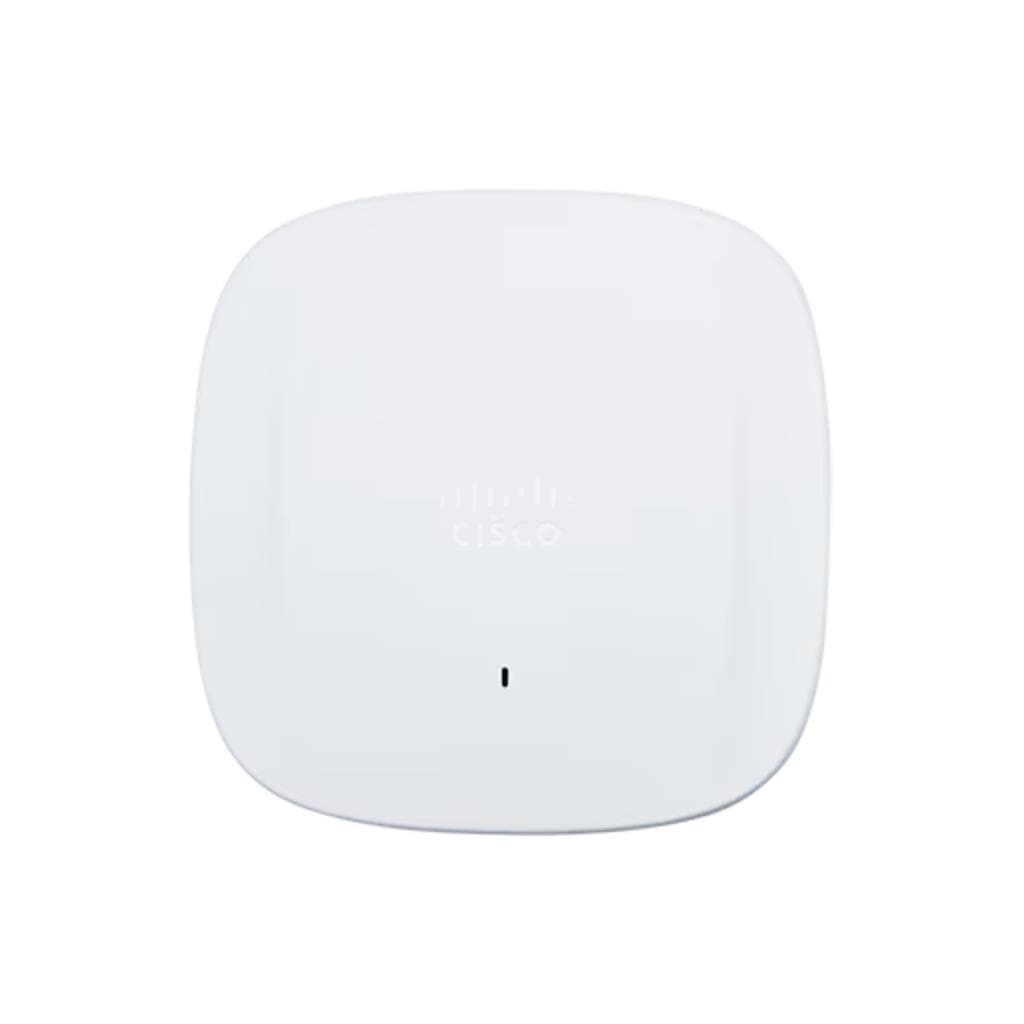


Cisco Business 140AC Access Point (Wi-Fi 5 Dual-Band 802.11ac) - 2.4GHz & 5GHz
SKU: CBW140AC-SCisco › Cisco Routers & Access Points· Model: 140AC
฿4,677
Price includes 7% VATPrice updated October 28, 2026
Out of stock3 years manufacturer's warranty
Temporarily out of stock — ask us about the restock date or an alternative model
Call us 092-251-4017Send a question to salesGenuineFree delivery from ฿5,000Tax invoice
Wireless access point for small business and office, supports Wi-Fi 5 on both 2.4 GHz and 5 GHz bands, cloud management, and easy setup with Day Zero configuration
Key features
- Supports Wi-Fi 5 (802.11ac) on both 2.4 GHz and 5 GHz bands
- Maximum speed of 1.267 Gbps on the 5 GHz band
- Easy installation with PoE 802.3af, no additional power outlet required
- Instant setup via cloud (Day Zero Configuration)
- Clear LED indicators for operational status
Product description
Cisco Business 140AC Access Point is designed for small businesses and offices to efficiently extend wireless connectivity. It supports Wi-Fi 5 (802.11ac) on both 2.4 GHz and 5 GHz bands with maximum speeds of 1.267 Gbps on the 5 GHz band and 450 Mbps on the 2.4 GHz band, enabling smooth simultaneous use of multiple devices for online meetings, video streaming, and large file sharing. The device supports Power over Ethernet (PoE 802.3af), allowing easy installation without additional power outlets, and can be configured instantly via the cloud application without manual setup. Clear LED indicators show operational status, enabling administrators to monitor device status immediately.
More features
- Supports automatic firmware updates
- Designed for small business and office use
- Supports management via Cisco Business Dashboard
- Includes Ethernet port for connection to the main network
- Wall mount or desk stand installation
Pros and limitations
Pros
- Set up instantly via cloud with no manual configuration required.
- Supports PoE (Power over Ethernet) for easy installation.
- Supports Wi-Fi 5 on both bands with a maximum speed of 1.267 Gbps.
- Managed through Cisco Business Dashboard for easy operation.
- Supports automatic firmware updates to maintain security at all times.
Limitations
- Not supported for CLI or Telnet setup.
- No USB port for additional updates or management.
- Not supported for Wi-Fi 6 (802.11ax) or Wi-Fi 6E.
Who it is for
Ideal for small business, office, retail store, or service center environments requiring efficient Wi-Fi signal extension, especially those needing simple initial setup and cloud-based management.
Connectivity
Wi-Fi, Ethernet
Specifications (61)
- MIMO
- 2x2
- Weight
- 0.7 kg
- AP Mode
- Yes
- Logging
- Yes
- MU-MIMO
- Support
- Warranty
- 3 years
- Compliance
- China RoHS, EU Compliance Info (for EU SKU)
- Dimensions
- 180 x 180 x 35 mm
- Encryption
- AES-CCMP
- HTTP/HTTPS
- Yes
- LED Status
- Yes
- Beamforming
- Support
- DHCP Client
- Yes
- DNS Support
- Yes
- Dynamic DNS
- Yes
- Mode Button
- Yes
- NTP Support
- Yes
- PoE Support
- 802.3af (PoE-In)
- Power Input
- PoE (802.3af)
- QoS Support
- Yes
- Guest Access
- Yes
- LED Behavior
- Blinks green during boot, solid green when ready
- License Type
- Included with hardware
- SNMP Support
- Yes
- Supported OS
- Windows, macOS, iOS, Android
- VLAN Support
- Yes
- Band Steering
- Yes
- Channel Width
- 20/40/80 MHz (5 GHz), 20/40 MHz (2.4 GHz)
- Ethernet Port
- 1 x RJ-45 (10/100 Mbps)
- Factory Reset
- Yes
- LED Indicator
- Status LED (green, amber, red)
- MAC Filtering
- Yes
- Max Data Rate
- 1.267 Gbps (5 GHz), 450 Mbps (2.4 GHz)
- Port Security
- Yes
- Remote Access
- Yes
- Web Interface
- Yes
- Certifications
- FCC Class A, CE, RoHS
- Humidity Range
- 10% to 90% non-condensing
- Load Balancing
- Yes
- SSID Broadcast
- Yes
- Wi-Fi Standard
- 802.11ac Wave 2
- Firmware Update
- Over-the-air (OTA) automatic update
- Frequency Bands
- 2.4 GHz and 5 GHz
- Spatial Streams
- 2x2 (5 GHz), 2x2 (2.4 GHz)
- Traffic Shaping
- Yes
- Client Isolation
- Yes
- Cloud Management
- Yes
- Mounting Options
- Wall or Desk Mount
- Network Protocol
- IPv4, IPv6
- Time Zone Support
- Yes
- Event Notification
- Yes
- Security Protocols
- WPA3, WPA2-Enterprise, WPA2-Personal, WPA-PSK
- Security Screw Hole
- Yes
- Storage Temperature
- -20°C to 70°C
- Access Control Lists
- Yes
- Backup Configuration
- Yes
- Management Interface
- Cisco Business Dashboard (cloud-based)
- Multiple SSID Support
- Up to 8
- Operating Temperature
- 0°C to 40°C
- Restore Configuration
- Yes
- Radio Resource Management
- Yes
Datasheets and manuals straight from the manufacturer — select a document to open or download it.
13 questions
Frequently asked questions about this product
Compiled from manufacturer information
Do you need a PoE switch or PoE injector?
Yes, a PoE switch or PoE injector supporting 802.3af standard is required to power the Access Point without an additional power outlet, enabling easier installation and reducing cable clutter
How long does setup take?
No, it can be set up instantly via the cloud (Day Zero Configuration) without manual configuration. The LED will blink during boot, and a steady green light indicates it is ready for use, taking no more than 6 minutes
How many devices can connect simultaneously?
Supports multiple simultaneous connections, especially in Wi-Fi 5 mode with MU-MIMO and Beamforming support, delivering high performance even in environments with many users
Can you set up a Guest Network?
Yes, supports Guest Access configuration separate from the main network, allowing separate SSID setup, access restriction, and time-based access control, enhancing security for external users
Do you need a DHCP server?
Yes, a DHCP server on the main network, such as from a router, is required to assign IP addresses to devices connected through the Access Point, and this can be configured via Cisco Business Dashboard
Can it work with Wi-Fi 6?
Does not directly support Wi-Fi 6 (802.11ax), but can operate alongside Wi-Fi 6 devices on the same network. However, it will function only in Wi-Fi 5 mode and cannot utilize Wi-Fi 6 features
Can it be wall mounted?
Yes, the device is designed for wall mount or desk stand installation, with screw holes for security and a bracket for mounting
Does it have alerts when problems occur?
Supports Cisco Business Dashboard alerts for device issues or status changes, such as connection failures or successful firmware updates.
Is it in stock?
The Cisco Business 140AC Access Point (Wi-Fi 5 Dual-Band 802.11ac) - 2.4GHz & 5GHz is temporarily out of stock. Ask us about the restock date or an alternative model at sales@gist.co.th or 092-251-4017.
How much does it cost?
The price is ฿4,677 (including 7% VAT). It is currently out of stock; ask us about the restock date at sales@gist.co.th. Business customers can request a quotation at sales@gist.co.th.
How long is the warranty?
Warranty period: 3-year warranty as per manufacturer terms. (manufacturer's terms). To make a warranty claim, call 092-251-4017 or 065-523-5262, or email sales@gist.co.th (Mon–Fri 9:00–18:00), then send the product with your order number to our head office, or bring it to the head office in person.
How long does delivery take?
Orders placed before 12:00 on a business day are delivered within 1–3 business days (Bangkok and vicinity) or 2–5 business days (other provinces). Free delivery on orders of ฿5,000 or more (a ฿150 delivery fee applies below this amount).
Is it genuine?
Genuine products sourced from distributors in Thailand, covered by the manufacturer's warranty. Full tax invoices are available.
Didn't find the answer you need?
Loading reviews…
Genuine products
Sourced from distributors in Thailand and covered by the manufacturer's warranty
Warranty period
3-year warranty as per manufacturer terms.
Covered by the manufacturer's warranty; you can make claims through GIST
Claims through GIST
Ship the product to our head office or bring it in person
Warranty conditions
- A receipt or other proof of purchase is required
- The product must not have been modified or altered
- Damage caused by misuse is not covered by the warranty
- To make a warranty claim, call 092-251-4017 or 065-523-5262, or email sales@gist.co.th (Mon–Fri 9:00–18:00), then send the product with your order number to our head office, or bring it to the head office in person.Head office: 554 Sky Nine Center, Floor 12A, Room 554/62, Asok-Din Daeng Road, Din Daeng Subdistrict, Din Daeng District, Bangkok 10400
More in Cisco Routers & Access Points


Cisco
Cisco Catalyst 9800-L Wireless Controller (Copper Uplink) - 250 APs / 5,000 Clients
Price on request
