

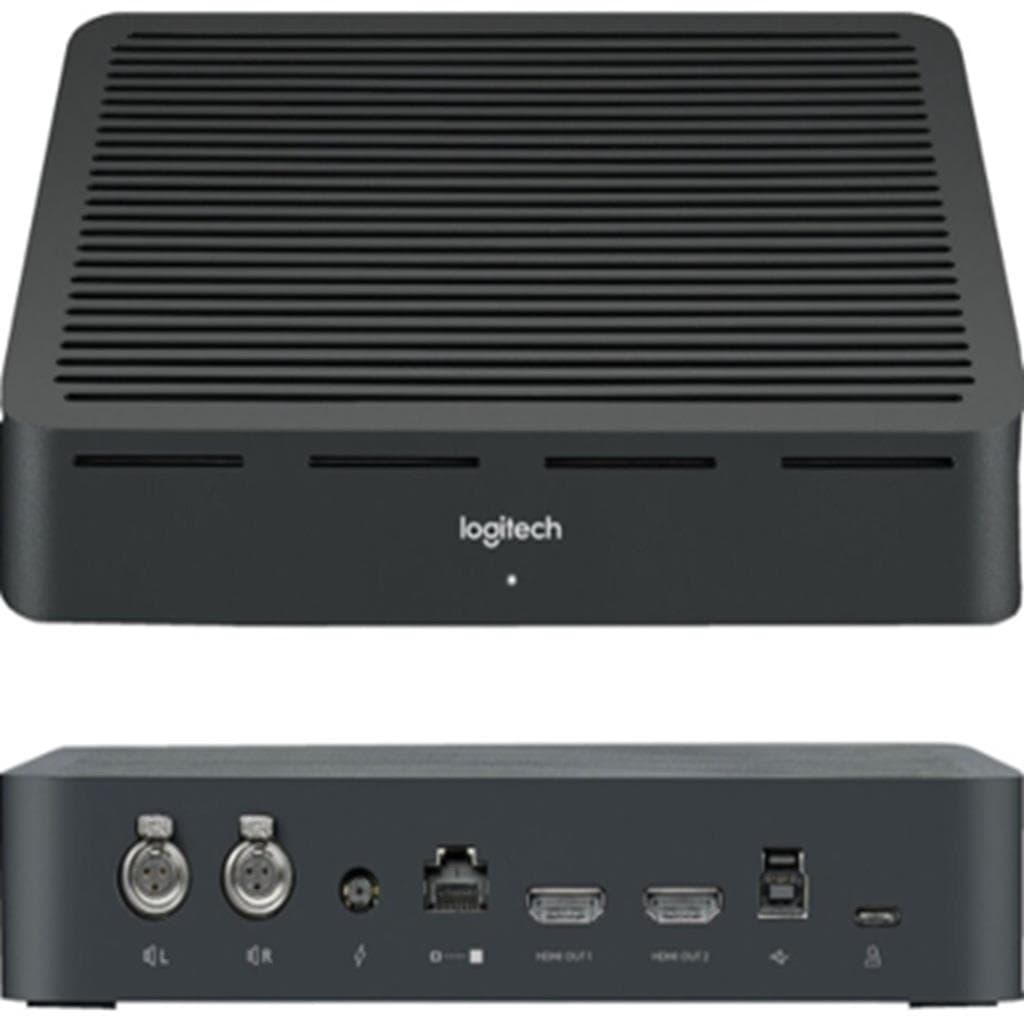

Logitech DISPLAY HUB for Rally System - BLACK
SKU: DISPLAYHUBGadgets & Accessories › Video Conferencing
฿23,910
Price includes 7% VATPrice updated November 1, 2026
In stock3 unitsManufacturer's warranty
For orders placed before 12:00 on a business day; weekends excluded
GenuineFree delivery from ฿5,000Tax invoice
อุปกรณ์จัดการสัญญาณกลางสำหรับระบบประชุมวิดีโอ Logitech Rally รองรับการเชื่อมต่อกล้อง ลำโพง และคอมพิวเตอร์ห้องประชุม พร้อมพอร์ต HDMI และ CAT6a สำหรับการส่งข้อมูลที่เสถียร
Key features
- รองรับการเชื่อมต่อ CAT6a สำหรับส่งข้อมูลระยะไกล
- มีพอร์ต HDMI สำหรับแสดงผลวิดีโอ 4K
- รองรับการใช้งานกับจอคู่ จำกัดที่ 1080p
- จัดการสัญญาณจากกล้อง ลำโพง และคอมพิวเตอร์ห้องประชุม
- ใช้ร่วมกับ Logitech Sync เพื่อตรวจสอบสถานะอุปกรณ์
Product description
Logitech DISPLAY HUB เป็นศูนย์กลางการเชื่อมต่อสำหรับระบบประชุมวิดีโอ Rally ที่ออกแบบมาเพื่อจัดการสัญญาณจากกล้อง ลำโพง และคอมพิวเตอร์ห้องประชุมอย่างมีประสิทธิภาพ โดยรองรับการเชื่อมต่อผ่าน CAT6a สำหรับการส่งข้อมูลระยะไกล และมีพอร์ต HDMI สำหรับแสดงผลวิดีโอความละเอียดสูง สามารถส่งสัญญาณ 4K ได้เมื่อใช้งานกับจอหนึ่งจอ แต่ในโหมดจอคู่จะจำกัดที่ 1080p ที่ 60 Hz และ 30 Hz ตามลำดับ ทำให้เหมาะกับห้องประชุมขนาดกลางถึงใหญ่ที่ต้องการระบบวิดีโอคอลที่มีความเสถียรและคุณภาพสูง พร้อมรองรับการตั้งค่าแบบโมดูลาร์ ช่วยให้การจัดวางอุปกรณ์ในห้องประชุมเป็นไปอย่างยืดหยุ่น
More features
- ไม่รองรับ HDMI ARC
- รองรับการตั้งค่าโมดูลาร์สำหรับห้องประชุมขนาดใหญ่
- ออกแบบมาเพื่อใช้งานในระบบประชุมวิดีโอ Rally
- รองรับการเชื่อมต่อผ่าน USB-A ไปยัง Display Hub
- ใช้ร่วมกับ Table Hub ผ่าน CAT6a สำหรับการส่งข้อมูล
Pros and limitations
Pros
- รองรับการเชื่อมต่อ CAT6a สำหรับการส่งข้อมูลระยะไกลอย่างเสถียร
- รองรับการแสดงผล 4K ได้เมื่อใช้งานกับจอหนึ่งจอ
- จัดการอุปกรณ์ร่วมกันได้ผ่าน Logitech Sync อย่างมีประสิทธิภาพ
- ออกแบบมาเพื่อใช้งานในระบบโมดูลาร์ รองรับการตั้งค่ายืดหยุ่น
- ไม่ต้องใช้สาย HDMI ยาวเกินไป ลดปัญหาสัญญาณรบกวน
Limitations
- ไม่รองรับ HDMI ARC ทำให้ไม่สามารถส่งเสียงกลับจาก TV ได้
- โหมดจอคู่จำกัดความละเอียดที่ 1080p ทำให้ไม่เหมาะกับการใช้งาน 4K แบบ dual display
- ต้องใช้ CAT6a ที่มีคุณภาพสูง ไม่สามารถใช้สายประเภทอื่นแทนได้
Who it is for
เหมาะสำหรับห้องประชุมขนาดกลางถึงใหญ่ที่ต้องการระบบวิดีโอคอลคุณภาพสูง รองรับการเชื่อมต่อหลายอุปกรณ์พร้อมกัน และใช้งานร่วมกับระบบโมดูลาร์ของ Logitech Rally
Specifications (24)
- แบรนด์
- LOGITECH
- สี
- BLACK
- การติดตั้ง
- Desk or wall mount compatible
- พอร์ต USB
- 1 x USB-A to USB-B (for connection to Display Hub)
- HDMI Output
- 1 x HDMI 2.0
- แหล่งจ่ายไฟ
- Via USB-B connection
- ความเข้ากันได้
- Logitech Rally and Rally Plus systems
- ไฟแสดงสถานะ
- Solid green dot when stable
- Component Type
- Display Hub
- ซีรีส์
- Rally
- การเชื่อมต่อ
- CAT6a Ethernet
- Modular Support
- รองรับ, supports up to 7 mic pods and multiple audio components
- Audio Processing
- Auto-leveling, noise suppression, active speaker focus
- Cable Management
- Sleek design with thoughtful cable routing
- Cable Requirement
- CAT6a cable required between Table Hub and Display Hub
- HDMI Refresh Rate
- 60 Hz (HDMI 1), 30 Hz (HDMI 2)
- Integrated System
- Rally System
- Network Interface
- CAT6a Ethernet for inter-hub communication
- Status Monitoring
- Via Logitech Sync App
- อินเทอร์เฟซการจัดการ
- Logitech Sync App
- Operating Environment
- Indoor use only
- Supported Applications
- Google Meet, Microsoft Teams, Zoom, Skype for Business
- HDMI Resolution Support
- 4K at 30 Hz (single display), 1080p at 60 Hz and 30 Hz (dual display)
- RightSense Technologies
- RightSight™, RightLight™, RightSound™
Datasheets and manuals straight from the manufacturer — select a document to open or download it.
12 questions
Frequently asked questions about this product
Compiled from manufacturer information
Display Hub รองรับการเชื่อมต่อจอคู่พร้อมกันได้ไหม?
รองรับการเชื่อมต่อจอคู่ได้ แต่จำกัดความละเอียดที่ 1080p โดย HDMI 1 ทำงานที่ 60 Hz และ HDMI 2 ที่ 30 Hz เท่านั้น สำหรับการใช้งาน 4K แนะนำให้เชื่อมต่อคอมพิวเตอร์กับ Display Hub โดยตรง
ต้องใช้สายอะไรเชื่อมต่อระหว่าง Table Hub และ Display Hub?
ต้องใช้สาย CAT6a เท่านั้น ไม่แนะนำให้ใช้สายประเภทอื่นหรือสายที่ยาวเกินกว่าที่กำหนด หากมีปัญหาการเชื่อมต่อ ให้ลองเปลี่ยนสายใหม่หรือตรวจสอบการต่อปลายสาย
Display Hub รองรับ HDMI ARC ไหม?
ไม่รองรับ HDMI ARC ตามเอกสารทางเทคนิค เนื่องจากระบบ Rally ออกแบบมาเพื่อการประชุมวิดีโอโดยเฉพาะ ไม่ได้ตั้งใจให้ใช้ร่วมกับ TV หรืออุปกรณ์เสียงทั่วไป
สามารถตรวจสอบสถานะของ Display Hub ได้อย่างไร?
สามารถตรวจสอบสถานะได้ผ่านแอป Logitech Sync โดยเชื่อมต่อแล็ปท็อปเข้ากับ Display Hub ผ่าน USB-A ไปยัง USB-B แล้วเปิดแอปเพื่อดูสถานะอุปกรณ์ เช่น กล้อง ลำโพง และ Hub ว่าทำงานปกติหรือไม่
ใช้ Display Hub กับคอมพิวเตอร์ห้องประชุมได้ไหม?
ได้ แต่ต้องเชื่อมต่อคอมพิวเตอร์กับ Display Hub โดยตรงเพื่อให้สามารถส่งสัญญาณ 4K ไปยังจอได้อย่างเต็มประสิทธิภาพ ไม่แนะนำให้ผ่าน Table Hub หากต้องการใช้ 4K แบบ dual display
มีปัญหาการเชื่อมต่อระหว่าง Hub ควรทำอย่างไร?
ให้ลองเปลี่ยนสาย CAT6a ใหม่ หรือตรวจสอบว่าสายที่ใช้มีการต่อปลายถูกต้องหรือไม่ หากยังมีปัญหา ให้ติดต่อทีมสนับสนุน Logitech โดยเตรียมข้อมูลการเชื่อมต่อและสถานะใน Logitech Sync ไว้
Display Hub ต้องใช้พลังงานจากไหน?
ต้องใช้พลังงานผ่านสาย USB-B ที่เชื่อมต่อกับแล็ปท็อปหรืออุปกรณ์อื่นที่รองรับการจ่ายไฟผ่าน USB ไม่สามารถใช้พอร์ต USB บนจอหรืออุปกรณ์อื่นได้หากไม่มีการจ่ายไฟเพียงพอ
Is it in stock?
The Logitech DISPLAY HUB for Rally System - BLACK is in stock and ready to ship. Orders placed before 12:00 on a business day are delivered within 1–3 business days (Bangkok and vicinity) or 2–5 business days (other provinces). Order online at store.gist.co.th or contact our sales team at 092-251-4017.
How much does it cost?
The price is ฿23,910 (including 7% VAT). It is in stock and ready to ship. Business customers can request a quotation at sales@gist.co.th.
How long is the warranty?
The warranty follows the manufacturer's terms for each model; ask our sales team for the warranty period of this model. To make a warranty claim, call 092-251-4017 or 065-523-5262, or email sales@gist.co.th (Mon–Fri 9:00–18:00), then send the product with your order number to our head office, or bring it to the head office in person.
How long does delivery take?
Orders placed before 12:00 on a business day are delivered within 1–3 business days (Bangkok and vicinity) or 2–5 business days (other provinces). Free delivery on orders of ฿5,000 or more (a ฿150 delivery fee applies below this amount).
Is it genuine?
Genuine products sourced from distributors in Thailand, covered by the manufacturer's warranty. Full tax invoices are available.
Didn't find the answer you need?
Loading reviews…
Genuine products
Sourced from distributors in Thailand and covered by the manufacturer's warranty
Warranty period
According to the manufacturer's terms for each model
Covered by the manufacturer's warranty; you can make claims through GIST
Claims through GIST
Ship the product to our head office or bring it in person
Warranty conditions
- A receipt or other proof of purchase is required
- The product must not have been modified or altered
- Damage caused by misuse is not covered by the warranty
- To make a warranty claim, call 092-251-4017 or 065-523-5262, or email sales@gist.co.th (Mon–Fri 9:00–18:00), then send the product with your order number to our head office, or bring it to the head office in person.Head office: 554 Sky Nine Center, Floor 12A, Room 554/62, Asok-Din Daeng Road, Din Daeng Subdistrict, Din Daeng District, Bangkok 10400
More in Video Conferencing


Price
฿23,910