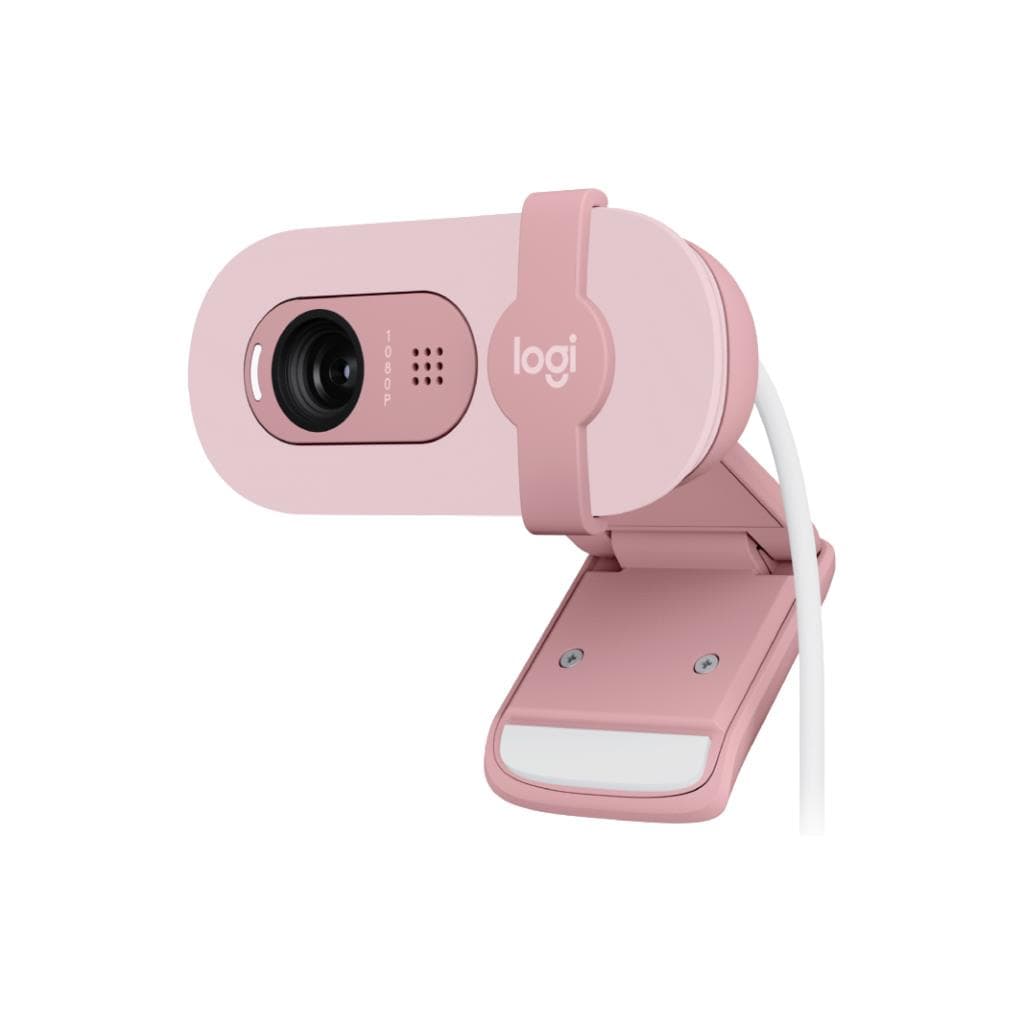


Logitech Brio500 Webcam (ROSE) 1080p HDR with Privacy Shutter
SKU: QCAM-BRIO500-ROSEGadgets & Accessories › Video Conferencing· Model: Brio 500
Please enquire before ordering
The distributor has not yet confirmed the latest price and availability (last checked Sep 15, 2026)
092-251-4017Awaiting stock confirmationManufacturer's warranty
GenuineFree delivery from ฿5,000Tax invoice
กล้องเว็บแคมคุณภาพสูงจาก Logitech รองรับการประชุมออนไลน์ วิดีโอคอล และสตรีมมิ่ง พร้อมระบบปรับแสงอัตโนมัติและไมโครโฟนลดเสียงรบกวน
Key features
- ความละเอียด Full HD 1080p พร้อม HDR
- ระบบปรับแสงอัตโนมัติ RightLight 4
- ไมโครโฟนลดเสียงรบกวนสองตัว
- ชัตเตอร์เปิด-ปิดส่วนตัวแบบหมุนได้
- รองรับการเชื่อมต่อ USB-C และ USB-A
Product description
กล้องเว็บแคม Logitech Brio500 สีชมพู (ROSE) ออกแบบมาเพื่อให้คุณดูดีที่สุดในทุกการประชุมออนไลน์ ด้วยความละเอียด Full HD 1080p และเทคโนโลยี RightLight 4 ที่ปรับแสงอัตโนมัติ ทำให้ภาพคมชัดแม้ในพื้นที่แสงน้อย กล้องมาพร้อมเลนส์กระจกคุณภาพสูง ที่มีมุมมองกว้าง 90° และระบบโฟกัสอัตโนมัติ ช่วยให้ภาพคงความคมชัดตลอดเวลา ไมโครโฟนสองตัวแบบ omni-directional ลดเสียงรบกวนได้อย่างมีประสิทธิภาพ รองรับการใช้งานระยะไกลถึง 1.2 เมตร พร้อมชัตเตอร์เปิด-ปิดส่วนตัวที่สามารถหมุนได้เพื่อความปลอดภัยสูงสุด
More features
- มุมมองกว้าง 90°
- รองรับ Windows Hello ด้วยเซ็นเซอร์อินฟราเรด
- ติดตั้งด้วยแม่เหล็กและไมโครซัคชันพัด
- ใช้งานได้กับทุกแพลตฟอร์มประชุมยอดนิยม
- ผลิตจากวัสดุรีไซเคิล 38% ของพลาสติก
Pros and limitations
Pros
- ภาพคมชัดแม้ในแสงน้อยด้วยเทคโนโลยี RightLight 4
- ไมโครโฟนสองตัวลดเสียงรบกวนได้ดี
- ชัตเตอร์เปิด-ปิดส่วนตัวแบบหมุนได้ ปลอดภัยสูง
- รองรับการเชื่อมต่อ USB-C และ USB-A ใช้งานง่าย
- ติดตั้งด้วยแม่เหล็กและไมโครซัคชันพัด ยึดแน่นบนหน้าจอ
Limitations
- ต้องดาวน์โหลด Logi Tune เพื่อปรับแต่งภาพ
- ไม่มีสาย USB-A แถมมาในกล่อง
Who it is for
เหมาะสำหรับผู้ใช้งานที่ต้องการภาพและเสียงคมชัดในการประชุมออนไลน์ วิดีโอคอล หรือสตรีมมิ่ง โดยเฉพาะในสภาพแวดล้อมแสงน้อย
Color
ชมพู
Connectivity
USB-A
Specifications (32)
- สี
- Off-white (Rose)
- เลนส์
- Glass
- โฟกัส
- Auto focus
- ความลึก
- 1.04 in (26.5 mm)
- ความสูง
- 1.06 in (27 mm)
- น้ำหนัก
- 2.29 oz (65 g)
- ไมโครโฟน
- Dual omni-directional built-in microphone
- การใช้งาน
- Video conferencing, streaming, video calls
- ความกว้าง
- 4.01 in (102 mm)
- สายเคเบิล
- Attached USB-C cable, 5 ft (1.5 m)
- รองรับ Logi Tune
- รองรับ, requires download on Windows and macOS
- การติดตั้ง
- Micro-suction pad with removable film
- รองรับ Logitech Sync
- รองรับ, for company-wide deployment and management
- รองรับ Windows Hello
- รองรับ, via infrared sensor technology
- ความละเอียด
- 1080p/60 fps (up to 1920x1080 pixels)
- ระบบปรับแสง
- RightLight 4
- การเชื่อมต่อ
- USB-A or USB-C plug-and-play
- ระยะรับเสียง
- 1.2 m
- เซ็นเซอร์ภาพ
- 13MP
- การซูมดิจิทัล
- 5x
- วัสดุรีไซเคิล
- 38% post-consumer recycled material
- มุมมองแนวทแยง (dFoV)
- 90°
- การจัดการระยะไกล
- Logitech Sync
- ความละเอียดต่ำสุด
- 720p/90 fps (up to 1280x720 pixels)
- ความละเอียดสูงสุด
- 4K/30 fps (up to 4096 x 2160 pixels)
- ช่องเสียบแม่เหล็ก
- ¼-20 adaptor for 3rd party mounts
- น้ำหนักแพ็กเกจจิ้ง
- 10.58 oz (300 g)
- แพ็กเกจจิ้ง ความยาว
- 5.47 in (13.9 cm)
- แพ็กเกจจิ้ง ความลึก
- 5.28 in (13.4 cm)
- แพ็กเกจจิ้ง ความกว้าง
- 2.80 in (7.1 cm)
- ชัตเตอร์เปิด-ปิดส่วนตัว
- Attachable privacy shutter
- การใช้งานร่วมกับระบบปฏิบัติการ
- Windows, macOS
Compatibility
Windows, macOS, ChromeOS
Datasheets and manuals straight from the manufacturer — select a document to open or download it.
13 questions
Frequently asked questions about this product
Compiled from manufacturer information
Brio500 รองรับการใช้งานกับ Zoom, Google Meet และ Microsoft Teams ได้ไหม?
ใช่ กล้องเว็บแคมนี้รองรับการใช้งานกับแพลตฟอร์มประชุมออนไลน์ทุกประเภท เช่น Zoom, Google Meet และ Microsoft Teams โดยไม่จำเป็นต้องติดตั้งไดรเวอร์เพิ่มเติม
สามารถใช้งานกับแล็ปท็อปที่ไม่มีพอร์ต USB-C ได้หรือไม่?
ได้ กล้องนี้รองรับการเชื่อมต่อผ่านพอร์ต USB-A โดยใช้สาย USB-C ที่แถมมา หรือสามารถใช้อะแดปเตอร์แปลงได้
ชัตเตอร์เปิด-ปิดส่วนตัวทำงานอย่างไร?
ชัตเตอร์เปิด-ปิดส่วนตัวสามารถหมุนได้เพื่อปิดกล้องเมื่อไม่ใช้งาน ช่วยรักษาความเป็นส่วนตัวได้อย่างมีประสิทธิภาพ โดยไม่ต้องพึ่งซอฟต์แวร์
Brio500 มีระบบปรับแสงอัตโนมัติหรือไม่?
ใช่ กล้องนี้มาพร้อมเทคโนโลยี RightLight 4 ที่ปรับแสงอัตโนมัติให้ภาพดูสว่างและคมชัดแม้ในพื้นที่แสงน้อยหรือแสงจ้า
สามารถติดตั้งบนจอคอมพิวเตอร์ที่ไม่มีพื้นผิวเรียบได้ไหม?
ได้ โดยใช้ไมโครซัคชันพัดที่มาพร้อมกล้อง สามารถติดตั้งได้กับจอที่มีพื้นผิวเรียบและสะอาด แม้จะเป็นกระจกหรือพลาสติก
รองรับการใช้งานกับ Windows Hello ไหม?
ใช่ กล้องนี้มีเซ็นเซอร์อินฟราเรดที่รองรับการล็อกอินด้วย Windows Hello ได้อย่างรวดเร็วและปลอดภัย
ต้องติดตั้งซอฟต์แวร์เพิ่มเติมไหม?
สามารถใช้งานได้ทันทีโดยไม่ต้องติดตั้งไดรเวอร์ แต่หากต้องการปรับแต่งค่าภาพหรือแสง แนะนำให้ดาวน์โหลด Logi Tune จากเว็บไซต์ Logitech
มีการรับประกันหรือไม่?
มี ลูกค้าสามารถขอคืนสินค้าภายใน 30 วันหลังจากซื้อได้ โดยไม่มีค่าใช้จ่ายเพิ่มเติม
Is it in stock?
We are confirming the latest stock and price of the Logitech Brio500 Webcam (ROSE) 1080p HDR with Privacy Shutter with the distributor. Please contact us before ordering at 092-251-4017 or sales@gist.co.th.
How much does it cost?
The distributor has not yet confirmed the latest price and availability. Please contact us before ordering at 092-251-4017 or sales@gist.co.th.
How long is the warranty?
The warranty follows the manufacturer's terms for each model; ask our sales team for the warranty period of this model. To make a warranty claim, call 092-251-4017 or 065-523-5262, or email sales@gist.co.th (Mon–Fri 9:00–18:00), then send the product with your order number to our head office, or bring it to the head office in person.
How long does delivery take?
Orders placed before 12:00 on a business day are delivered within 1–3 business days (Bangkok and vicinity) or 2–5 business days (other provinces). Free delivery on orders of ฿5,000 or more (a ฿150 delivery fee applies below this amount).
Is it genuine?
Genuine products sourced from distributors in Thailand, covered by the manufacturer's warranty. Full tax invoices are available.
Didn't find the answer you need?
Loading reviews…
Genuine products
Sourced from distributors in Thailand and covered by the manufacturer's warranty
Warranty period
According to the manufacturer's terms for each model
Covered by the manufacturer's warranty; you can make claims through GIST
Claims through GIST
Ship the product to our head office or bring it in person
Warranty conditions
- A receipt or other proof of purchase is required
- The product must not have been modified or altered
- Damage caused by misuse is not covered by the warranty
- To make a warranty claim, call 092-251-4017 or 065-523-5262, or email sales@gist.co.th (Mon–Fri 9:00–18:00), then send the product with your order number to our head office, or bring it to the head office in person.Head office: 554 Sky Nine Center, Floor 12A, Room 554/62, Asok-Din Daeng Road, Din Daeng Subdistrict, Din Daeng District, Bangkok 10400
More in Video Conferencing