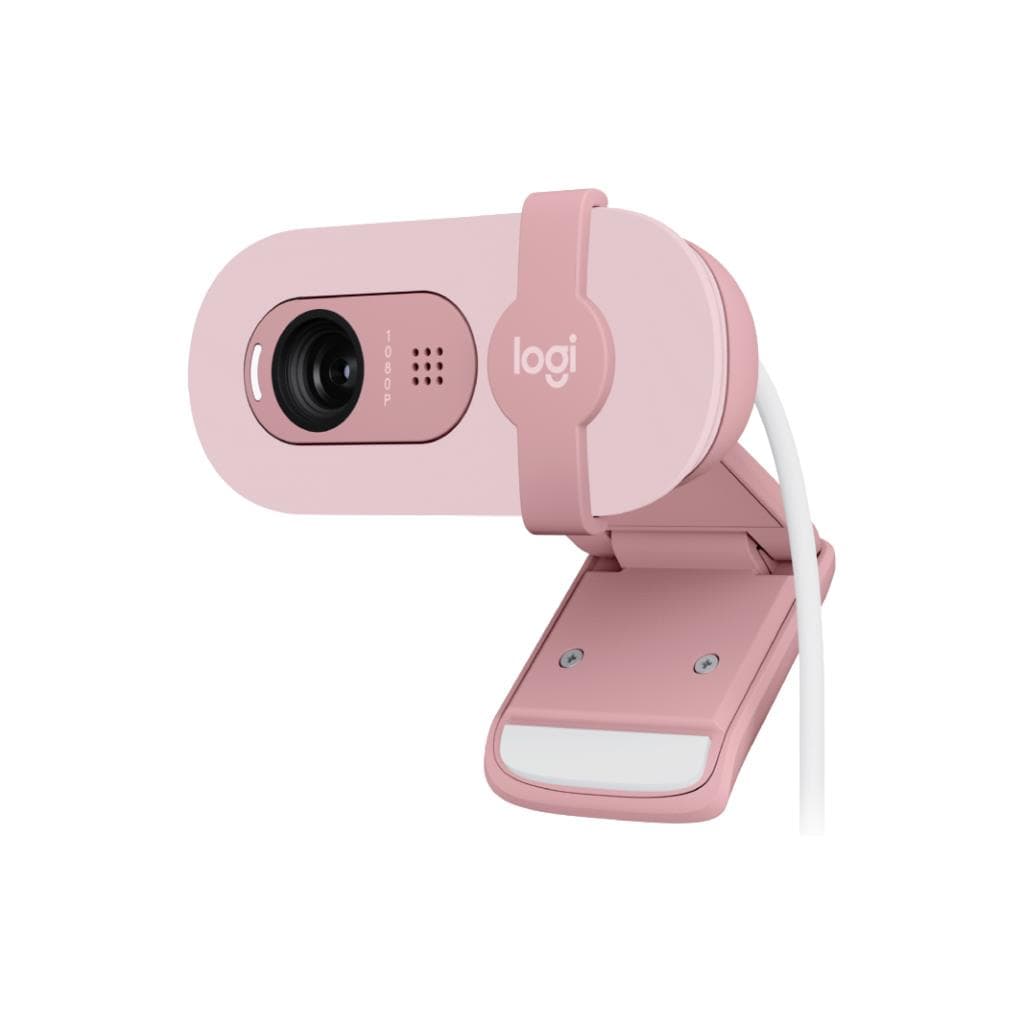


Logitech Brio 300 Full HD Webcam (OFFWHITE) - 1080p Auto Light Correction
SKU: QCAM-BRIO300-OFFWHITEGadgets & Accessories › Video Conferencing· Model: Brio 300
Please enquire before ordering
The distributor has not yet confirmed the latest price and availability (last checked Jun 15, 2026)
092-251-4017Awaiting stock confirmationManufacturer's warranty
GenuineFree delivery from ฿5,000Tax invoice
เว็บแคม Full HD ความละเอียด 1080p พร้อมระบบปรับแสงอัตโนมัติ RightLight 2 และชัตเตอร์เปิด-ปิดส่วนตัว ใช้สำหรับประชุมออนไลน์ ทำงานจากบ้าน หรือไลฟ์สตรีมมิ่ง
Key features
- ความละเอียด Full HD 1080p 60 fps ภาพคมชัดสมจริง
- ระบบปรับแสงอัตโนมัติ RightLight 2 ดูดีในทุกสภาพแสง
- เลนส์แก้วคุณภาพสูง โฟกัสออโต้ ไม่เบลอ
- ชัตเตอร์เปิด-ปิดส่วนตัว ป้องกันการรั่วไหลของข้อมูล
- ผลิตจากพลาสติกนำกลับมาใช้ใหม่อย่างน้อย 48%
Product description
Logitech Brio 300 คือเว็บแคม Full HD ที่ออกแบบมาเพื่อให้คุณดูดีในทุกการประชุมออนไลน์ ด้วยความละเอียด 1920 x 1080 พิกเซล และรองรับเฟรมเรตสูงสุด 60 fps ทำให้ภาพลื่นไหล ไม่กระตุก ระบบ RightLight 2 ช่วยปรับแสงอัตโนมัติในสภาพแวดล้อมที่มืดหรือสว่างจ้า ทำให้ใบหน้าของคุณชัดเจนและสมจริง พร้อมเลนส์แก้วคุณภาพสูงและโฟกัสออโต้เพื่อภาพคมชัดตลอดเวลา เว็บแคมรุ่นนี้ผลิตจากพลาสติกที่มีส่วนผสมของพลาสติกนำกลับมาใช้ใหม่อย่างน้อย 48% จึงเป็นมิตรกับสิ่งแวดล้อม และมาพร้อมชัตเตอร์เปิด-ปิดเพื่อความปลอดภัยส่วนตัว รองรับการเชื่อมต่อ USB-C แบบ Plug-and-Play ใช้งานได้ทันทีกับคอมพิวเตอร์ทุกรุ่น
More features
- เชื่อมต่อ USB-C แบบ Plug-and-Play ใช้งานง่าย
- รองรับการตั้งค่าผ่านแอป Logi Tune
- มีขาตั้งยืดหยุ่น ติดตั้งได้กับจอทุกขนาด
- น้ำหนักเบาเพียง 74.6 กรัม ใช้งานสะดวก
- รองรับ Windows Hello ผ่านเซ็นเซอร์อินฟราเรด
Pros and limitations
Pros
- ภาพ Full HD คมชัด 60 fps ไม่กระตุก
- ระบบปรับแสงอัตโนมัติ RightLight 2 ดูดีในทุกสภาพแวดล้อม
- เลนส์แก้วคุณภาพสูง โฟกัสออโต้ ไม่เบลอ
- ชัตเตอร์เปิด-ปิดส่วนตัว ปลอดภัยสูง
- ผลิตจากพลาสติกนำกลับมาใช้ใหม่อย่างน้อย 48% ดีต่อสิ่งแวดล้อม
Limitations
- ไม่มีพอร์ต HDMI หรือ DisplayPort
- ต้องใช้แอป Logi Tune เพื่อปรับแต่งค่าต่าง ๆ
Who it is for
เหมาะสำหรับพนักงานที่ทำงานจากบ้าน ผู้ประกอบการออนไลน์ หรือครูสอนออนไลน์ที่ต้องการภาพและเสียงชัดเจนในการประชุมหรือสตรีมมิ่ง
Color
ขาว
Connectivity
USB-A
Specifications (29)
- พอร์ต
- USB-C
- เลนส์
- Glass
- ประเภทจอ
- CMOS Image Sensor
- โฟกัส
- Autofocus
- ขาตั้ง
- Detachable universal mounting clip
- RightLight Technology
- RightLight 2
- ระบบเสียง
- Dual omni-directional built-in microphone
- อัตราการรีเฟรช
- 60 fps
- ความยาวสาย
- 1.5 m (5 ft)
- ความละเอียด
- 1920 x 1080 (Full HD)
- การเชื่อมต่อ
- Plug-and-Play
- มุมมองแนวนอน
- 90°
- ระยะรับเสียง
- 1.2 m
- เซ็นเซอร์ภาพ
- 13MP
- การซูมดิจิทัล
- 5x
- มุมมองแนวตั้ง
- 78°
- มุมมองแนวทแยง
- 65°
- การจัดการระยะไกล
- Logitech Sync
- การติดตั้งบนแท่น
- ¼" thread for tripod mounting
- การตั้งค่าผ่านแอป
- Download Logi Tune at www.logitech.com/tune
- แอปพลิเคชันควบคุม
- Logi Tune
- การอัปเดตซอฟต์แวร์
- Periodic software and firmware updates via Logi Tune
- ขนาด (สูง x กว้าง x ลึก)
- 65.63 mm x 53.1 mm x 45 mm
- เซ็นเซอร์อินฟราเรด
- Infrared sensor technology for Windows Hello
- ชัตเตอร์เปิด-ปิดส่วนตัว
- Attachable Privacy Shutter
- การรองรับระบบปฏิบัติการ
- Windows, macOS
- น้ำหนัก (รวมสายและขาตั้ง)
- 74.6 g
- การใช้งานร่วมกับระบบประชุม
- Certified for leading meeting platforms
- ความจุพลาสติกนำกลับมาใช้ใหม่
- 48% post-consumer recycled material
Datasheets and manuals straight from the manufacturer — select a document to open or download it.
12 questions
Frequently asked questions about this product
Compiled from manufacturer information
Brio 300 รองรับการใช้งานกับ Zoom, Google Meet และ Microsoft Teams ได้ไหม?
ใช่ Brio 300 ได้รับการรับรองจากแพลตฟอร์มประชุมออนไลน์ชั้นนำ เช่น Zoom, Google Meet และ Microsoft Teams โดยไม่ต้องติดตั้งไดรเวอร์เพิ่มเติม ใช้งานได้ทันทีเมื่อเสียบ USB-C เข้ากับคอมพิวเตอร์
สามารถตั้งค่าความสว่างหรือสีของภาพได้อย่างไร?
สามารถปรับแต่งค่าความสว่าง สี และเอฟเฟกต์ภาพผ่านแอป Logi Tune ที่ดาวน์โหลดได้จากเว็บไซต์ logitech.com/tune โดยรองรับทั้ง Windows และ macOS
Brio 300 ใช้พลังงานจากไหน?
ใช้พลังงานจากพอร์ต USB-C บนคอมพิวเตอร์โดยตรง ไม่ต้องใช้อุปกรณ์ชาร์จเพิ่มเติม และรองรับการใช้งานต่อเนื่องได้นานโดยไม่ต้องกังวลเรื่องแบตเตอรี่
สามารถติดตั้งบนแท่นหรือขาตั้งกล้องได้ไหม?
ใช่ Brio 300 มีช่องเสียบแบบ¼" สำหรับติดตั้งกับขาตั้งกล้องหรือแท่นยึดได้ทันที โดยขาตั้งไม่ได้อยู่ในกล่อง
มีระบบ Windows Hello ใช้งานได้ไหม?
ใช่ Brio 300 มาพร้อมเซ็นเซอร์อินฟราเรดที่รองรับการล็อกอินด้วย Windows Hello ทำให้สามารถเปิดเครื่องและเข้าระบบได้ภายในไม่กี่วินาทีโดยไม่ต้องพิมพ์รหัสผ่าน
ชัตเตอร์เปิด-ปิดส่วนตัวใช้งานอย่างไร?
เปิดชัตเตอร์โดยการเลื่อนจากด้านซ้ายหรือขวาของตัวกล้อง ชัตเตอร์จะล็อกไว้ที่ตำแหน่ง 'เปิด' ปิดได้เมื่อเลื่อนกลับ ช่วยป้องกันการถ่ายทอดภาพโดยไม่ตั้งใจ
สามารถใช้งานร่วมกับ Mac และ Windows ได้ไหม?
ใช่ Brio 300 รองรับทั้งระบบปฏิบัติการ Windows และ macOS โดยสามารถดาวน์โหลดแอป Logi Tune เพื่อปรับแต่งค่าต่าง ๆ ได้อย่างเต็มประสิทธิภาพ
Is it in stock?
We are confirming the latest stock and price of the Logitech Brio 300 Full HD Webcam (OFFWHITE) - 1080p Auto Light Correction with the distributor. Please contact us before ordering at 092-251-4017 or sales@gist.co.th.
How much does it cost?
The distributor has not yet confirmed the latest price and availability. Please contact us before ordering at 092-251-4017 or sales@gist.co.th.
How long is the warranty?
The warranty follows the manufacturer's terms for each model; ask our sales team for the warranty period of this model. To make a warranty claim, call 092-251-4017 or 065-523-5262, or email sales@gist.co.th (Mon–Fri 9:00–18:00), then send the product with your order number to our head office, or bring it to the head office in person.
How long does delivery take?
Orders placed before 12:00 on a business day are delivered within 1–3 business days (Bangkok and vicinity) or 2–5 business days (other provinces). Free delivery on orders of ฿5,000 or more (a ฿150 delivery fee applies below this amount).
Is it genuine?
Genuine products sourced from distributors in Thailand, covered by the manufacturer's warranty. Full tax invoices are available.
Didn't find the answer you need?
Loading reviews…
Genuine products
Sourced from distributors in Thailand and covered by the manufacturer's warranty
Warranty period
According to the manufacturer's terms for each model
Covered by the manufacturer's warranty; you can make claims through GIST
Claims through GIST
Ship the product to our head office or bring it in person
Warranty conditions
- A receipt or other proof of purchase is required
- The product must not have been modified or altered
- Damage caused by misuse is not covered by the warranty
- To make a warranty claim, call 092-251-4017 or 065-523-5262, or email sales@gist.co.th (Mon–Fri 9:00–18:00), then send the product with your order number to our head office, or bring it to the head office in person.Head office: 554 Sky Nine Center, Floor 12A, Room 554/62, Asok-Din Daeng Road, Din Daeng Subdistrict, Din Daeng District, Bangkok 10400
More in Video Conferencing