
Logitech Extend BYOD Connection Kit (Black)
SKU: EXTEND-BLACKGadgets & Accessories › Video Conferencing
฿25,986
Price includes 7% VATPrice updated November 11, 2026
Out of stockManufacturer's warranty
Temporarily out of stock — ask us about the restock date or an alternative model
Call us 092-251-4017Send a question to salesGenuineFree delivery from ฿5,000Tax invoice
USB-C connectivity device for BYOD meeting rooms, supports personal device use, single-cable connection, easy to use, supports HDMI 4K60 and two USB 2.0 ports
Key features
- Connect via a single USB-C cable for easy setup
- Supports video conferencing from personal devices (BYOD)
- Supports remote connection up to 100 meters
- Supports high-quality HDMI 4K60 4:4:4
- Includes two USB 2.0 ports for peripherals
Product description
Logitech Extend enables users to instantly connect personal devices such as laptops or smartphones to Logitech video conferencing cameras in meeting rooms using just a single USB-C cable, without requiring additional drivers. Supports remote connectivity up to 100 meters via Category cable, making it ideal for large meeting rooms or spaces requiring flexible device placement. Fully compatible with Logitech Rally Bar cameras and USB cameras supporting BYOD mode automatically. Features an HDMI 2.0 port for high-quality 4K60 4:4:4 video and two USB 2.0 ports for connecting peripherals.
More features
- Mountable on desk or wall using VESA 100x100
- Supports management via Logitech Sync
- Auto-switches between 100-240V power
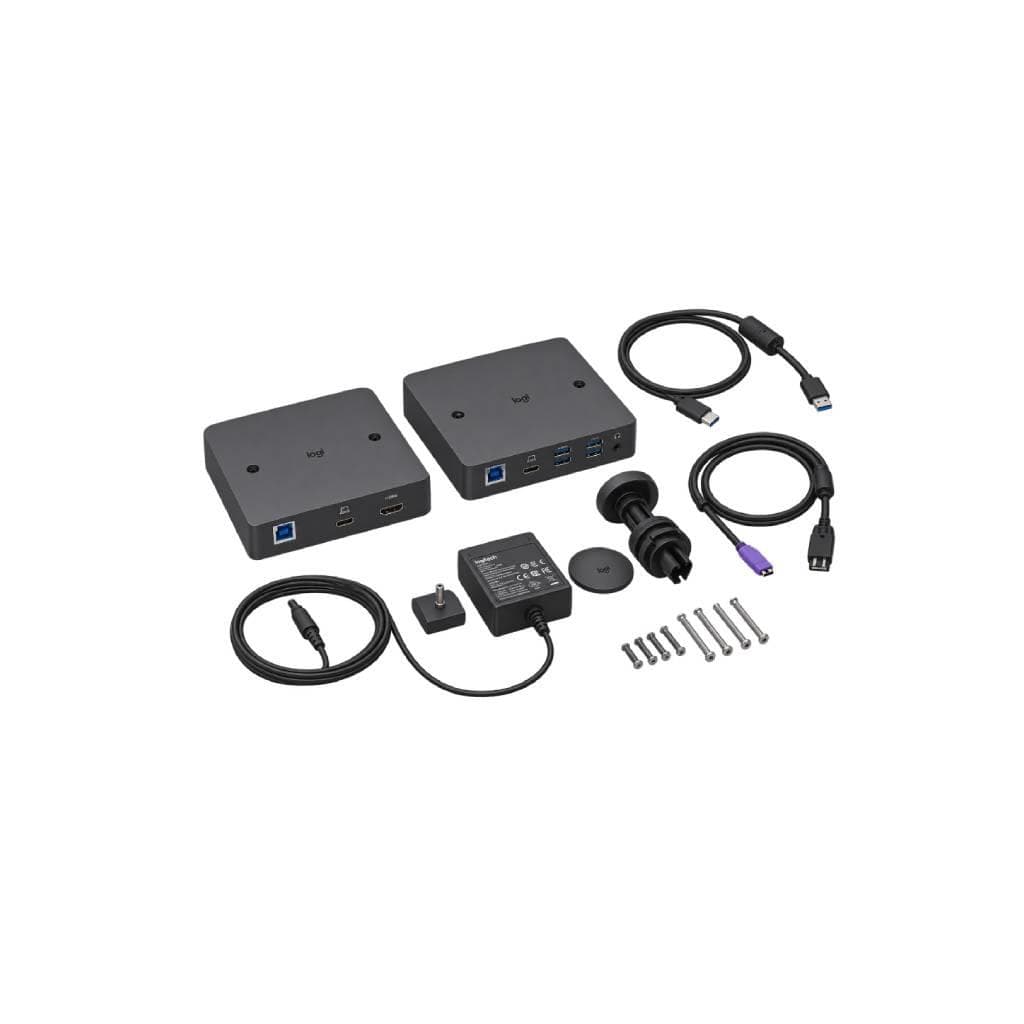
- Includes power cable and mounting hardware
- Ideal for large meeting rooms requiring flexibility
Pros and limitations
Pros
- Connects with a single cable, easy to use, no drivers required
- Supports up to 100 meters of remote connectivity, flexible for placement
- Supports high-quality HDMI 4K60 4:4:4
- Mounts on desk or wall using VESA standard
- Supports management via Logitech Sync for organizations
Limitations
- No built-in speakers
- No direct Bluetooth or Wi-Fi support
- Requires a Logitech video camera that supports BYOD mode
Who it is for
Ideal for organizations that need BYOD meeting rooms, supporting connections from personal devices such as laptops or smartphones via a single USB-C cable
Specifications (11)
- port
- HDMI 2.0 4K60 4:4:4, USB 2.0 Type A x2, Micro USB Management Interface, USB-C (TX), RJ45
- size
- Display Side Box: 143 mm (H) x 143 mm (W) x 34.5 mm (D), Table Side Box: 143 mm (H) x 143 mm (W) x 34.5 mm (D)
- color
- Black
- Features
- BYOD Extension, Extended reach up to 100 meters, Plug-and-play, Auto-sensing power
- Interface
- USB-C, HDMI 2.0, RJ45
- Connection
- USB-C, RJ45
- Dimensions
- Display Side Box: 143 mm (H) x 143 mm (W) x 34.5 mm (D), Table Side Box: 143 mm (H) x 143 mm (W) x 34.5 mm (D)
- Management
- Logitech Sync
- VESA Mount
- 100 x 100 mm
- Input Voltage
- 100-240V
- number of ports
- HDMI 2.0 1 port, USB 2.0 Type A 2 ports, Micro USB 1 port, USB-C 1 port, RJ45 2 ports
Datasheets and manuals straight from the manufacturer — select a document to open or download it.
13 questions
Frequently asked questions about this product
Compiled from manufacturer information
Which Logitech video cameras is the Logitech Extend compatible with?
Supports Logitech video cameras that support BYOD mode, especially Rally Bar models, and USB cameras that support this mode. Check the list of supported models at logitech.com/support/extend-compatibility
Can I connect a USB-C cable to a laptop?
Yes, you can connect a USB-C cable to a laptop or smartphone to start a video meeting immediately, without installing additional drivers. Supports use with your regular video conferencing platforms.
How far can it be connected?
Can be connected up to 100 meters using Category cable, making it ideal for large meeting rooms or areas requiring equipment placement at a distance.
What power source is required?
Uses 100-240V power automatically, supports electricity in multiple countries, with a power cable included in the box.
Can it be mounted on a desk or wall?
Yes, it supports mounting on a desk or wall using VESA 100x100 mm standard, and mounting hardware is included in the box.
What ports are available?
Has an HDMI 2.0 port for 4K60 4:4:4 video, two USB 2.0 Type A ports, a Micro USB port for management, and a USB-C port for connecting user devices.
Do I need to install additional software?
No, it works immediately after connection, no additional drivers required. Supports management via Logitech Sync for organizations.
Is it compatible with smartphones?
Yes, supports connecting from a smartphone via USB-C to start a video meeting instantly through your usual platform, such as Zoom, Teams, etc.
Is it in stock?
The Logitech Extend BYOD Connection Kit (Black) is temporarily out of stock. Ask us about the restock date or an alternative model at sales@gist.co.th or 092-251-4017.
How much does it cost?
The price is ฿25,986 (including 7% VAT). It is currently out of stock; ask us about the restock date at sales@gist.co.th. Business customers can request a quotation at sales@gist.co.th.
How long is the warranty?
The warranty follows the manufacturer's terms for each model; ask our sales team for the warranty period of this model. To make a warranty claim, call 092-251-4017 or 065-523-5262, or email sales@gist.co.th (Mon–Fri 9:00–18:00), then send the product with your order number to our head office, or bring it to the head office in person.
How long does delivery take?
Orders placed before 12:00 on a business day are delivered within 1–3 business days (Bangkok and vicinity) or 2–5 business days (other provinces). Free delivery on orders of ฿5,000 or more (a ฿150 delivery fee applies below this amount).
Is it genuine?
Genuine products sourced from distributors in Thailand, covered by the manufacturer's warranty. Full tax invoices are available.
Didn't find the answer you need?
Loading reviews…
Genuine products
Sourced from distributors in Thailand and covered by the manufacturer's warranty
Warranty period
According to the manufacturer's terms for each model
Covered by the manufacturer's warranty; you can make claims through GIST
Claims through GIST
Ship the product to our head office or bring it in person
Warranty conditions
- A receipt or other proof of purchase is required
- The product must not have been modified or altered
- Damage caused by misuse is not covered by the warranty
- To make a warranty claim, call 092-251-4017 or 065-523-5262, or email sales@gist.co.th (Mon–Fri 9:00–18:00), then send the product with your order number to our head office, or bring it to the head office in person.Head office: 554 Sky Nine Center, Floor 12A, Room 554/62, Asok-Din Daeng Road, Din Daeng Subdistrict, Din Daeng District, Bangkok 10400
More in Video Conferencing