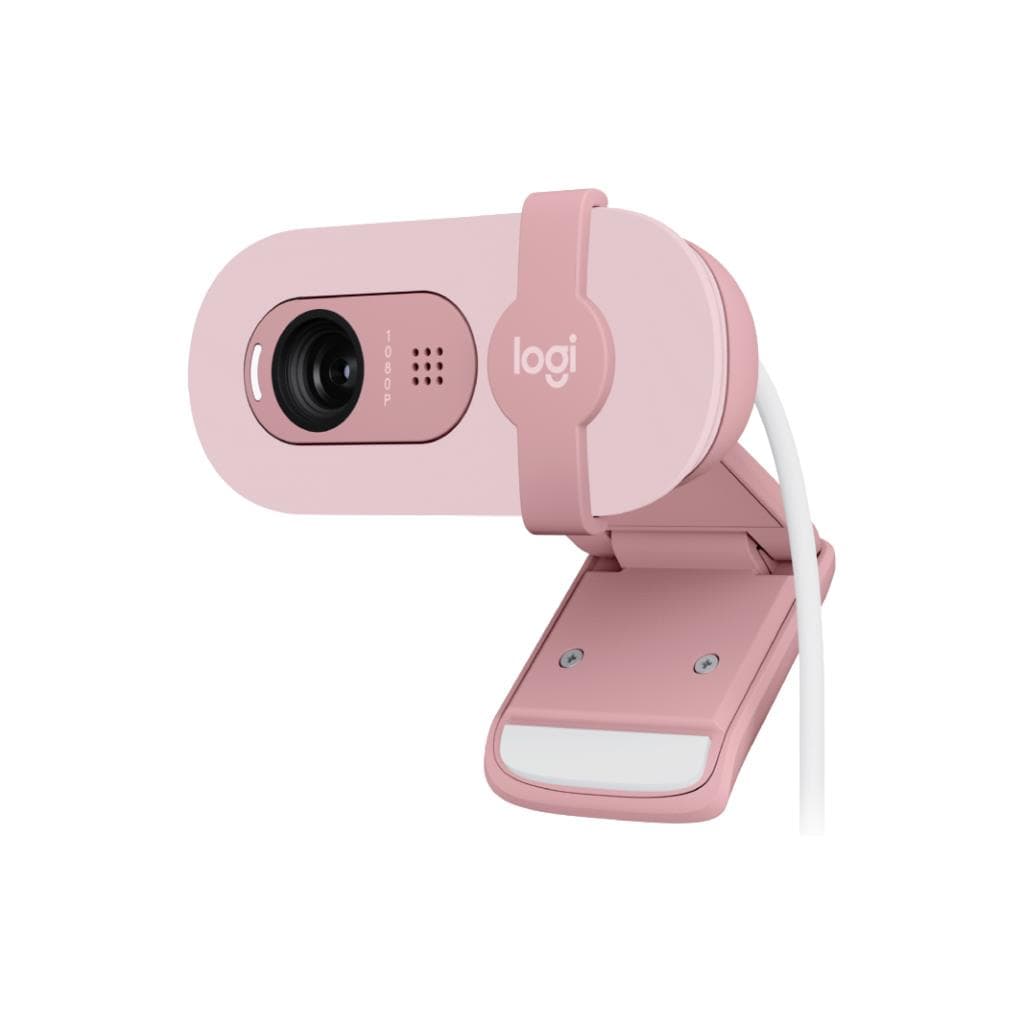


Logitech Brio 100 Full HD Webcam - GRAPHITE
SKU: QCAM-BRIO100-GRAPHITEGadgets & Accessories › Video Conferencing· Model: Brio 100
฿881
Price includes 7% VATPrice updated October 7, 2026
Out of stockManufacturer's warranty
Temporarily out of stock — ask us about the restock date or an alternative model
Call us 092-251-4017Send a question to salesGenuineFree delivery from ฿5,000Tax invoice
เว็บแคม Full HD 1080p รุ่นประหยัดจาก Logitech พร้อมไมโครโฟนในตัว ชัตเตอร์เปิด-ปิดส่วนตัวอัตโนมัติ และเทคโนโลยี RightLight เพื่อภาพสว่างชัดแม้แสงน้อย เหมาะสำหรับการประชุมออนไลน์ วิดีโอคอล และทำงานจากที่บ้าน
Key features
- Full HD 1080p ความละเอียดสูง คมชัดทุกการประชุม
- RightLight เพิ่มความสว่างภาพได้สูงสุด 50%
- ไมโครโฟนในตัวจับเสียงรอบทิศทาง ระยะ 1.2 เมตร
- ชัตเตอร์เปิด-ปิดส่วนตัวอัตโนมัติ ปลอดภัยทุกครั้งที่ไม่ใช้งาน
- รองรับการเชื่อมต่อ USB-A และ USB-C (ผ่านอะแดปเตอร์)
Product description
Logitech Brio 100 เว็บแคม Full HD 1080p รุ่นประหยัดที่ออกแบบมาเพื่อประสบการณ์การประชุมออนไลน์ที่ดีขึ้นอย่างแท้จริง โดยให้ความละเอียดสูงถึง 1920 x 1080 พิกเซล พร้อมเทคโนโลยี RightLight ที่ช่วยเพิ่มความสว่างของภาพได้สูงสุด 50% เมื่อเทียบกับเว็บแคมรุ่นก่อนหน้าอย่าง C270 ทำให้คุณดูชัดเจนแม้ในพื้นที่มีแสงน้อยหรือแสงจ้า ไมโครโฟนสองตัวแบบ omni-directional ช่วยจับเสียงได้รอบทิศทาง ระยะถึง 1.2 เมตร ทำให้คู่สนทนาได้ยินเสียงชัดเจนในทุกการประชุม ไม่ว่าจะใช้ Zoom, Microsoft Teams หรือ Google Meet ก็รองรับได้ทันที โดยไม่ต้องติดตั้งไดรเวอร์เพิ่มเติม
More features
- ออกแบบด้วยพลาสติกรีไซเคิล 38% ลดคาร์บอนฟุตพรินต์
Pros and limitations
Pros
- ภาพ Full HD 1080p คมชัดแม้ในแสงน้อยด้วย RightLight 3
- ไมโครโฟนสองตัวจับเสียงได้รอบทิศทาง ระยะ 1.2 เมตร
- ชัตเตอร์เปิด-ปิดส่วนตัวอัตโนมัติ ปลอดภัยทุกครั้งที่ไม่ใช้งาน
- รองรับการเชื่อมต่อ USB-C และ USB-A ผ่านอะแดปเตอร์
- ออกแบบด้วยพลาสติกรีไซเคิล 38% ลดคาร์บอนฟุตพรินต์
Limitations
- ไม่รองรับ Windows Hello
- ไม่มีขาตั้งแบบฝังในตัว
- ต้องใช้ Logi Options+ เพื่อปรับแต่งภาพ
Who it is for
เหมาะสำหรับพนักงานที่ทำงานจากที่บ้าน ผู้ใช้งานออนไลน์ทั่วไป และผู้ที่ต้องการภาพชัดเจนในทุกการประชุมออนไลน์
Color
GRAPHITE
Connectivity
USB-A
Specifications (30)
- สี
- Graphite
- RightLight
- RightLight 3
- พอร์ต
- USB-A, USB-C (ผ่านอะแดปเตอร์)
- วัสดุ
- 38% post-consumer recycled material
- เลนส์
- Glass
- ประเภทจอ
- CMOS
- โฟกัส
- Auto-focus
- น้ำหนัก
- 65 g
- ขนาด (ลึก)
- 26.5 mm
- ขนาด (สูง)
- 27 mm
- ไมโครโฟน
- Dual omni-directional built-in microphone
- การจัดวาง
- Detachable universal mounting clip
- ซอฟต์แวร์
- Logi Options+
- อัตราการรีเฟรช
- 60 fps
- ขนาด (กว้าง)
- 102 mm
- ความละเอียด
- 1920 x 1080
- เซนเซอร์ภาพ
- 13MP
- การยึดแนวนอน
- ¼" thread for tripod mounting
- การเชื่อมต่อ
- Plug-and-play
- มุมมองแนวนอน
- 90°
- ระยะจับเสียง
- 1.2 m
- การซูมดิจิทัล
- 5x
- มุมมองแนวตั้ง
- 78°
- มุมมองเชิงทแยง
- 65°
- การจัดการระยะไกล
- Logitech Sync
- ความยาวสายเคเบิล
- 1.5 m
- คาร์บอนฟุตพรินต์
- 6.29 kg CO2e
- ชัตเตอร์เปิด-ปิดส่วนตัว
- Integrated privacy shutter
- การรองรับระบบปฏิบัติการ
- Windows, macOS
- การใช้งานร่วมกับแพลตฟอร์ม
- Microsoft Teams, Zoom, Google Meet
Compatibility
Windows, macOS, Chrome OS
Datasheets and manuals straight from the manufacturer — select a document to open or download it.
13 questions
Frequently asked questions about this product
Compiled from manufacturer information
Brio 100 รองรับการใช้งานกับ Zoom และ Microsoft Teams ได้ไหม?
ใช่ รองรับการใช้งานกับ Zoom, Microsoft Teams และ Google Meet โดยไม่ต้องติดตั้งไดรเวอร์เพิ่มเติม เหมาะสำหรับการประชุมออนไลน์ทุกแพลตฟอร์ม
ชัตเตอร์เปิด-ปิดส่วนตัวของ Brio 100 ใช้งานได้จริงไหม?
ใช่ ชัตเตอร์เปิด-ปิดส่วนตัวแบบฝังในตัว สามารถเลื่อนเปิด-ปิดได้ทันทีเมื่อไม่ใช้งาน เพื่อความปลอดภัยและส่วนตัวอย่างมั่นใจ
Brio 100 มีการซูมภาพได้ไหม?
รองรับการซูมดิจิทัล 5 เท่า ช่วยให้เห็นรายละเอียดใกล้ชิดขึ้น โดยไม่ต้องย้ายตำแหน่งเว็บแคม
Brio 100 ใช้กับแล็ปท็อปหรือจอภาพได้ไหม?
ใช่ เว็บแคมมีขาตั้งแบบถอดได้ สามารถยึดแน่นกับจอภาพ หน้าจอ LCD หรือแล็ปท็อปได้ทันที
Brio 100 รองรับการใช้งานกับ Mac และ Windows ไหม?
ใช่ รองรับระบบปฏิบัติการ Windows และ macOS โดยสามารถปรับแต่งภาพและเสียงผ่านซอฟต์แวร์ Logi Options+
Brio 100 มีการจัดเก็บข้อมูลหรือสตรีมวิดีโอได้ไหม?
ไม่มีหน่วยความจำภายใน ไม่สามารถบันทึกวิดีโอได้โดยตรง ต้องใช้โปรแกรมภายนอก เช่น Zoom หรือ OBS Studio
Brio 100 มีการรองรับ Windows Hello ไหม?
ไม่รองรับ เว็บแคมรุ่นนี้ไม่มีเซ็นเซอร์อินฟราเรดสำหรับล็อกอินด้วย Windows Hello
Brio 100 ใช้พลังงานจากไหน?
ใช้พลังงานผ่านพอร์ต USB-A หรือ USB-C โดยไม่ต้องใช้อะแดปเตอร์ไฟพิเศษ
Is it in stock?
The Logitech Brio 100 Full HD Webcam - GRAPHITE is temporarily out of stock. Ask us about the restock date or an alternative model at sales@gist.co.th or 092-251-4017.
How much does it cost?
The price is ฿881 (including 7% VAT). It is currently out of stock; ask us about the restock date at sales@gist.co.th. Business customers can request a quotation at sales@gist.co.th.
How long is the warranty?
Warranty period: null (manufacturer's terms). To make a warranty claim, call 092-251-4017 or 065-523-5262, or email sales@gist.co.th (Mon–Fri 9:00–18:00), then send the product with your order number to our head office, or bring it to the head office in person.
How long does delivery take?
Orders placed before 12:00 on a business day are delivered within 1–3 business days (Bangkok and vicinity) or 2–5 business days (other provinces). Free delivery on orders of ฿5,000 or more (a ฿150 delivery fee applies below this amount).
Is it genuine?
Genuine products sourced from distributors in Thailand, covered by the manufacturer's warranty. Full tax invoices are available.
Didn't find the answer you need?
Loading reviews…
Genuine products
Sourced from distributors in Thailand and covered by the manufacturer's warranty
Warranty period
According to the manufacturer's terms for each model
Covered by the manufacturer's warranty; you can make claims through GIST
Claims through GIST
Ship the product to our head office or bring it in person
Warranty conditions
- A receipt or other proof of purchase is required
- The product must not have been modified or altered
- Damage caused by misuse is not covered by the warranty
- To make a warranty claim, call 092-251-4017 or 065-523-5262, or email sales@gist.co.th (Mon–Fri 9:00–18:00), then send the product with your order number to our head office, or bring it to the head office in person.Head office: 554 Sky Nine Center, Floor 12A, Room 554/62, Asok-Din Daeng Road, Din Daeng Subdistrict, Din Daeng District, Bangkok 10400
More in Video Conferencing