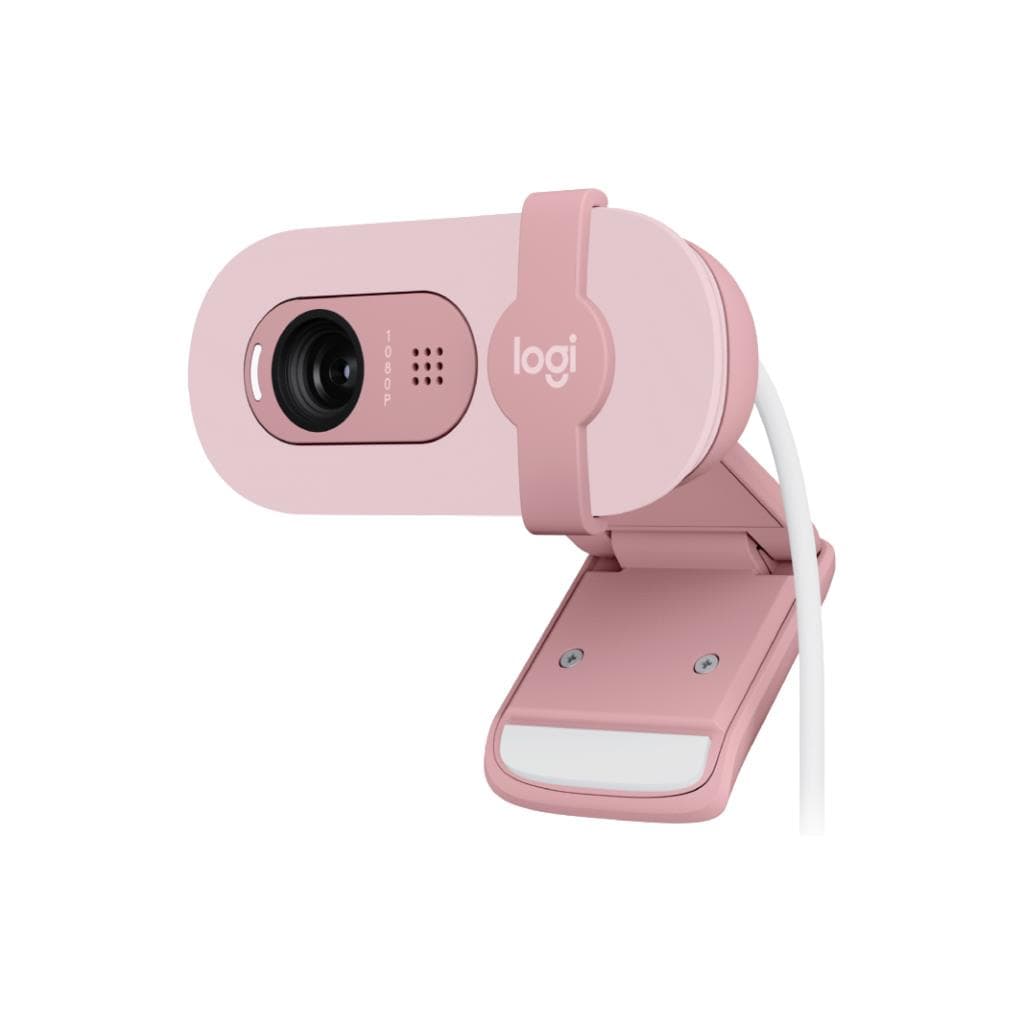


Logitech Brio 100 Full HD Webcam - OFFWHITE
SKU: QCAM-BRIO100-OFFWHITEGadgets & Accessories › Video Conferencing· Model: Brio 100
฿881
Price includes 7% VATPrice updated October 7, 2026
Out of stockManufacturer's warranty
Temporarily out of stock — ask us about the restock date or an alternative model
Call us 092-251-4017Send a question to salesGenuineFree delivery from ฿5,000Tax invoice
เว็บแคม Full HD 1080p พร้อมระบบปรับแสงอัตโนมัติ RightLight 3 และชัตเตอร์เปิด-ปิดความเป็นส่วนตัว ใช้สำหรับประชุมออนไลน์ เรียนออนไลน์ หรือไลฟ์สตรีมอย่างมืออาชีพ
Key features
- Full HD 1080p ความละเอียดสูง ชัดเจนทุกการประชุม
- RightLight 3 ปรับแสงอัตโนมัติ ได้ภาพสว่างขึ้น 50%
- ไมโครโฟนคู่จับเสียงไกลถึง 1.2 เมตร
- ชัตเตอร์เปิด-ปิดความเป็นส่วนตัวแบบฝังในตัว
- รองรับการติดตั้งบนจอ แล็ปท็อป หรือขาตั้งกล้อง
Product description
Logitech Brio 100 เว็บแคม Full HD 1080p มอบภาพชัดเจนทุกครั้งที่คุณเริ่มประชุมออนไลน์ ด้วยเซ็นเซอร์ภาพความละเอียดสูง 13MP และเทคโนโลยี RightLight 3 ที่ช่วยเพิ่มความสว่างได้สูงสุด 50% ในสภาพแสงน้อย ทำให้ใบหน้าของคุณดูชัดเจนและเป็นธรรมชาติแม้ในห้องมืด พร้อมไมโครโฟนคู่แบบ Omni-directional ที่จับเสียงได้ไกลถึง 1.2 เมตร ช่วยให้เสียงชัดเจนแม้ในพื้นที่กว้าง ตัวเว็บแคมมาพร้อมชัตเตอร์เปิด-ปิดความเป็นส่วนตัวแบบฝังในตัว ป้องกันการรั่วไหลของข้อมูลภาพได้อย่างมั่นใจ ใช้งานได้ทั้งกับคอมพิวเตอร์และแล็ปท็อปผ่านพอร์ต USB-A หรือ USB-C (ต้องใช้อะแดปเตอร์แยก) พร้อมขาตั้งแบบถอดได้และรองรับการติดตั้งบนขาตั้งกล้องด้วยขั้ว ¼ นิ้ว
More features
- ใช้งานได้ทั้ง USB-A และ USB-C
- ออกแบบด้วยพลาสติกรีไซเคิล 38%
- รองรับ Logi Tune ปรับค่าภาพและเสียงได้
- เหมาะสำหรับงานออนไลน์ ประชุม หรือสตรีมมิ่ง
- น้ำหนักเบาเพียง 65 กรัม ติดตั้งง่าย
Pros and limitations
Pros
- ภาพ Full HD 1080p คมชัดแม้ในแสงน้อยด้วย RightLight 3
- ไมโครโฟนคู่จับเสียงไกลถึง 1.2 เมตร ชัดเจนทุกการพูด
- ชัตเตอร์เปิด-ปิดความเป็นส่วนตัวแบบฝังในตัว ปลอดภัยทุกครั้ง
- น้ำหนักเบาเพียง 65 กรัม ติดตั้งง่าย ใช้ได้กับทุกจอ
- รองรับการตั้งค่าผ่าน Logi Tune ปรับภาพและเสียงได้แม่นยำ
Limitations
- ไม่รองรับ Windows Hello
- ต้องใช้อะแดปเตอร์แยกหากใช้กับ USB-C
Who it is for
เหมาะสำหรับพนักงานที่ทำงานจากบ้าน นักเรียน หรือผู้ที่ต้องประชุมออนไลน์บ่อย ๆ ต้องการภาพชัด เสียงดี และความเป็นส่วนตัวสูง
Color
OFFWHITE
Connectivity
USB-A
Specifications (39)
- HDR
- ไม่รองรับ
- สี
- OFFWHITE
- พอร์ต
- USB-A, USB-C (with third-party adapter)
- น้ำหนัก
- 65 g
- ลำโพง
- Built-in dual omni-directional microphone
- Lens Type
- Glass
- ความสว่าง
- Up to 50% brighter than previous generation
- ขนาด
- Height: 27 mm, Width: 102 mm, Depth: 26.5 mm
- Focus Type
- Autofocus
- เฟรมเรต
- 60 fps at 1080p
- ขนาดหน้าจอ
- 13MP
- ความละเอียด
- 1080p/60 fps (up to 1920x1080 pixels)
- การติดตั้ง VESA
- ไม่รองรับ
- Audio Input
- Dual omni-directional built-in microphone
- ขอบเขตสี
- Full HD 1080p
- อัตราส่วนภาพ
- 16:9
- ความยาวสาย
- 1.5 m (5 ft)
- การเชื่อมต่อ
- USB plug-and-play
- Digital Zoom
- 5x
- Image Sensor
- 13MP
- อัตราการรีเฟรช
- 60 Hz
- การปรับตั้ง
- Detachable universal mounting clip
- ความเข้ากันได้
- Windows, macOS
- Field of View
- 90° diagonal
- แรงดันไฟฟ้าขาเข้า
- 5V DC
- เวลาตอบสนอง
- Auto-focus
- Plastic Content
- 38% post-consumer recycled material
- Privacy Shutter
- Integrated, slide-to-cover
- Carbon Footprint
- 6.29 kg CO2e
- Microphone Range
- Up to 1.2 m
- การติดตั้ง
- Detachable universal mounting clip, ¼" thread for tripod
- Packaging Weight
- 300 g
- Software Support
- Logi Tune (Windows & macOS)
- การใช้พลังงาน
- USB-powered
- Packaging Dimensions
- Length: 13.9 cm, Width: 7.1 cm, Depth: 13.4 cm
- Tripod Compatibility
- รองรับ (¼" thread, tripod not included)
- Deployment Management
- Logitech Sync (enterprise)
- RightLight Technology
- RightLight 3
- Windows Hello Support
- ไม่รองรับ
Compatibility
Windows, macOS, ChromeOS
Datasheets and manuals straight from the manufacturer — select a document to open or download it.
13 questions
Frequently asked questions about this product
Compiled from manufacturer information
Brio 100 รองรับการใช้งานกับ USB-C ได้ไหม?
ใช่ รองรับการเชื่อมต่อผ่านพอร์ต USB-C ได้ แต่ต้องใช้อะแดปเตอร์แปลงแยก (ไม่รวมในกล่อง) เนื่องจากเว็บแคมใช้พอร์ต USB-A มาตรฐาน
ชัตเตอร์เปิด-ปิดความเป็นส่วนตัวของ Brio 100 ทำงานอย่างไร?
ชัตเตอร์เปิด-ปิดความเป็นส่วนตัวแบบฝังในตัว สามารถเลื่อนเปิด-ปิดได้ด้วยมือ ปิดทันทีเมื่อไม่ใช้งาน เพื่อป้องกันการถ่ายภาพโดยไม่ได้ตั้งใจ ใช้งานได้จริง ไม่ต้องพึ่งซอฟต์แวร์
Brio 100 ใช้กับแล็ปท็อปได้ไหม?
ได้แน่นอน ตัวเว็บแคมมาพร้อมขาตั้งแบบถอดได้ที่ออกแบบให้ยึดกับจอหรือแล็ปท็อปได้ทุกรุ่น พร้อมรองรับการติดตั้งบนขาตั้งกล้องด้วยขั้ว ¼ นิ้ว
Brio 100 ปรับความสว่างภาพได้ไหม?
ใช่ ตัวเว็บแคมมาพร้อมเทคโนโลยี RightLight 3 ที่ช่วยปรับความสว่างอัตโนมัติได้สูงสุด 50% ในสภาพแสงน้อย ทำให้ใบหน้าดูชัดเจนแม้ในห้องมืด
Brio 100 ใช้กับ Logi Tune ได้ไหม?
ได้ รองรับการตั้งค่าผ่านแอป Logi Tune บน Windows และ macOS เพื่อปรับสี ความสว่าง หรือค่าภาพอื่น ๆ ได้แม่นยำ ช่วยเพิ่มประสิทธิภาพการใช้งาน
Brio 100 ใช้พลังงานจากไหน?
ใช้พลังงานจากพอร์ต USB ของเครื่อง ไม่ต้องใช้ปลั๊กไฟแยก รองรับทั้ง USB-A และ USB-C (ต้องใช้อะแดปเตอร์แปลงหากใช้ USB-C)
Brio 100 รองรับการตั้งค่าในองค์กรหรือไม่?
ใช่ รองรับการจัดการและตั้งค่าแบบรวมศูนย์ผ่าน Logitech Sync สำหรับองค์กรที่ต้องการบริหารอุปกรณ์เว็บแคมจำนวนมาก
Brio 100 ติดตั้งบนขาตั้งกล้องได้ไหม?
ได้ ตัวเว็บแคมมีขั้ว ¼ นิ้ว สำหรับติดตั้งบนขาตั้งกล้องทั่วไป แต่ขาตั้งกล้องไม่ได้รวมอยู่ในกล่อง
Is it in stock?
The Logitech Brio 100 Full HD Webcam - OFFWHITE is temporarily out of stock. Ask us about the restock date or an alternative model at sales@gist.co.th or 092-251-4017.
How much does it cost?
The price is ฿881 (including 7% VAT). It is currently out of stock; ask us about the restock date at sales@gist.co.th. Business customers can request a quotation at sales@gist.co.th.
How long is the warranty?
Warranty period: null (manufacturer's terms). To make a warranty claim, call 092-251-4017 or 065-523-5262, or email sales@gist.co.th (Mon–Fri 9:00–18:00), then send the product with your order number to our head office, or bring it to the head office in person.
How long does delivery take?
Orders placed before 12:00 on a business day are delivered within 1–3 business days (Bangkok and vicinity) or 2–5 business days (other provinces). Free delivery on orders of ฿5,000 or more (a ฿150 delivery fee applies below this amount).
Is it genuine?
Genuine products sourced from distributors in Thailand, covered by the manufacturer's warranty. Full tax invoices are available.
Didn't find the answer you need?
Loading reviews…
Genuine products
Sourced from distributors in Thailand and covered by the manufacturer's warranty
Warranty period
According to the manufacturer's terms for each model
Covered by the manufacturer's warranty; you can make claims through GIST
Claims through GIST
Ship the product to our head office or bring it in person
Warranty conditions
- A receipt or other proof of purchase is required
- The product must not have been modified or altered
- Damage caused by misuse is not covered by the warranty
- To make a warranty claim, call 092-251-4017 or 065-523-5262, or email sales@gist.co.th (Mon–Fri 9:00–18:00), then send the product with your order number to our head office, or bring it to the head office in person.Head office: 554 Sky Nine Center, Floor 12A, Room 554/62, Asok-Din Daeng Road, Din Daeng Subdistrict, Din Daeng District, Bangkok 10400
More in Video Conferencing