


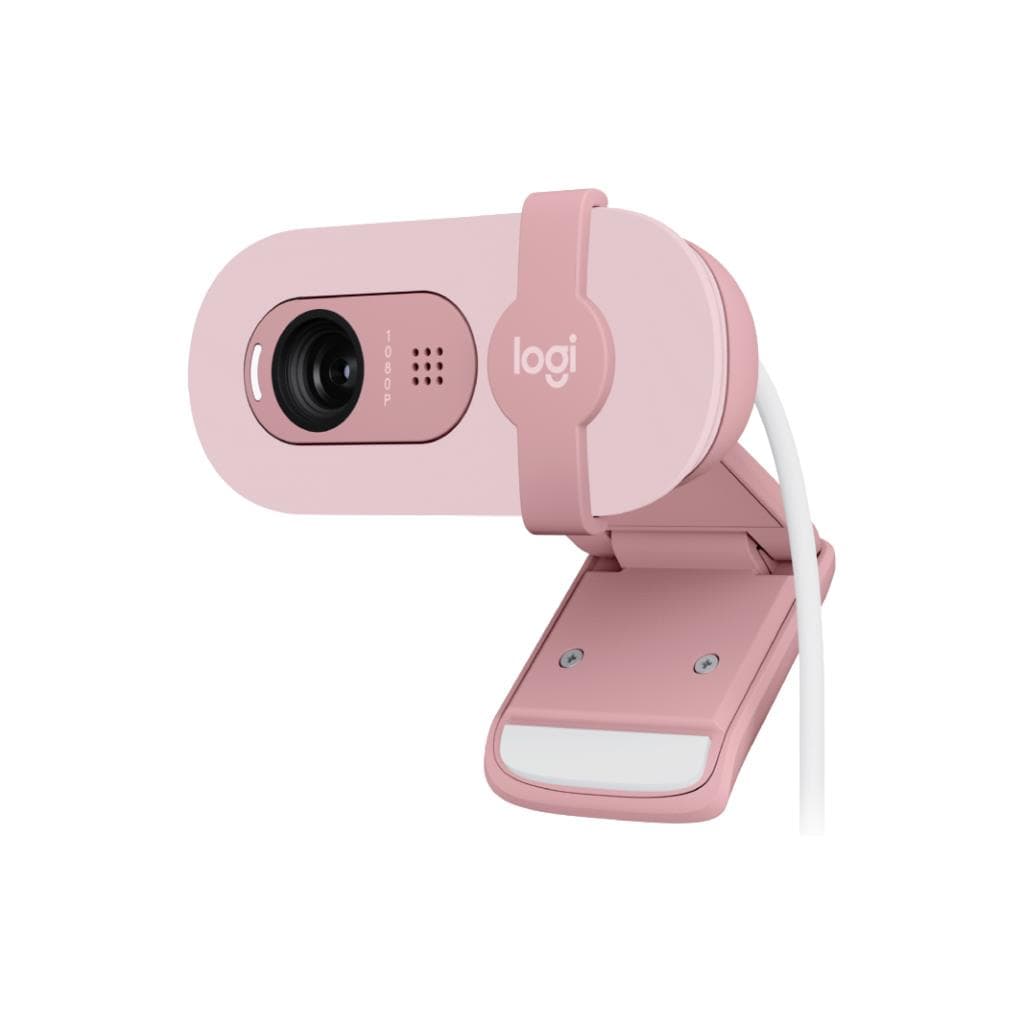
Logitech Brio 305 - GRAPHITE (1080p USB-C Webcam)
SKU: QCAM-BRIO305-GRAPHITEGadgets & Accessories › Video Conferencing· Model: Brio 305
฿2,024
Price includes 7% VATPrice updated November 1, 2026
In stock18 units3 years manufacturer's warranty
For orders placed before 12:00 on a business day; weekends excluded
GenuineFree delivery from ฿5,000Tax invoice
เว็บแคม Full HD ความละเอียด 1080p พร้อมระบบปรับแสงอัตโนมัติ RightLight 2 และไมโครโฟนลดเสียงรบกวน เหมาะสำหรับการประชุมออนไลน์ในที่ทำงานอย่างมืออาชีพ
Key features
- ความละเอียด Full HD 1920x1080 พิกเซล 30fps
- ระบบปรับแสงอัตโนมัติ RightLight 2
- ไมโครโฟนลดเสียงรบกวน ระยะไกล 1.22 เมตร
- ชัตเตอร์ปิดเลนส์แบบฝังในเพื่อความเป็นส่วนตัว
- เชื่อมต่อผ่าน USB-C ใช้งานได้ทันที
Product description
Logitech Brio 305 คือเว็บแคมระดับพรีเมียมที่ออกแบบมาเพื่อการประชุมออนไลน์อย่างมืออาชีพ โดยรองรับความละเอียด Full HD 1920 x 1080 พิกเซล ที่ 30fps พร้อมเทคโนโลยี RightLight 2 ที่ปรับแสงอัตโนมัติ ช่วยให้ภาพดูเป็นธรรมชาติแม้ในสภาพแสงน้อยหรือแสงจ้า ไมโครโฟนแบบโมโนลดเสียงรบกวนได้ไกลถึง 1.22 เมตร ทำให้เสียงพูดชัดเจนและไม่รบกวนผู้อื่น นอกจากนี้ยังมาพร้อมชัตเตอร์ปิดเลนส์แบบฝังใน เพื่อความเป็นส่วนตัวที่ปลอดภัยทุกครั้งที่ไม่ใช้งาน รองรับการเชื่อมต่อผ่านพอร์ต USB-C แบบ Plug-and-Play ใช้งานได้ทันทีกับ Windows, macOS และ ChromeOS โดยเฉพาะอย่างยิ่งได้รับการรับรองจาก Microsoft Teams, Zoom และ Google Meet ทำให้มั่นใจได้ว่าทำงานร่วมกับแพลตฟอร์มหลักได้อย่างราบรื่น
More features
- รองรับ Microsoft Teams, Zoom, Google Meet
- ออกแบบด้วยพลาสติกรีไซเคิล 62% (Graphite)
- มีขาตั้งยึดจัดวางได้หลากหลายตำแหน่ง
- ใช้งานร่วมกับ Logi Tune และ Logitech Sync
- น้ำหนักเบาเพียง 74.6 กรัม
Pros and limitations
Pros
- ภาพคมชัดระดับ Full HD แม้ในสภาพแสงไม่ดี
- ระบบปรับแสงอัตโนมัติ RightLight 2 ช่วยให้ภาพดูเป็นธรรมชาติ
- ไมโครโฟนลดเสียงรบกวนได้ไกลถึง 1.22 เมตร
- มีชัตเตอร์ปิดเลนส์เพื่อความปลอดภัยสูงสุด
- เชื่อมต่อผ่าน USB-C ใช้งานได้ทันที ไม่ต้องติดตั้งไดรเวอร์
Limitations
- ไม่มีการซูมแบบออปติคอล
- ไม่รองรับการจัดการผ่าน ChromeOS ด้วย Logi Tune
- น้ำหนักเบา อาจไม่เหมาะกับจอใหญ่ที่มีพื้นผิวโค้ง
Who it is for
เหมาะสำหรับพนักงานที่ต้องประชุมออนไลน์บ่อยครั้งในออฟฟิศหรือทำงานจากบ้าน โดยเฉพาะผู้ที่ต้องการภาพและเสียงคมชัด พร้อมความเป็นส่วนตัวสูง
Color
GRAPHITE
Connectivity
USB-C
Specifications (29)
- PoE
- ไม่รองรับ
- VLAN
- ไม่รองรับ
- พอร์ต
- USB-C (1 พอร์ต)
- เว็บแคม
- 2MP CMOS
- สี
- Graphite
- Features
- RightLight 2, Integrated Privacy Shutter, Fixed Focus, Noise-reducing Mic
- In the Box
- Brio 305, ขาตั้งยึดแบบติดแน่น, คู่มือผู้ใช้งาน
- การจัดการ
- รองรับ Logitech Sync และ Logi Tune
- การติดตั้ง VESA
- ไม่รองรับ
- อัตราส่วนภาพ
- 16:9
- ความยาวสาย
- 1.5 เมตร (5 ฟุต)
- ขนาด
- 2.58 in x 2.09 in x 1.78 in (65.63 mm x 53.1 mm x 45 mm)
- การปรับตั้ง
- มีการปรับเอียง (Tilt) และปรับมุมหน้าจอ (Monitor Angle Adjustment)
- ความเข้ากันได้
- Windows, macOS, ChromeOS
- แรงดันไฟฟ้าขาเข้า
- USB-C 5V
- มุมมองภาพ
- 70° (dFoV)
- Carbon Neutral
- ได้รับการรับรองว่าเป็นคาร์บอนนิวทรัล
- การรับรอง
- Microsoft Teams, Zoom, Google Meet, Works With Chromebook
- Sustainability
- Graphite: 62% post-consumer recycled material
- Paper Packaging
- FSC™-certified
- ประเภทจอ
- CMOS
- การติดตั้ง
- Attached mounting clip
- Logi Tune Support
- รองรับการปรับแต่งสีและอัปเดตเฟิร์มแวร์ผ่านแอป Logi Tune
- Remote Management
- รองรับการจัดการระยะไกลผ่าน Logitech Sync
- น้ำหนัก
- 74.6 กรัม
- อัตราการรีเฟรช
- 30 Hz
- ความละเอียด
- 1920 x 1080 พิกเซล (1080p)
- การรับประกัน
- 3 ปี จำกัดด้านฮาร์ดแวร์
- ระบบปฏิบัติการ
- Windows 10 หรือใหม่กว่า, macOS 10.15 หรือใหม่กว่า, ChromeOS
Compatibility
Windows, macOS, ChromeOS
Datasheets and manuals straight from the manufacturer — select a document to open or download it.
13 questions
Frequently asked questions about this product
Compiled from manufacturer information
Brio 305 รองรับการใช้งานกับ ChromeOS ได้ไหม?
ใช่ รองรับ ChromeOS โดยต้องมี RAM อย่างน้อย 2GB เพื่อสตรีมวิดีโอ Full HD และ 1GB สำหรับ 720p แต่แอป Logi Tune ไม่สามารถใช้งานได้บน ChromeOS
ต้องการ RAM เท่าไหร่ในการใช้งาน Brio 305 ที่ความละเอียด 1080p?
ต้องการ RAM อย่างน้อย 2GB เพื่อสตรีมวิดีโอ Full HD ได้อย่างราบรื่น ซึ่งเป็นข้อกำหนดพื้นฐานสำหรับการทำงานร่วมกับแพลตฟอร์มเช่น Zoom และ Google Meet
Brio 305 มีการซูมภาพได้ไหม?
รองรับการซูมดิจิทัล 1x เท่านั้น โดยไม่มีการซูมออปติคอล กล้องมีโฟกัสแบบคงที่ (fixed focus) ทำให้ภาพคมชัดตลอดระยะทาง
สามารถจัดการเว็บแคมผ่าน Logitech Sync ได้หรือไม่?
ใช่ รองรับการจัดการระยะไกลและอัปเดตเฟิร์มแวร์ผ่าน Logitech Sync ซึ่งเหมาะสำหรับองค์กรที่ต้องการบริหารจัดการอุปกรณ์จำนวนมาก
ชัตเตอร์ปิดเลนส์ของ Brio 305 ใช้งานได้จริงไหม?
ใช่ ชัตเตอร์แบบหมุนฝังในสามารถปิดเลนส์ได้ทันทีเมื่อไม่ใช้งาน เพื่อป้องกันการรั่วไหลของข้อมูลส่วนตัว และเปิดใช้งานได้ทันทีเมื่อต้องการใช้
Brio 305 ใช้พลังงานจากไหน?
ใช้พลังงานผ่านพอร์ต USB-C โดยไม่ต้องใช้อุปกรณ์ชาร์จเพิ่มเติม รองรับการจ่ายไฟ 5V ซึ่งเป็นมาตรฐานทั่วไปของอุปกรณ์ USB
เว็บแคมนี้ทำจากวัสดุอะไร?
ตัวเครื่องผลิตจากพลาสติกที่มีส่วนผสมของวัสดุรีไซเคิลอย่างน้อย 62% (สำหรับรุ่น Graphite) และบรรจุภัณฑ์ทำจากกระดาษ FSC™-certified พร้อมรับรองคาร์บอนนิวทรัล
ต้องใช้แอป Logi Tune ไหมในการใช้งาน?
ไม่จำเป็น ใช้งานได้ทันทีผ่าน USB-C โดยไม่ต้องติดตั้งซอฟต์แวร์ แต่หากต้องการปรับแต่งสีหรืออัปเดตเฟิร์มแวร์ แนะนำให้ดาวน์โหลด Logi Tune จากเว็บไซต์ Logitech
Is it in stock?
The Logitech Brio 305 - GRAPHITE (1080p USB-C Webcam) is in stock and ready to ship. Orders placed before 12:00 on a business day are delivered within 1–3 business days (Bangkok and vicinity) or 2–5 business days (other provinces). Order online at store.gist.co.th or contact our sales team at 092-251-4017.
How much does it cost?
The price is ฿2,024 (including 7% VAT). It is in stock and ready to ship. Business customers can request a quotation at sales@gist.co.th.
How long is the warranty?
Warranty period: รับประกันฮาร์ดแวร์ 3 ปี ตามเงื่อนไขผู้ผลิต (manufacturer's terms). To make a warranty claim, call 092-251-4017 or 065-523-5262, or email sales@gist.co.th (Mon–Fri 9:00–18:00), then send the product with your order number to our head office, or bring it to the head office in person.
How long does delivery take?
Orders placed before 12:00 on a business day are delivered within 1–3 business days (Bangkok and vicinity) or 2–5 business days (other provinces). Free delivery on orders of ฿5,000 or more (a ฿150 delivery fee applies below this amount).
Is it genuine?
Genuine products sourced from distributors in Thailand, covered by the manufacturer's warranty. Full tax invoices are available.
Didn't find the answer you need?
Loading reviews…
Genuine products
Sourced from distributors in Thailand and covered by the manufacturer's warranty
Warranty period
รับประกันฮาร์ดแวร์ 3 ปี ตามเงื่อนไขผู้ผลิต
Covered by the manufacturer's warranty; you can make claims through GIST
Claims through GIST
Ship the product to our head office or bring it in person
Warranty conditions
- A receipt or other proof of purchase is required
- The product must not have been modified or altered
- Damage caused by misuse is not covered by the warranty
- To make a warranty claim, call 092-251-4017 or 065-523-5262, or email sales@gist.co.th (Mon–Fri 9:00–18:00), then send the product with your order number to our head office, or bring it to the head office in person.Head office: 554 Sky Nine Center, Floor 12A, Room 554/62, Asok-Din Daeng Road, Din Daeng Subdistrict, Din Daeng District, Bangkok 10400
More in Video Conferencing



Price
฿2,024