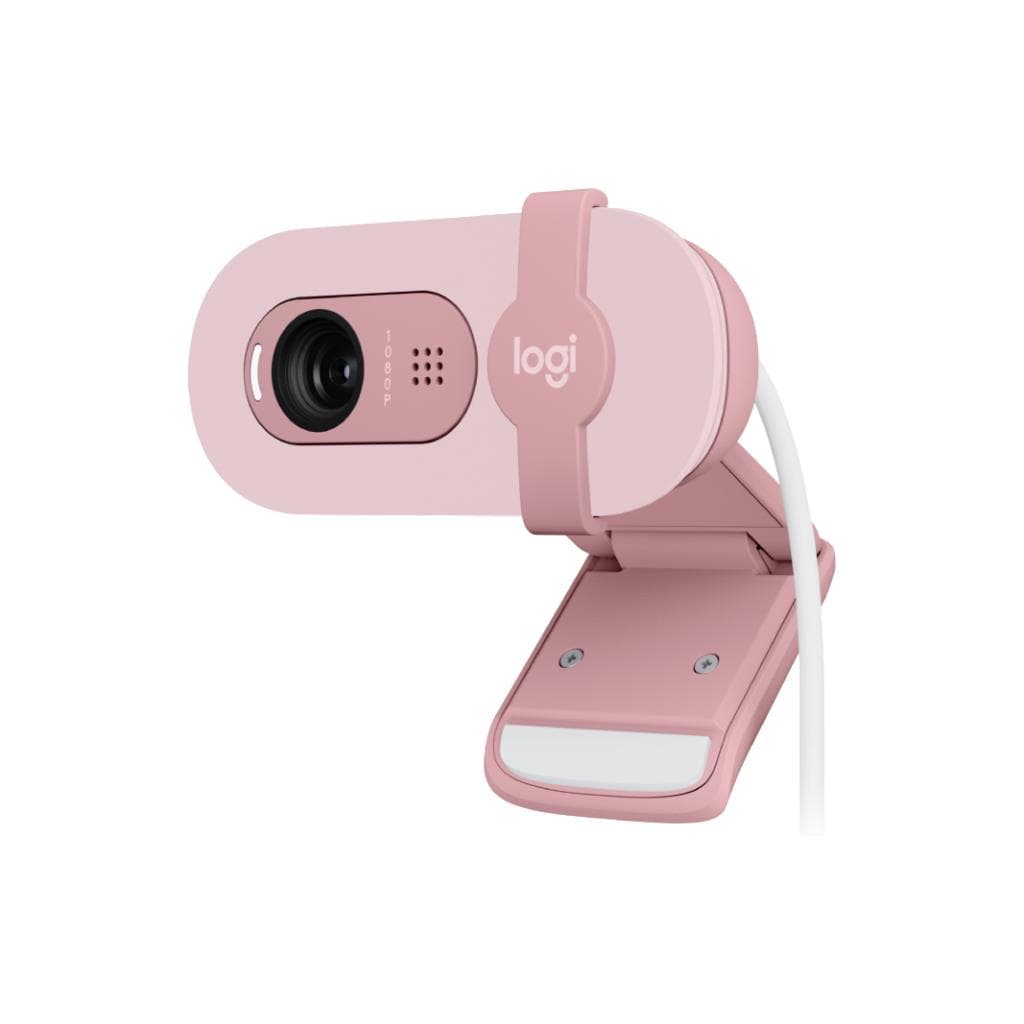


Logitech Brio500 Webcam (Off-White) 1080p HDR with Privacy Shutter
SKU: QCAM-BRIO500-WHITEGadgets & Accessories › Video Conferencing· Model: Brio 500
Please enquire before ordering
The distributor has not yet confirmed the latest price and availability (last checked Jun 15, 2026)
092-251-4017Awaiting stock confirmation3 years manufacturer's warranty
GenuineFree delivery from ฿5,000Tax invoice
Logitech Brio500 White Soft Color HD webcam supports high-quality online meetings with Full HD 1080p resolution and the RightLight 4 automatic lighting adjustment technology, ideal for users who want a bright, natural appearance even in low-light environments.
Key features
- Full HD 1080p high-resolution video with HDR
- RightLight 4 automatic lighting adjustment
- Dual stereo microphones with 1.2-meter pickup range
- Built-in physical privacy shutter
- Adjustable camera angle with magnetic stand
Product description
The Logitech Brio500 is a premium webcam designed to help you confidently present yourself in every online meeting. With Full HD 1080p resolution and RightLight 4 technology that automatically adjusts lighting, you’ll look bright and natural, whether in dim or overly bright environments. The webcam features a high-quality 4MP glass lens and a 90° vertical field of view, ensuring all meeting participants are clearly visible from every angle. It also includes dual stereo microphones that reduce background noise and capture sound up to 1.2 meters away.
More features
- USB-C Plug-and-Play connectivity
- Works immediately with Zoom, Google Meet, Microsoft Teams
- Supports Logi Tune (Windows/macOS only)
- Designed for professional hybrid meetings
- Easy installation with micro-suction pad, no residue left
Pros and limitations
Pros
- Sharp Full HD 1080p with HDR, even in low-light conditions
- RightLight 4 automatic lighting technology delivers vibrant, lifelike images
- Stereo microphone captures sound up to 1.2 meters away
- Built-in physical shutter for privacy, ensuring security whenever the camera is not in use
- Easy installation with a micro-suction pad that leaves no residue
Limitations
- Not supported on ChromeOS with Logi Tune
- No optical zoom—only digital zoom of 4x
- Requires USB-C connection (not directly compatible with USB-A)
Who it is for
Ideal for office employees who frequently join online meetings, streamers, or general users who want clear video and crisp audio in any setting
Connectivity
USB-A
Specifications (33)
- Zoom
- 4x digital zoom
- Color
- Off-white
- Ports
- USB-C plug-and-play
- Returns
- Free returns within 30 days
- Shipping
- Free standard shipping on orders $29+
- Use Case
- Video conferencing, streaming, remote work, hybrid meetings
- Warranty
- 3-year limited hardware warranty
- Lens Type
- Glass
- Materials
- 38% post-consumer recycled material (excludes plastic in electronics)
- Mic Range
- Up to 4 ft (1.22 m)
- Packaging
- Length: 5.47 in (13.9 cm), Width: 2.80 in (7.1 cm), Depth: 5.28 in (13.4 cm), Weight: 10.58 oz (300 g)
- Brightness
- RightLight 4 with HDR for clear image in various lighting environments ranging from low light to direct sunlight
- Focus Type
- Autofocus
- Resolution
- 1080p/30fps (1920x1080 pixels), 720p/60fps (1280x720 pixels)
- Works With
- Microsoft Teams, Zoom, Google Meet, Works With Chromebook
- Part Number
- 960-001454
- Cable Length
- 5 ft (1.5 m)
- Connectivity
- USB-C plug-and-play
- Image Sensor
- 13MP
- Certified For
- TAA Compliant
- Mounting Clip
- Detachable universal mounting clip fits monitors, LCD displays, and laptops
- Microphone Type
- Stereo microphone
- Privacy Shutter
- Integrated
- Camera Megapixel
- 4MP
- Mounting Options
- Micro-suction pad, magnetic mount receiver, ¼-20 adaptor for 3rd party mounts
- OS Compatibility
- Windows, macOS, or ChromeOS
- Software Support
- Logi Tune (requires Windows/macOS)
- Power Consumption
- USB-powered
- Weight - Webcam only
- 4.27 oz (121 g), incl. mount clip & cable
- Deployment & Management
- Logitech Sync supports company-wide deployments at scale
- Dimensions - Webcam only
- Height: 1.24 in (31.5 mm), Width: 4.33 in (110 mm), Depth: 1.24 in (31.5 mm)
- Dimensions - Webcam + Mount
- Height: 2.03 in (51.5 mm), Width: 4.33 in (110 mm), Depth: 1.77 in (45 mm) incl. mount clip
- Diagonal Field of View - dFoV
- 90°/78°/65°
Compatibility
Windows, macOS, ChromeOS
Datasheets and manuals straight from the manufacturer — select a document to open or download it.
13 questions
Frequently asked questions about this product
Compiled from manufacturer information
Does Brio500 support ChromeOS?
Yes, it supports ChromeOS and works immediately with platforms such as Google Meet, Zoom, and Microsoft Teams. However, Logi Tune is not supported on ChromeOS.
How far can this camera zoom?
It supports 4x digital zoom without an optical zoom lens, allowing you to enlarge the image without significant loss of resolution.
How do I mount this webcam on my computer monitor?
It comes with a magnetic stand and micro-suction pad, securely attaching to your monitor without leaving residue, and can be removed for use with other stands.
Where does this webcam get its power?
It draws power directly from the USB-C port, eliminating the need for an external power adapter, making it convenient for travel and setup.
How much can the camera angle be adjusted?
Adjusts to multiple angles via magnetic stand and swivel mount, with a secure grip that lets you position the camera as needed
What features help improve image quality in low-light conditions?
It features RightLight 4 technology that automatically adjusts lighting to deliver bright, clear images even in low-light environments without needing additional lighting
Is this camera suitable for streaming or content creation?
Yes, it's ideal for streaming or online content creation, offering Full HD clarity and stereo microphones that capture sound clearly from a distance
Can it be used with other video conferencing software?
Supports all major platforms, such as Zoom, Google Meet, Microsoft Teams, and Works With Chromebook, without requiring additional driver installation
Is it in stock?
We are confirming the latest stock and price of the Logitech Brio500 Webcam (Off-White) 1080p HDR with Privacy Shutter with the distributor. Please contact us before ordering at 092-251-4017 or sales@gist.co.th.
How much does it cost?
The distributor has not yet confirmed the latest price and availability. Please contact us before ordering at 092-251-4017 or sales@gist.co.th.
How long is the warranty?
Warranty period: 3-year hardware warranty, subject to manufacturer terms (manufacturer's terms). To make a warranty claim, call 092-251-4017 or 065-523-5262, or email sales@gist.co.th (Mon–Fri 9:00–18:00), then send the product with your order number to our head office, or bring it to the head office in person.
How long does delivery take?
Orders placed before 12:00 on a business day are delivered within 1–3 business days (Bangkok and vicinity) or 2–5 business days (other provinces). Free delivery on orders of ฿5,000 or more (a ฿150 delivery fee applies below this amount).
Is it genuine?
Genuine products sourced from distributors in Thailand, covered by the manufacturer's warranty. Full tax invoices are available.
Didn't find the answer you need?
Loading reviews…
Genuine products
Sourced from distributors in Thailand and covered by the manufacturer's warranty
Warranty period
3-year hardware warranty, subject to manufacturer terms
Covered by the manufacturer's warranty; you can make claims through GIST
Claims through GIST
Ship the product to our head office or bring it in person
Warranty conditions
- A receipt or other proof of purchase is required
- The product must not have been modified or altered
- Damage caused by misuse is not covered by the warranty
- To make a warranty claim, call 092-251-4017 or 065-523-5262, or email sales@gist.co.th (Mon–Fri 9:00–18:00), then send the product with your order number to our head office, or bring it to the head office in person.Head office: 554 Sky Nine Center, Floor 12A, Room 554/62, Asok-Din Daeng Road, Din Daeng Subdistrict, Din Daeng District, Bangkok 10400
More in Video Conferencing