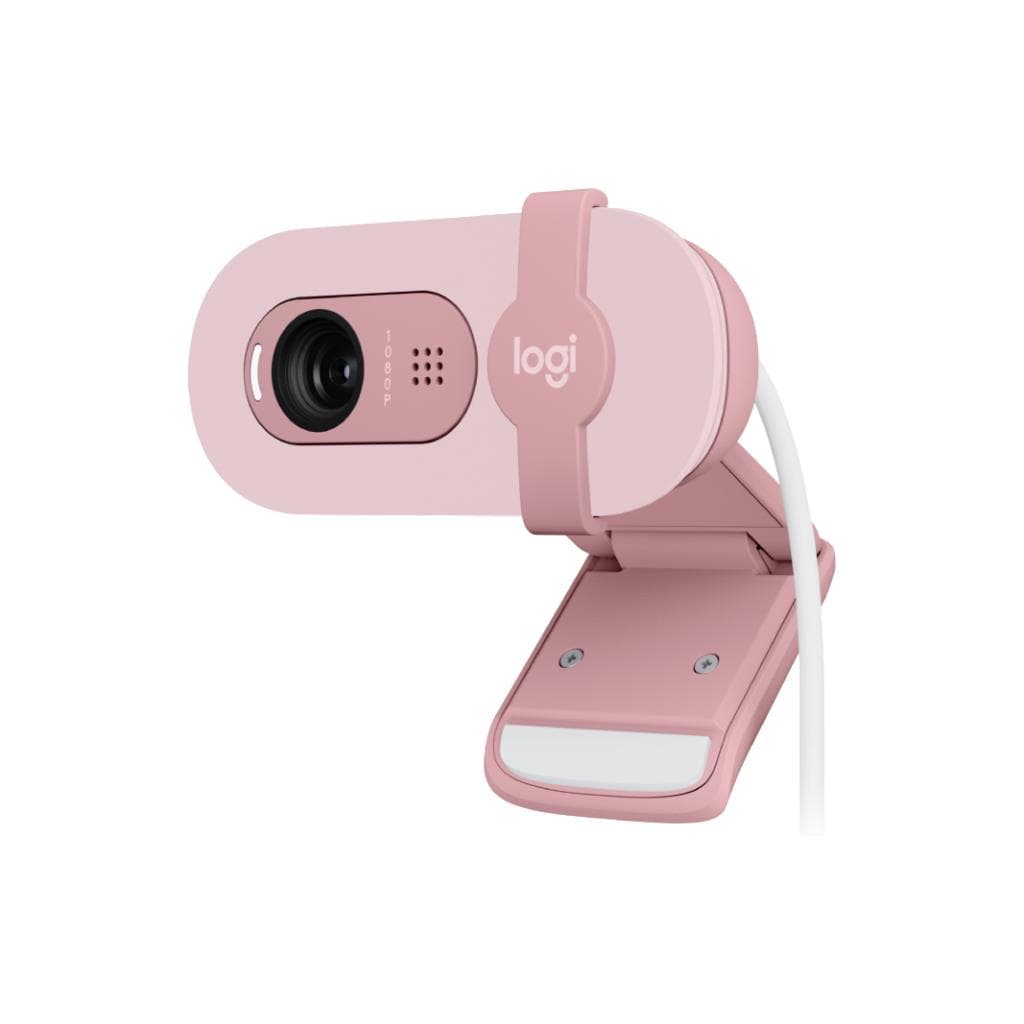


Logitech Brio505 Webcam (Graphite) - 4MP Full HD 1080p with Privacy Shutter & Auto Framing
SKU: QCAM-BRIO505-GRAPHITEGadgets & Accessories › Video Conferencing· Model: Brio 505
Please enquire before ordering
The distributor has not yet confirmed the latest price and availability (last checked Aug 13, 2026)
092-251-4017Awaiting stock confirmation3 years manufacturer's warranty
GenuineFree delivery from ฿5,000Tax invoice
Full HD 1080p webcam for online meetings, supports RightLight 4 technology to automatically adjust lighting, dual microphones to reduce background noise, ideal for teams needing clear video without complex setup
Key features
- Full HD 1080p resolution at 1920x1080 pixels
- Supports RightLight 4 for automatic lighting adjustment in dark or bright environments
- Auto Framing system detects the speaker and automatically centers the frame
- Dual microphones reduce background noise for clear audio even in noisy environments
- Built-in physical shutter for privacy
Product description
The Logitech Brio505 Graphite webcam is designed for a professional online meeting experience, delivering sharp Full HD 1080p video at 1920 x 1080 pixel resolution, supporting 30fps or 60fps depending on resolution. It features a 4MP sensor with high-quality glass lens, ensuring clear images even in low or bright lighting conditions. With RightLight 4 technology including HDR, it automatically adjusts lighting to prevent faces from appearing too pale or overly bright. The webcam supports a wide 90° field of view with 4x Digital Zoom for clear zooming without quality loss. RightSight Auto Framing detects the speaker and automatically centers the frame, even if the user moves or stands up during a meeting.
More features
- Compatible with Microsoft Teams, Zoom, Google Meet
- Connects via USB-C Plug-and-Play
- 90° wide-angle view with 4x Digital Zoom
- Made with 68% recycled materials to reduce environmental impact
- Easy setup with micro-silicone mount and detachable stand
Pros and limitations
Pros
- Crystal-clear Full HD 1080p video even in low-light conditions
- RightLight 4 automatic lighting adjustment helps produce realistic images
- Dual microphones effectively reduce background noise
- Privacy shutter for complete peace of mind
- Easy to install with strong micro-suction grip
Limitations
- Does not support Logi Tune on ChromeOS
- Requires a USB-C cable that supports video signal transmission
Who it is for
Ideal for frequent online meeting users, teachers, or content creators who need clear video, simple setup, and high privacy
Color
Graphite
Connectivity
USB-C
Specifications (36)
- Zoom
- 4x digital zoom
- Depth
- 1.24 in (31.5 mm)
- Width
- 4.33 in (110 mm)
- Height
- 1.24 in (31.5 mm)
- Weight
- 4.27 oz (121 g), incl. mount clip & cable
- Lens Type
- Glass
- Mic Range
- Up to 4 ft (1.22 m)
- Show Mode
- Yes
- Focus Type
- Autofocus
- Resolution
- 1080p/30fps (1920x1080 pixels)
- Padded Foot
- Yes
- Cable Length
- 5 ft (1.5 m)
- Image Sensor
- 4 megapixel
- Certified For
- Microsoft Teams, Zoom, Google Meet, Works With Chromebook
- Compatibility
- Windows, macOS, ChromeOS
- Mounting Clip
- Detachable universal mounting clip
- TAA Compliant
- Yes
- ¼-20 Adaptor
- Yes
- Mounting Method
- Micro-suction pad with removable adapter
- Noise Reduction
- Dual beamforming mics
- Privacy Shutter
- Integrated
- Resolution_720p
- 720p/30fps or 60fps (1280x720 pixels)
- Camera Megapixel
- 4MP
- USB Connectivity
- USB-C plug-and-play
- LED Activity Light
- Yes
- System Requirements
- Available USB-C port
- Auto Light Correction
- RightLight 4 with HDR
- Supported in Logi Tune
- Yes
- FSC-Certified Packaging
- Yes
- Magnetic Mount Receiver
- Yes
- Removable Mount Adaptor
- Yes
- RightSight Auto Framing
- Yes
- Built-in Microphone Type
- Stereo microphone
- Diagonal Field of View (dFoV)
- 90°/78°/65°
- Operating System Compatibility
- Windows 10 or later, macOS 10.15 and later, ChromeOS (2GB RAM or more for 1080p)
- Post-Consumer Recycled Plastic
- 68% minimum
Datasheets and manuals straight from the manufacturer — select a document to open or download it.
13 questions
Frequently asked questions about this product
Compiled from manufacturer information
Can the Brio505 webcam be used with ChromeOS?
Yes, it works with ChromeOS that has 2GB RAM or more for 1080p streaming, but Logi Tune app is not supported
Where does the Auto Framing system work?
RightSight Auto Framing works in supported apps such as Microsoft Teams, Zoom, and Google Meet, detecting the speaker and automatically centering the frame even if the user moves
Does this webcam have a physical shutter?
Yes, the webcam has a built-in physical shutter that can be manually slid open or closed for privacy
Can it be used with external headphones or microphones?
Yes, it works with external headphones or microphones. The webcam connects via USB-C, so there are no audio limitations
Can it be mounted on a computer monitor?
Yes, the webcam comes with a micro-silicone mount that securely attaches to your screen and features adjustable angles for easy setup without leaving marks
Is it compatible with Zoom?
Yes, it is Zoom-certified and works immediately without requiring additional driver installation
What can the Show Mode feature be used for?
The Show Mode feature allows you to tilt the camera downward to clearly display real-world items such as drawings, prototypes, or documents during online meetings
Can it be used with a notebook that has no USB-C port?
Yes, it can be used with a notebook that lacks a USB-C port by using a USB-C to USB-A adapter, but ensure the device supports video signal transmission through the USB-A port
Is it in stock?
We are confirming the latest stock and price of the Logitech Brio505 Webcam (Graphite) - 4MP Full HD 1080p with Privacy Shutter & Auto Framing with the distributor. Please contact us before ordering at 092-251-4017 or sales@gist.co.th.
How much does it cost?
The distributor has not yet confirmed the latest price and availability. Please contact us before ordering at 092-251-4017 or sales@gist.co.th.
How long is the warranty?
Warranty period: 3-year hardware warranty subject to manufacturer terms (manufacturer's terms). To make a warranty claim, call 092-251-4017 or 065-523-5262, or email sales@gist.co.th (Mon–Fri 9:00–18:00), then send the product with your order number to our head office, or bring it to the head office in person.
How long does delivery take?
Orders placed before 12:00 on a business day are delivered within 1–3 business days (Bangkok and vicinity) or 2–5 business days (other provinces). Free delivery on orders of ฿5,000 or more (a ฿150 delivery fee applies below this amount).
Is it genuine?
Genuine products sourced from distributors in Thailand, covered by the manufacturer's warranty. Full tax invoices are available.
Didn't find the answer you need?
Loading reviews…
Genuine products
Sourced from distributors in Thailand and covered by the manufacturer's warranty
Warranty period
3-year hardware warranty subject to manufacturer terms
Covered by the manufacturer's warranty; you can make claims through GIST
Claims through GIST
Ship the product to our head office or bring it in person
Warranty conditions
- A receipt or other proof of purchase is required
- The product must not have been modified or altered
- Damage caused by misuse is not covered by the warranty
- To make a warranty claim, call 092-251-4017 or 065-523-5262, or email sales@gist.co.th (Mon–Fri 9:00–18:00), then send the product with your order number to our head office, or bring it to the head office in person.Head office: 554 Sky Nine Center, Floor 12A, Room 554/62, Asok-Din Daeng Road, Din Daeng Subdistrict, Din Daeng District, Bangkok 10400
More in Video Conferencing