
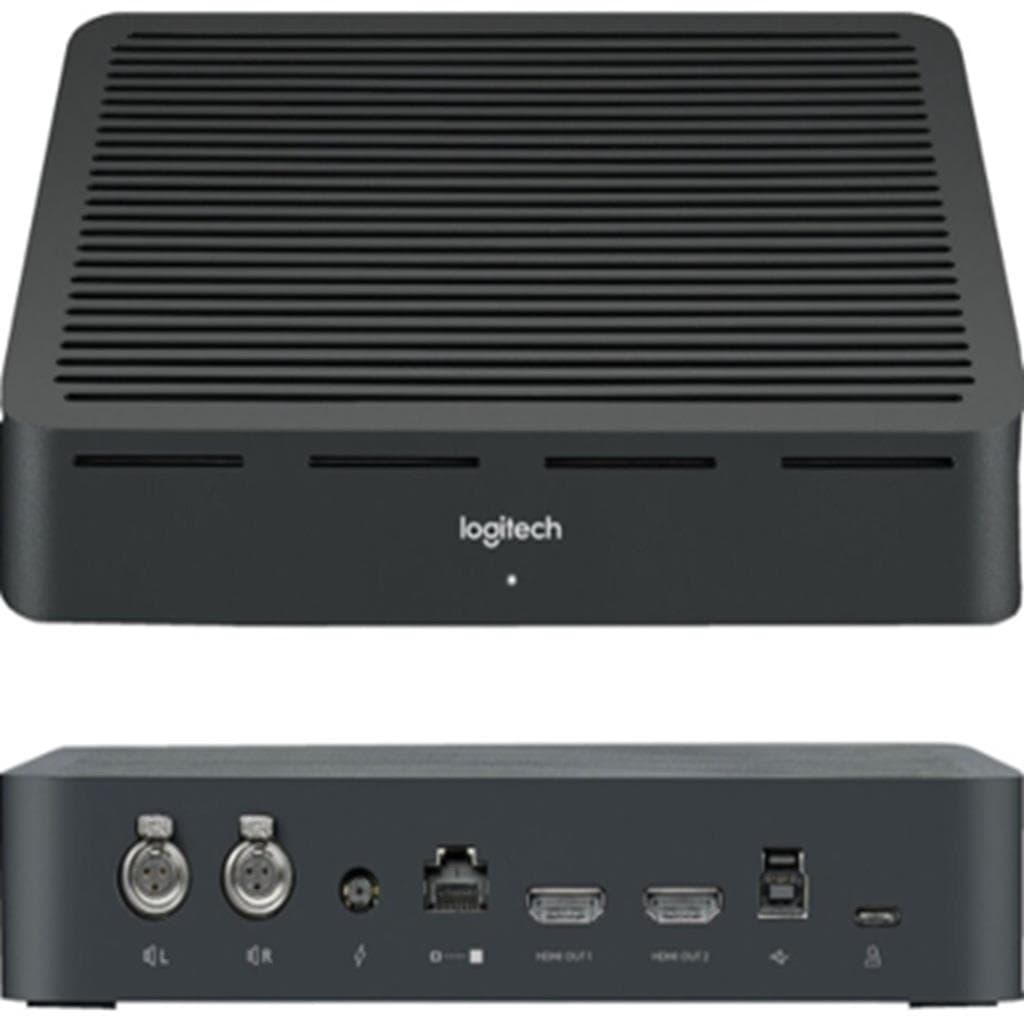


LOGITECH MeetUp 2 All-in-One USB Conference Camera 4K Ultra HD
SKU: QCAM-MEETUP2Gadgets & Accessories › Video Conferencing· Model: MeetUp 2
฿32,376
Price includes 7% VATPrice updated November 1, 2026
In stock10 units3 years manufacturer's warranty
For orders placed before 12:00 on a business day; weekends excluded
GenuineFree delivery from ฿5,000Tax invoice
กล้องประชุมออนไลน์แบบครบวงจร รองรับการเชื่อมต่อ USB ทันที ใช้งานได้กับ Microsoft Teams, Zoom และ Google Meet พร้อมระบบเสียงและวิดีโออัจฉริยะด้วย AI สำหรับห้องประชุมขนาดเล็ก
Key features
- มุมมองกว้าง 120° ขยายได้สูงสุด 170° ด้วยระบบ pan/tilt มอเตอร์ized
- เซ็นเซอร์ Ultra HD 4K รองรับ 4K, 1080p และ 720p
- ไมโครโฟน 3 ตัวแบบ beamforming ตัดเสียงรบกวน รองรับคำสั่งเสียง Cortana
- ลำโพงปรับแต่งเฉพาะ ให้เสียงชัด สมจริง ไม่สะท้อน
- รองรับการซูม HD 5x แบบไม่สูญเสียคุณภาพ
Product description
LOGITECH MeetUp 2 คือกล้องประชุมแบบครบวงจรที่ออกแบบมาเพื่อห้องประชุมขนาดเล็กและพื้นที่ทำงานร่วมกัน (huddle room) โดยให้ภาพและเสียงคุณภาพสูงในทุกการประชุม ด้วยเลนส์ Logitech-engineered ที่ให้มุมมองกว้างถึง 120° และสามารถขยายมุมมองได้สูงสุดถึง 170° ผ่านระบบ pan/tilt แบบมอเตอร์ized ช่วยให้ทุกคนในห้องเห็นชัดเจน ไม่ว่าจะนั่งใกล้หรืออยู่มุมห้อง กล้องใช้เซ็นเซอร์ Ultra HD 4K รองรับการถ่ายภาพที่ความละเอียดสูงสุด 4K (Ultra HD), 1080p (Full HD) และ 720p (HD) พร้อมความสามารถในการซูม HD 5x แบบไม่สูญเสียคุณภาพ ทำให้สามารถซูมเข้าไปดูข้อมูลบนกระดานไวท์บอร์ดได้อย่างชัดเจน ระบบเสียงอัจฉริยะด้วยไมโครโฟน 3 ตัวแบบ beamforming พร้อมการตัดเสียงรบกวนและเสียงสะท้อน รวมถึงลำโพงที่ปรับแต่งเฉพาะสำหรับห้องประชุม ทำให้เสียงชัดเจนและสมจริง กล้องรองรับการตั้งค่าพื้นที่ถ่ายภาพได้สูงสุด 3 ตำแหน่ง พร้อมปุ่มกดเปลี่ยนตำแหน่งได้ทันที ใช้งานง่ายด้วยการเชื่อมต่อ USB แบบ plug-and-play ไม่ต้องติดตั้งซอฟต์แวร์เพิ่มเติม และรองรับการใช้งานทั้งในโหมด BYOD และโหมดคอมพิวเตอร์ในห้องประชุม
More features
- ตั้งค่าพื้นที่ถ่ายภาพได้ 3 ตำแหน่ง ใช้ปุ่มกดเปลี่ยนได้ทันที
- เชื่อมต่อ USB แบบ plug-and-play ใช้งานได้ทันทีกับ Teams, Zoom, Google Meet
- รองรับการจัดการผ่าน Logitech Sync แบบคลาวด์
- มีชัตเตอร์ปิดกล้องแบบแมนนวล เพื่อความเป็นส่วนตัว
- น้ำหนักเบา 1.8 กก. ติดตั้งได้ทั้งบนโต๊ะและผนัง
Pros and limitations
Pros
- มุมมองกว้าง 120° ขยายได้ถึง 170° ด้วยระบบ pan/tilt มอเตอร์ized ช่วยให้เห็นทุกคนในห้อง
- รองรับการซูม 5x HD แบบไม่สูญเสียคุณภาพ ใช้ดูข้อมูลบนกระดานไวท์บอร์ดได้ชัดเจน
- ไมโครโฟน 3 ตัวแบบ beamforming พร้อมตัดเสียงรบกวนและเสียงสะท้อน ได้ยินชัดเจน
- รองรับการจัดการผ่าน Logitech Sync แบบคลาวด์ ใช้งานง่ายในองค์กร
- ติดตั้งง่าย ใช้ USB แบบ plug-and-play ไม่ต้องติดตั้งซอฟต์แวร์เพิ่มเติม
Limitations
- ต้องใช้พอร์ต Ethernet เพื่อใช้งาน LNA และการจัดการผ่าน Logitech Sync
- ขนาดใหญ่ 46.9 ซม. อาจไม่เหมาะกับโต๊ะแคบหรือพื้นที่จำกัด
Who it is for
เหมาะสำหรับห้องประชุมขนาดเล็ก ห้องทำงานร่วมกัน หรือพื้นที่ประชุมแบบ BYOD ที่ต้องการภาพและเสียงคมชัด ใช้ร่วมกับ Teams, Zoom หรือ Google Meet โดยไม่ต้องติดตั้งซอฟต์แวร์เพิ่มเติม
Weight
0.89 กก.
Dimensions
83 x 83 x 213 มม.
Connectivity
USB
Specifications (33)
- HDR
- รองรับ
- Zoom
- 5x HD zoom
- น้ำหนัก
- 1.8 kg (63.5 oz)
- ลำโพง
- Custom-tuned speaker
- Pan/Tilt
- Motorized pan/tilt
- การรับประกัน
- 3 years
- Lens Type
- Logitech-engineered lens
- ขนาด
- Height: 73.3 mm (2.9 in), Width: 469.2 mm (18.5 in), Depth: 73 mm (2.9 in)
- ขนาดหน้าจอ
- 120° field of view
- ความละเอียด
- 4K (Ultra HD), 1080p (Full HD), 720p (HD)
- AI Features
- RightSound 2, RightSight 2
- ขอบเขตสี
- DCI-P3 95%
- LNA Support
- รองรับ
- Microphones
- 3 beamforming microphones
- อัตราส่วนภาพ
- 16:9
- อัตราการรีเฟรช
- 60 Hz
- Audio Quality
- Full duplex
- ความเข้ากันได้
- Microsoft Teams, Zoom, Google Meet
- พอร์ต Ethernet
- รองรับ
- Field of View
- 120° (standard), up to 170° (expanded)
- แรงดันไฟฟ้าขาเข้า
- 5V DC
- Plug and Play
- รองรับ
- Camera Presets
- Up to 3 presets
- การรับรอง
- TAA Compliant
- การเชื่อมต่อ
- USB
- Privacy Shutter
- Manual privacy shutter
- การติดตั้ง
- Table stand, wall mount
- Echo Cancellation
- รองรับ
- Operating Systems
- Windows 10 and higher, macOS: two most recent versions
- การใช้พลังงาน
- USB-powered
- Noise Cancellation
- รองรับ
- Management Platform
- Logitech Sync
- Network Requirements
- Recommended wired or wireless network
Compatibility
Zoom, Microsoft Teams, Google Meet
Datasheets and manuals straight from the manufacturer — select a document to open or download it.
Upgrade your small meeting rooms with MeetUp 2 and simplifyDatasheet· logitech.com· 1.0 MBOpenMEET EASY Compatible with virtually any video conferencing software app,Datasheet· logitech.com· 1.2 MBOpenMeetUp’s integrated audio is optimized for huddle room acoustics and deliversDatasheet· logitech.com· 0.2 MBOpen
13 questions
Frequently asked questions about this product
Compiled from manufacturer information
MeetUp 2 ใช้กับ Microsoft Teams ได้ไหม?
ได้แน่นอน MeetUp 2 รองรับการใช้งานกับ Microsoft Teams ได้ทันทีผ่านการเชื่อมต่อ USB โดยไม่ต้องติดตั้งซอฟต์แวร์เพิ่มเติม พร้อมรองรับฟีเจอร์ AI เช่น RightSound 2 และ RightSight 2 ที่ช่วยปรับเสียงและภาพอัตโนมัติ
ต้องใช้คอมพิวเตอร์ในห้องประชุมไหม?
ไม่จำเป็น คุณสามารถใช้ MeetUp 2 ในโหมด BYOD โดยเชื่อมต่อกับแล็ปท็อปของผู้ประชุมได้ทันที หรือใช้ในโหมดคอมพิวเตอร์ในห้องก็ได้ ทั้งสองโหมดรองรับการจัดการผ่าน Logitech Sync
ใช้กับ Google Meet ได้ไหม?
ได้แน่นอน MeetUp 2 รองรับ Google Meet ได้ทันทีผ่าน USB โดยไม่ต้องติดตั้งซอฟต์แวร์เพิ่มเติม รองรับการใช้งานกับทุกแพลตฟอร์มหลัก เช่น Zoom, Microsoft Teams และ Google Meet
ตั้งค่าพื้นที่ถ่ายภาพได้กี่ตำแหน่ง?
สามารถตั้งค่าพื้นที่ถ่ายภาพได้สูงสุด 3 ตำแหน่ง พร้อมปุ่มกดเปลี่ยนตำแหน่งได้ทันที ช่วยให้สามารถสลับมุมมองได้สะดวกระหว่างการประชุม เช่น จากมุมทั้งห้อง เป็นมุมกระดานไวท์บอร์ด
ต้องใช้ Ethernet ไหมถึงจะใช้งานได้?
ไม่จำเป็นสำหรับการใช้งานพื้นฐาน แต่หากต้องการใช้ฟีเจอร์การจัดการผ่าน Logitech Sync หรือเปิดใช้งาน LNA จำเป็นต้องเชื่อมต่อ Ethernet เพื่อให้กล้องสามารถสื่อสารกับระบบจัดการได้
ใช้กับ Mac ได้ไหม?
ได้แน่นอน MeetUp 2 รองรับ macOS สองเวอร์ชันล่าสุด และสามารถใช้งานได้ทันทีผ่าน USB โดยไม่ต้องติดตั้งซอฟต์แวร์เพิ่มเติม รองรับทุกแพลตฟอร์มหลัก
มีชัตเตอร์ปิดกล้องไหม?
มี กล้อง MeetUp 2 มาพร้อมชัตเตอร์ปิดกล้องแบบแมนนวล ช่วยให้คุณสามารถปิดกล้องได้ทันทีเมื่อไม่ต้องการถ่ายทอดภาพ ช่วยรักษาความเป็นส่วนตัวได้อย่างมีประสิทธิภาพ
ใช้กับ Chromebook ได้ไหม?
ได้แน่นอน MeetUp 2 รองรับ ChromeOS และสามารถใช้งานได้ทันทีผ่าน USB โดยไม่ต้องติดตั้งซอฟต์แวร์เพิ่มเติม รองรับการใช้งานกับแพลตฟอร์มวิดีโอคอนเฟอเรนซ์ที่นิยมใช้ในองค์กร
Is it in stock?
The LOGITECH MeetUp 2 All-in-One USB Conference Camera 4K Ultra HD is in stock and ready to ship. Orders placed before 12:00 on a business day are delivered within 1–3 business days (Bangkok and vicinity) or 2–5 business days (other provinces). Order online at store.gist.co.th or contact our sales team at 092-251-4017.
How much does it cost?
The price is ฿32,376 (including 7% VAT). It is in stock and ready to ship. Business customers can request a quotation at sales@gist.co.th.
How long is the warranty?
Warranty period: รับประกัน 3 ปี ตามเงื่อนไขผู้ผลิต (manufacturer's terms). To make a warranty claim, call 092-251-4017 or 065-523-5262, or email sales@gist.co.th (Mon–Fri 9:00–18:00), then send the product with your order number to our head office, or bring it to the head office in person.
How long does delivery take?
Orders placed before 12:00 on a business day are delivered within 1–3 business days (Bangkok and vicinity) or 2–5 business days (other provinces). Free delivery on orders of ฿5,000 or more (a ฿150 delivery fee applies below this amount).
Is it genuine?
Genuine products sourced from distributors in Thailand, covered by the manufacturer's warranty. Full tax invoices are available.
Didn't find the answer you need?
Loading reviews…
Genuine products
Sourced from distributors in Thailand and covered by the manufacturer's warranty
Warranty period
รับประกัน 3 ปี ตามเงื่อนไขผู้ผลิต
Covered by the manufacturer's warranty; you can make claims through GIST
Claims through GIST
Ship the product to our head office or bring it in person
Warranty conditions
- A receipt or other proof of purchase is required
- The product must not have been modified or altered
- Damage caused by misuse is not covered by the warranty
- To make a warranty claim, call 092-251-4017 or 065-523-5262, or email sales@gist.co.th (Mon–Fri 9:00–18:00), then send the product with your order number to our head office, or bring it to the head office in person.Head office: 554 Sky Nine Center, Floor 12A, Room 554/62, Asok-Din Daeng Road, Din Daeng Subdistrict, Din Daeng District, Bangkok 10400
More in Video Conferencing



Price
฿32,376