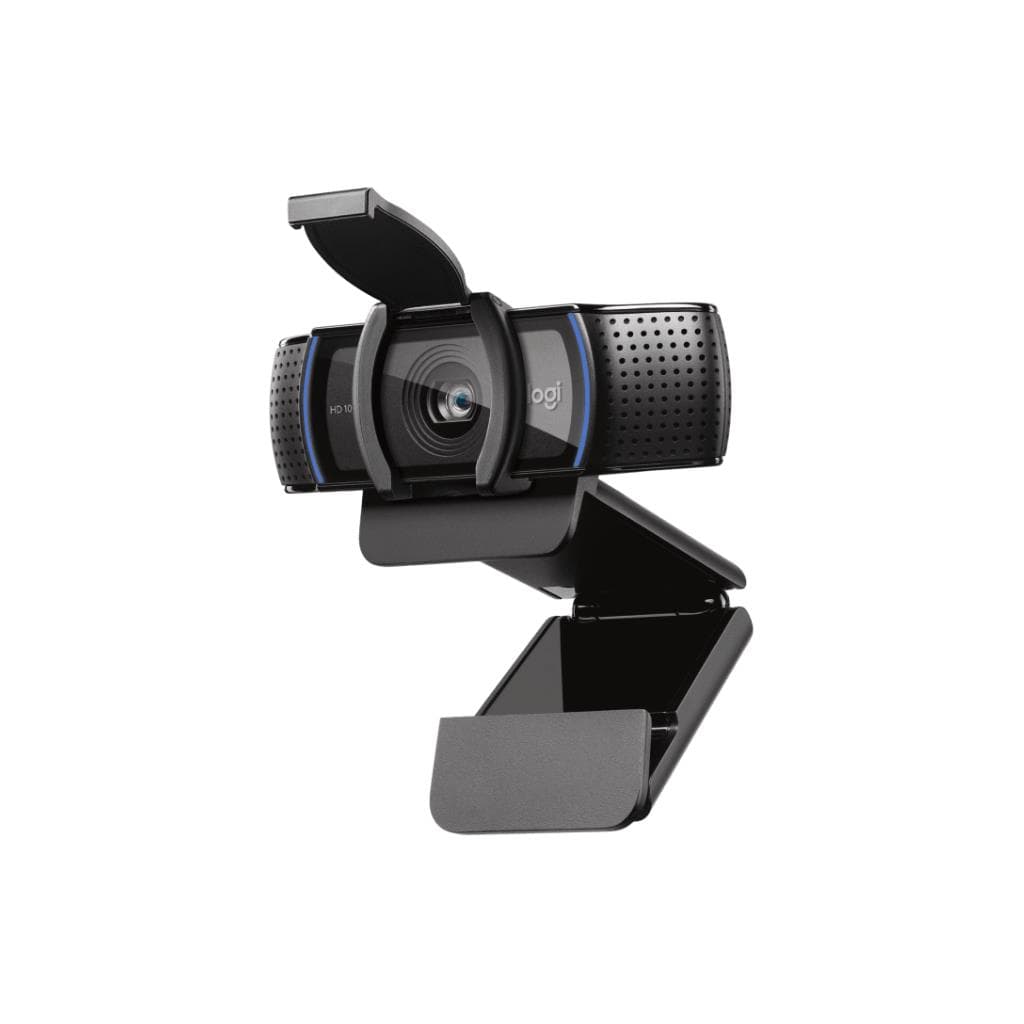

Logitech C920E Webcam 1080p Full HD with Stereo Mic
SKU: QCAM-C920EGadgets & Accessories › Video Conferencing· Model: C920E
Please enquire before ordering
The distributor has not yet confirmed the latest price and availability (last checked Oct 15, 2026)
092-251-4017Awaiting stock confirmation3 years manufacturer's warranty
GenuineFree delivery from ฿5,000Tax invoice
กล้องเว็บแคม Logitech C920E ให้ภาพ Full HD 1080p พร้อมไมโครโฟนสเตอริโอ สำหรับการประชุมออนไลน์ หรือเรียนออนไลน์อย่างมืออาชีพ
Key features
- ภาพ Full HD 1080p ที่คมชัด 30fps
- เลนส์แก้ว 5 ชั้น ลดแสงสะท้อน
- ไมโครโฟนสเตอริโอ จับเสียงกว้าง 1 เมตร
- มุมมองภาพ 78° แบบไดอะโกนัล
- รองรับ RightLight™ 2 ภาพชัดแม้แสงน้อย
Product description
กล้องเว็บแคม Logitech C920E มอบคุณภาพวิดีโอระดับ Full HD 1080p ที่คมชัด พร้อมเลนส์แก้ว 5 ชั้น ที่ช่วยให้ภาพคมชัดแม้ในสภาพแสงน้อยด้วยเทคโนโลยี RightLight™ 2 ที่ปรับแสงอัตโนมัติ พร้อมมุมมองภาพ 78° แบบไดอะโกนัล จึงสามารถจับภาพผู้ใช้และพื้นที่รอบตัวได้อย่างสมบูรณ์ ไมโครโฟนสเตอริโอสองตัวติดตั้งด้านข้างกล้อง ช่วยจับเสียงได้กว้างและชัดเจน แม้ระยะห่างถึง 1 เมตร ทำให้เสียงพูดฟังดูเป็นธรรมชาติในทุกการประชุมออนไลน์ กล้องนี้รองรับการเชื่อมต่อแบบ USB-A Plug-and-Play ใช้งานง่ายกับระบบปฏิบัติการ Windows 8 ขึ้นไป, macOS 10.10 ขึ้นไป และ ChromeOS โดยสามารถใช้งานร่วมกับแพลตฟอร์มการประชุมยอดนิยม เช่น Zoom, Microsoft Teams และ Google Meet ได้ทันที
More features
- ติดตั้งง่ายด้วยคลิปยึดแบบสามขา
- มีชัตเตอร์เปิด-ปิดเพื่อความเป็นส่วนตัว
- ใช้งานร่วมกับ Logi Tune ปรับค่ากล้องได้
- รองรับระบบปฏิบัติการ Windows, macOS, ChromeOS
- สาย USB ยาว 1.5 เมตร พร้อมตัวยึด
Pros and limitations
Pros
- ภาพ Full HD 1080p คมชัดแม้ในที่มืดด้วย RightLight™ 2
- ไมโครโฟนสเตอริโอจับเสียงได้กว้าง 1 เมตร
- เลนส์แก้ว 5 ชั้น ลดแสงสะท้อน ภาพคมชัด
- มีชัตเตอร์เปิด-ปิดเพื่อความเป็นส่วนตัว
- ติดตั้งง่ายด้วยคลิปยึดแบบสามขา
Limitations
- ไม่รองรับการซูมออปติคัล
- ไม่มีพอร์ต USB-C หรือการชาร์จไร้สาย
Who it is for
เหมาะสำหรับพนักงานที่ทำงานจากที่บ้าน ครูผู้สอนออนไลน์ หรือผู้ที่ต้องสตรีมมิ่งคุณภาพสูง ต้องการภาพชัด ไมโครโฟนเสียงชัด และความเป็นส่วนตัว
Color
ดำ
Connectivity
USB
Specifications (28)
- สี
- Black
- พอร์ต
- USB-A
- วัสดุ
- Plastic (with sustainability focus)
- ความลึก
- 2.8 in (71 mm)
- ความสูง
- 1.70 in (43.3 mm)
- น้ำหนัก
- 5.71 oz (162 g)
- ไมโครโฟน
- Stereo
- ความกว้าง
- 3.70 in (94 mm)
- อัตราการรีเฟรช
- 30 fps
- การติดตั้ง
- Tripod-ready universal mounting clip
- ความยาวสาย
- 5 ft (1.5 m)
- ซูมดิจิทัล
- 1x
- ความละเอียด
- 1920 x 1080 pixels
- ประเภทเลนส์
- Glass
- ประเภทโฟกัส
- Autofocus
- มุมมองภาพ (dFoV)
- 78°
- การรับประกัน
- 3-year limited hardware warranty
- การเชื่อมต่อ
- Plug-and-play
- ระยะจับเสียง
- Up to 3 ft (1 m)
- เทคโนโลยีเสริม
- RightLight™ 2
- จำนวนเมกะพิกเซล
- 3
- รองรับแพลตฟอร์ม
- Microsoft DirectShow, Zoom, Microsoft Teams, Google Meet
- ชัตเตอร์เปิด-ปิด
- Attachable privacy shutter
- คาร์บอนฟุตพรินต์
- 5.66 kg CO2e
- การจัดการแบบองค์กร
- Logitech Sync
- ความละเอียด (รองรับ)
- 1080p/30fps (up to 1920 x 1080 pixels), 720p/30fps (up to 1280 x 720 pixels)
- รองรับระบบปฏิบัติการ
- Windows 8 or later, macOS 10.10 or later, ChromeOS
- การจัดการผ่านซอฟต์แวร์
- Logi Tune App
Compatibility
Windows, macOS, Chrome OS
Datasheets and manuals straight from the manufacturer — select a document to open or download it.
13 questions
Frequently asked questions about this product
Compiled from manufacturer information
กล้องเว็บแคม C920E รองรับการใช้งานกับ Zoom และ Microsoft Teams ได้ไหม?
ได้แน่นอน กล้องเว็บแคม C920E รองรับการใช้งานกับแพลตฟอร์มการประชุมออนไลน์ยอดนิยม เช่น Zoom, Microsoft Teams และ Google Meet โดยรองรับระบบปฏิบัติการ Windows 8 ขึ้นไป, macOS 10.10 ขึ้นไป และ ChromeOS อย่างเต็มรูปแบบ
C920E ใช้กับแล็ปท็อปที่มีพอร์ต USB-C ได้ไหม?
ได้ครับ แม้กล้องจะใช้พอร์ต USB-A แต่สามารถใช้งานร่วมกับแล็ปท็อปที่มีพอร์ต USB-C ได้โดยใช้สายแปลง USB-C to USB-A ซึ่งมีวางจำหน่ายทั่วไป
มุมมองภาพของ C920E กว้างแค่ไหน?
กล้อง C920E มีมุมมองภาพ (dFoV) 78° แบบไดอะโกนัล ซึ่งจับภาพผู้ใช้และพื้นที่รอบตัวได้อย่างสมบูรณ์ ไม่ต้องถอยห่างมากเพื่อให้เห็นทั้งหน้าจอหรือโต๊ะทำงาน
C920E มีชัตเตอร์เปิด-ปิดเพื่อความเป็นส่วนตัวไหม?
ใช่ครับ กล้องเว็บแคม C920E มาพร้อมชัตเตอร์เปิด-ปิดแบบติดตั้งได้ สามารถปิดกล้องเมื่อไม่ใช้งานเพื่อความปลอดภัยและเป็นส่วนตัวได้ทันที
C920E ใช้พลังงานจากไหน?
กล้อง C920E ใช้พลังงานจากพอร์ต USB-A โดยไม่ต้องใช้ปลั๊กไฟภายนอก สาย USB ยาว 1.5 เมตร ช่วยให้ตั้งค่าใช้งานได้ยืดหยุ่นบนโต๊ะหรือหน้าจอ
C920E รองรับการปรับแต่งผ่านซอฟต์แวร์ไหม?
ได้ครับ สามารถใช้ซอฟต์แวร์ Logi Tune เพื่อปรับแต่งค่ากล้อง เช่น ความสว่าง, ความคมชัด, ซูมดิจิทัล และการจัดการการเชื่อมต่อ ทำให้การประชุมออนไลน์ดูมืออาชีพยิ่งขึ้น
C920E ใช้กับระบบปฏิบัติการ Linux ได้ไหม?
แม้ไม่ได้ระบุอย่างชัดเจนในแหล่งข้อมูล แต่เนื่องจากกล้องรองรับ USB Video Class (UVC) และ Plug-and-play จึงสามารถใช้งานได้กับระบบ Linux ที่รองรับ UVC โดยทั่วไป แนะนำให้ตรวจสอบความเข้ากันได้กับไดรเวอร์ในระบบ
C920E ติดตั้งบนจอ LCD หรือแล็ปท็อปได้ไหม?
ได้แน่นอน กล้องมีคลิปยึดแบบสามขา (universal mounting clip) ที่ออกแบบมาให้ติดตั้งได้กับจอ LCD, แล็ปท็อป หรือหน้าจอทั่วไป โดยไม่ต้องใช้ขาตั้งเพิ่มเติม
Is it in stock?
We are confirming the latest stock and price of the Logitech C920E Webcam 1080p Full HD with Stereo Mic with the distributor. Please contact us before ordering at 092-251-4017 or sales@gist.co.th.
How much does it cost?
The distributor has not yet confirmed the latest price and availability. Please contact us before ordering at 092-251-4017 or sales@gist.co.th.
How long is the warranty?
Warranty period: รับประกันฮาร์ดแวร์ 3 ปี ตามเงื่อนไขผู้ผลิต (manufacturer's terms). To make a warranty claim, call 092-251-4017 or 065-523-5262, or email sales@gist.co.th (Mon–Fri 9:00–18:00), then send the product with your order number to our head office, or bring it to the head office in person.
How long does delivery take?
Orders placed before 12:00 on a business day are delivered within 1–3 business days (Bangkok and vicinity) or 2–5 business days (other provinces). Free delivery on orders of ฿5,000 or more (a ฿150 delivery fee applies below this amount).
Is it genuine?
Genuine products sourced from distributors in Thailand, covered by the manufacturer's warranty. Full tax invoices are available.
Didn't find the answer you need?
Loading reviews…
Genuine products
Sourced from distributors in Thailand and covered by the manufacturer's warranty
Warranty period
รับประกันฮาร์ดแวร์ 3 ปี ตามเงื่อนไขผู้ผลิต
Covered by the manufacturer's warranty; you can make claims through GIST
Claims through GIST
Ship the product to our head office or bring it in person
Warranty conditions
- A receipt or other proof of purchase is required
- The product must not have been modified or altered
- Damage caused by misuse is not covered by the warranty
- To make a warranty claim, call 092-251-4017 or 065-523-5262, or email sales@gist.co.th (Mon–Fri 9:00–18:00), then send the product with your order number to our head office, or bring it to the head office in person.Head office: 554 Sky Nine Center, Floor 12A, Room 554/62, Asok-Din Daeng Road, Din Daeng Subdistrict, Din Daeng District, Bangkok 10400
More in Video Conferencing