
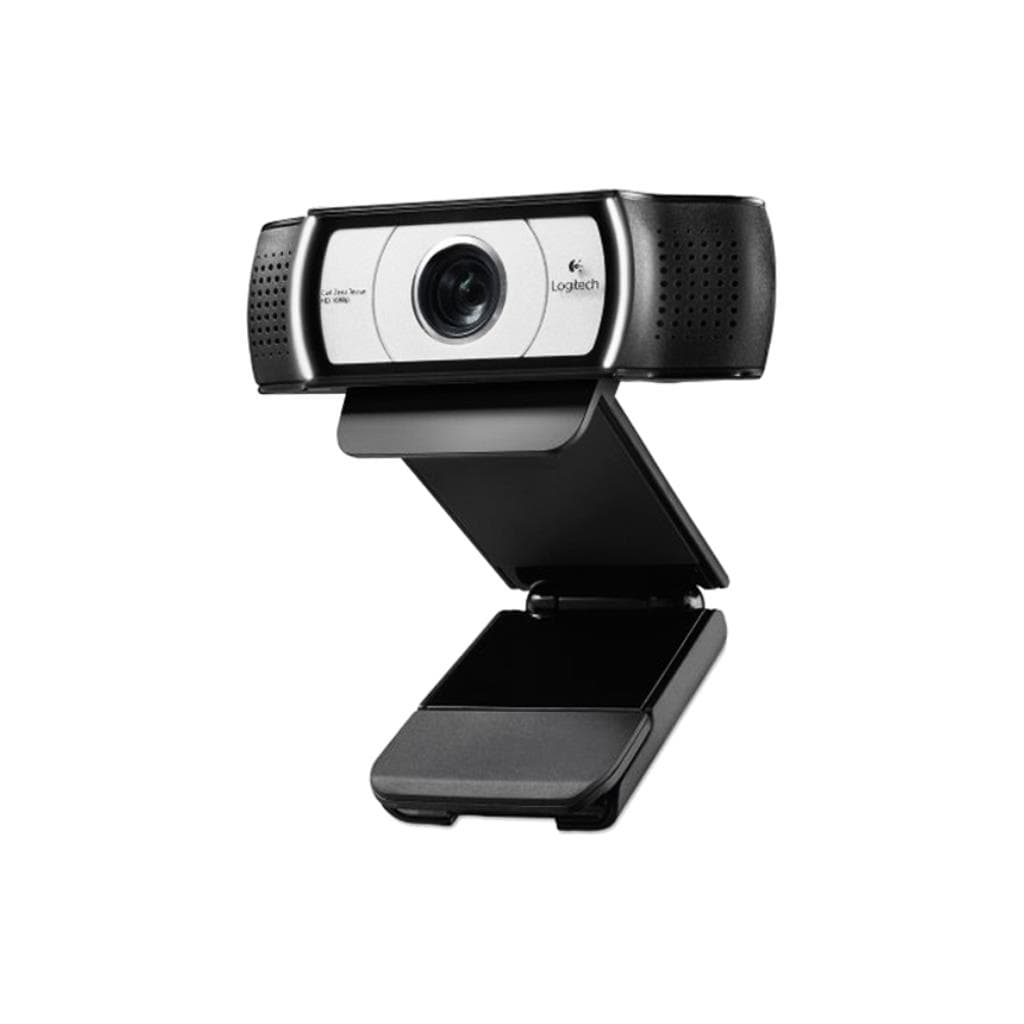

Logitech C930e Business Webcam 1080p H.264 with Privacy Shutter
SKU: QCAM-C930EGadgets & Accessories › Video Conferencing· Model: C930e-AP· P/N: 960-0011338
฿3,733
Price includes 7% VATPrice updated November 23, 2026
In stock21 units3 years manufacturer's warranty
For orders placed before 12:00 on a business day; weekends excluded
GenuineFree delivery from ฿5,000Tax invoice
กล้องเว็บแคมระดับธุรกิจจาก Logitech รองรับวิดีโอ Full HD 1080p พร้อมเลนส์แก้ว ZEISS®, ไมโครโฟนสเตอริโอ 2 ตัว และชัตเตอร์ปิดกล้องเพื่อความปลอดภัย ใช้สำหรับประชุมออนไลน์ ไลฟ์สตรีมมิ่ง และการทำงานร่วมกันจากระยะไกล
Key features
- วิดีโอ Full HD 1080p @ 30fps คมชัดทุกรายละเอียด
- มุมมองแนวดิ่ง 90° ครอบคลุมผู้ใช้งานและโต๊ะทำงาน
- ไมโครโฟนสเตอริโอ 2 ตัว จับเสียงได้ไกล 1 เมตร
- เลนส์แก้ว ZEISS® ให้ภาพคมชัดแม้ขยายดิจิทัล 4 เท่า
- ชัตเตอร์ปิดกล้องเพื่อความปลอดภัยและเปิดใช้งานได้ทันที
Product description
Logitech C930e เป็นกล้องเว็บแคมระดับธุรกิจที่ออกแบบมาเพื่อให้คุณภาพวิดีโอและเสียงสูงสุดในทุกสภาพแสง โดยรองรับการบันทึกวิดีโอ Full HD 1080p ที่ความละเอียด 1920 x 1080 พิกเซล พร้อมเฟรมเรต 30fps ให้ภาพคมชัด แม้ในสภาพแสงน้อยด้วยเทคโนโลยี RightLight™ 2 และเลนส์แก้ว ZEISS® ที่ช่วยให้ภาพคมชัดแม้ถ่ายใกล้หรือขยายดิจิทัล 4 เท่า โดยไม่เสียรายละเอียด กล้องมีมุมมองแนวดิ่ง 90° ครอบคลุมพื้นที่ผู้ใช้งานและโต๊ะทำงานได้อย่างสมบูรณ์ พร้อมไมโครโฟนสเตอริโอ 2 ตัว ที่จับเสียงได้ไกลถึง 1 เมตร ทำให้การประชุมออนไลน์มีความชัดเจนและเป็นธรรมชาติ กล้องรองรับการเชื่อมต่อแบบ Plug-and-Play ผ่านพอร์ต USB-A และสามารถควบคุมฟังก์ชัน Pan, Tilt, Zoom ได้ผ่านแอป Logi Tune ที่ดาวน์โหลดได้ฟรี
More features
- รองรับ H.264 UVC 1.5 และ Scalable Video Coding (SVC)
- ควบคุมการซูม/เลื่อน/เอียงผ่านแอป Logi Tune
- เชื่อมต่อแบบ Plug-and-Play ผ่าน USB-A
- รองรับแพลตฟอร์มประชุมยอดนิยม เช่น Zoom, Microsoft Teams, Google Meet
- มีขาตั้งแบบยึดหน้าจอและช่องยึดกล้องแบบ 1/4"
Pros and limitations
Pros
- ภาพวิดีโอ Full HD 1080p คมชัดแม้ในแสงน้อยด้วย RightLight™ 2
- มุมมองแนวดิ่ง 90° ครอบคลุมพื้นที่ผู้ใช้งานและโต๊ะทำงานได้เต็ม
- เลนส์แก้ว ZEISS® ให้ภาพคมชัดแม้ซูมดิจิทัล 4 เท่า
- รองรับการควบคุม Pan, Tilt, Zoom ผ่านแอป Logi Tune
- ชัตเตอร์ปิดกล้องเพื่อความปลอดภัยและเปิดใช้งานได้ทันที
Limitations
- ไม่มีการซูมออปติคอล — ใช้เฉพาะดิจิทัล
- สายยาว 1.5 เมตร อาจจำกัดการวางตำแหน่งในบางพื้นที่
Who it is for
เหมาะสำหรับพนักงานที่ทำงานจากบ้าน ผู้จัดการทีม ครูออนไลน์ และผู้ใช้งานที่ต้องการคุณภาพวิดีโอและเสียงระดับโปรเพื่อประชุมออนไลน์ นำเสนอผลงาน หรือไลฟ์สตรีมมิ่ง
Color
ดำ
Connectivity
USB
Specifications (34)
- รองรับ UVC
- UVC 1.5
- พอร์ต
- USB-A
- เลนส์ (Lens Type)
- Glass
- โฟกัส (Focus Type)
- Autofocus
- น้ำหนัก
- 5.71 oz (162 g)
- ขนาด (Dimensions) - ลึก
- 2.80 in (71 mm)
- ขนาด (Dimensions) - สูง
- 1.69 in (43 mm)
- ขาตั้ง (Mounting Options)
- Universal clip, 1/4" thread for tripod
- อัตราการรีเฟรช
- 30 fps
- ไมโครโฟน (Microphone Type)
- Stereo, dual omni-directional
- ขนาด (Dimensions) - กว้าง
- 3.70 in (94 mm)
- รหัสสินค้า (Part Number)
- 960-000971
- ความยาวสาย
- 5 ft (1.5 m)
- ความละเอียด
- 1920 x 1080 pixels @ 30fps
- การรับประกัน
- 3-year limited hardware warranty
- ระยะจับเสียง (Mic Range)
- Up to 1 m (3 ft)
- เลนส์ (Lens Type) - ยี่ห้อ
- ZEISS®
- การเชื่อมต่อ
- Plug-and-play USB-A
- การซูมดิจิทัล (Digital Zoom)
- 4x
- เทคโนโลยีภาพ (RightLight™ 2)
- ใช่
- รองรับการประชุม (Certified For)
- Skype™ for Business
- รองรับการประชุม (Compatible With)
- Microsoft DirectShow
- การจัดการอุปกรณ์ (Logitech Sync)
- Enterprise management & monitoring
- มุมมองแนวดิ่ง (Diagonal Field of View)
- 90°
- การบีบอัดวิดีโอ (Video Compression)
- H.264 with Scalable Video Coding (SVC)
- รองรับการจัดการ (Logi Tune Support)
- Download Logi Tune at logitech.com/Tune
- ชัตเตอร์ปิดกล้อง (Privacy Shutter)
- Attachable, flip-up/down
- ความละเอียด (Resolution) - รองรับ
- 640 x 480 pixels @ 30fps
- รองรับแอปพลิเคชัน (Compatible Apps)
- Zoom®, Microsoft Teams, Google Meet™, Cisco Webex™, BlueJeans, GoToMeeting®, RingCentral Video, Lifesize Cloud, Pexip, Vidyo
- ความต้องการทรัพยากร (RAM Requirement)
- 2 GB or more for 1080p streaming
- ความต้องการทรัพยากร (RAM Requirement) - 720p
- 1 GB typically needed
- การรองรับระบบปฏิบัติการ (OS Compatibility)
- Windows 8 or later
- การรองรับระบบปฏิบัติการ (OS Compatibility) - macOS
- macOS 10.7 or later
- การรองรับระบบปฏิบัติการ (OS Compatibility) - ChromeOS
- Version 29.0.1547.70 and higher
Compatibility
Windows, macOS, Chrome OS
Datasheets and manuals straight from the manufacturer — select a document to open or download it.
13 questions
Frequently asked questions about this product
Compiled from manufacturer information
กล้องเว็บแคม C930e รองรับการใช้งานกับ Zoom และ Google Meet ได้ไหม?
ใช่ กล้อง C930e รองรับการใช้งานกับแพลตฟอร์มยอดนิยม เช่น Zoom, Google Meet™, Microsoft Teams, Cisco Webex™ และอื่น ๆ โดยไม่จำเป็นต้องติดตั้งไดรเวอร์เพิ่มเติม เนื่องจากรองรับ UVC 1.5
สามารถควบคุมการซูมหรือเลื่อนกล้องได้ไหม?
ใช่ สามารถควบคุมฟังก์ชัน Pan, Tilt และ Zoom ได้ผ่านแอปพลิเคชัน Logi Tune ที่ดาวน์โหลดได้ฟรีจากเว็บไซต์ Logitech โดยไม่จำเป็นต้องมีฮาร์ดแวร์เพิ่มเติม
กล้อง C930e มีชัตเตอร์ปิดกล้องหรือไม่?
ใช่ กล้องมาพร้อมชัตเตอร์ปิดกล้องแบบถอดได้ สามารถเลื่อนขึ้น-ลงเพื่อปิดกล้องเมื่อไม่ใช้งาน เพื่อความปลอดภัยและเป็นส่วนตัว
รองรับการเชื่อมต่อผ่าน USB-C ได้ไหม?
ไม่รองรับ โดยกล้องใช้พอร์ต USB-A เท่านั้น สายยาว 1.5 เมตร จึงเหมาะกับการต่อผ่านพอร์ต USB บนแล็ปท็อปหรือเครื่องเดสก์ท็อป
ใช้กับ Windows 10 และ macOS ได้ไหม?
ใช่ กล้อง C930e รองรับระบบปฏิบัติการ Windows 8 ขึ้นไป และ macOS 10.7 ขึ้นไป โดยสามารถใช้งานได้ทันทีเมื่อเสียบเข้ากับพอร์ต USB โดยไม่ต้องติดตั้งไดรเวอร์เพิ่มเติม
มีการบีบอัดวิดีโอแบบ H.264 หรือไม่?
ใช่ กล้องรองรับการบีบอัดวิดีโอแบบ H.264 พร้อม Scalable Video Coding (SVC) ซึ่งช่วยลดภาระการประมวลผลของเครื่อง และทำให้การสตรีมวิดีโอราบรื่นขึ้น โดยเฉพาะในสภาพเครือข่ายที่จำกัด
สามารถยึดกล้องกับขาตั้งได้ไหม?
ใช่ กล้องมาพร้อมขาตั้งแบบยึดหน้าจอ และมีช่องยึดกล้องขนาด 1/4" สำหรับติดตั้งบนขาตั้งกล้อง (tripod) โดยขาตั้งไม่ได้แถมมาในกล่อง
ใช้กับ ChromeOS ได้ไหม?
ใช่ รองรับ ChromeOS เวอร์ชัน 29.0.1547.70 และใหม่กว่า โดยสามารถใช้งานได้ทันทีเมื่อเสียบเข้ากับพอร์ต USB โดยไม่ต้องติดตั้งไดรเวอร์เพิ่มเติม
Is it in stock?
The Logitech C930e Business Webcam 1080p H.264 with Privacy Shutter is in stock and ready to ship. Orders placed before 12:00 on a business day are delivered within 1–3 business days (Bangkok and vicinity) or 2–5 business days (other provinces). Order online at store.gist.co.th or contact our sales team at 092-251-4017.
How much does it cost?
The price is ฿3,733 (including 7% VAT). It is in stock and ready to ship. Business customers can request a quotation at sales@gist.co.th.
How long is the warranty?
Warranty period: รับประกันฮาร์ดแวร์ 3 ปี ตามเงื่อนไขผู้ผลิต (manufacturer's terms). To make a warranty claim, call 092-251-4017 or 065-523-5262, or email sales@gist.co.th (Mon–Fri 9:00–18:00), then send the product with your order number to our head office, or bring it to the head office in person.
How long does delivery take?
Orders placed before 12:00 on a business day are delivered within 1–3 business days (Bangkok and vicinity) or 2–5 business days (other provinces). Free delivery on orders of ฿5,000 or more (a ฿150 delivery fee applies below this amount).
Is it genuine?
Genuine products sourced from distributors in Thailand, covered by the manufacturer's warranty. Full tax invoices are available.
Didn't find the answer you need?
Loading reviews…
Genuine products
Sourced from distributors in Thailand and covered by the manufacturer's warranty
Warranty period
รับประกันฮาร์ดแวร์ 3 ปี ตามเงื่อนไขผู้ผลิต
Covered by the manufacturer's warranty; you can make claims through GIST
Claims through GIST
Ship the product to our head office or bring it in person
Warranty conditions
- A receipt or other proof of purchase is required
- The product must not have been modified or altered
- Damage caused by misuse is not covered by the warranty
- To make a warranty claim, call 092-251-4017 or 065-523-5262, or email sales@gist.co.th (Mon–Fri 9:00–18:00), then send the product with your order number to our head office, or bring it to the head office in person.Head office: 554 Sky Nine Center, Floor 12A, Room 554/62, Asok-Din Daeng Road, Din Daeng Subdistrict, Din Daeng District, Bangkok 10400
More in Video Conferencing
Price
฿3,733